
Product matching: a practical guide to ecommerce identity resolution
Product matching links records across suppliers, marketplaces, and stores, handles variants, and improves pricing, search, enrichment, and AI shopping.
The same product rarely arrives in the same shape twice. A supplier sends JKT-884; your store uses SKU-1048; a marketplace calls it an offer; a competitor drops the color and pack size from the title. Product matching decides whether those records describe the same sellable item.
That decision becomes the identity layer for pricing, enrichment, search, and AI shopping. This guide explains how to match records across sources, keep variants and offers separate, route uncertain pairs to review, and turn approved matches into product data your systems can trust.
What is product matching?
Product matching is the process of linking product records from different sources when they refer to the same real-world product or sellable variant. The sources can include supplier files, an ERP, a PIM, an ecommerce platform, marketplaces, retailer listings, competitor pages, or a product database.
A match creates a relationship between records. It does not erase the source records or make their identifiers interchangeable. A useful output might say:
- your
SKU-1048-NVY-Mmaps to a supplier'sJKT884-NM; - both records describe the same navy, medium, single jacket;
- the marketplace listing is a seller offer for that variant;
- a second listing is a related black color variant, so it must stay separate.
That distinction matters because similarity is broader than identity. Two black rain jackets can be good alternatives without being the same product. A six-pack can share a product family with a single unit while carrying a different price, quantity, and identifier.
Match relationships before merging data
Use an explicit relationship type instead of a single yes-or-no flag.
| Relationship | Meaning | Safe downstream use |
|---|---|---|
| Same variant | The records describe the same sellable item, including the relevant size, color, pack, and condition. | Join offers, enrich the canonical record, compare price and availability. |
| Same product family | The records belong to one parent product but differ by a variant attribute. | Group variants, share common content, keep variant facts separate. |
| Equivalent item | The items are functionally interchangeable under a stated rule. | Show a substitute or replacement, with the rule and evidence attached. |
| Related product | The items are accessories, bundles, complements, or alternatives. | Recommendations and merchandising only. |
| No match | The records fail an identity or compatibility check. | Keep them separate and prevent downstream joins. |
Product matching overlaps with three other data operations, yet they solve different problems:
- Deduplication finds repeated records after identity links exist and decides which records to consolidate.
- Classification assigns a record to a category or taxonomy.
- Similarity or recommendation finds items that may interest the same shopper. It does not establish that they are the same item.
The first decision is identity. Everything else depends on it.
Where Catalog fits
Catalog gives brands a product data layer for the handoff after matching: live, normalized product data with typed variants, offers, and identifiers that can be published to storefronts, feeds, search, and AI shopping surfaces. It complements the PIM or ERP that owns source facts; it does not replace them.
Why cross-source identity resolution is difficult
Every source has its own naming conventions, field model, and level of detail. A supplier may provide a manufacturer part number and dimensions. A storefront may expose a merchant SKU and a short title. A marketplace may separate one product from several seller offers. A competitor page may provide only a title, image, and price.
A Microsoft Research study describes the same problem at shopping-search scale: identifiers are often absent, structured product data becomes free text in offers, attribute names can be omitted, and many values are missing. A title-only join cannot distinguish missing information from contradictory information.
Before you compare fields, define the entity each record represents.
| Source | Common record grain | Identity risk |
|---|---|---|
| Supplier catalog | Product, part, pack, or supplier SKU | One file can mix sellable units with case packs. |
| ERP or inventory system | Merchant SKU or stock item | SKU scope ends at your business. It is not a global identifier. |
| PIM or catalog | Parent, variant, or content record | Parent records can hide variant-level price or stock. |
| Storefront | Product page, variant, or offer | One URL may represent many variants. |
| Marketplace | Catalog item plus seller offer | Price, condition, fulfillment, and stock belong to the offer. |
| Competitor listing | Retailer offer | The page may omit identifiers or change its variant selection. |
Create a canonical model that can hold all of those grains. At minimum, keep separate keys for the product family, sellable variant, source record, and commercial offer. Store the source system, source ID, locale, effective time, and evidence with every link.
Our product data integration guide covers the adjacent ownership problem: which system owns each attribute, how mappings are versioned, and how validated records move to feeds, storefronts, and AI shopping surfaces.
Identifiers are strong evidence, not a complete model
Identifiers make matching faster and safer when their scope is understood. They do not remove the need to model variants, packages, offers, or source provenance.
| Identifier | Authority or scope | What it identifies | Matching guidance |
|---|---|---|---|
| GTIN | GS1 | A defined trade item at a package level | Use as an exact signal when valid. A different package or variant may have a different GTIN. |
| UPC or EAN | GTIN formats | A GTIN-12 or GTIN-13 representation | Normalize format carefully and preserve the original value. |
| MPN + brand | Manufacturer | A manufacturer model or part | Compare the pair. An MPN without its brand can collide across manufacturers. |
| SKU | Merchant or supplier | A business's stock-keeping unit | Keep the namespace. ABC-10 at one merchant says nothing about another merchant's SKU. |
| ASIN or channel item ID | Marketplace or channel | An item in that channel's catalog | Map it to your canonical item. Do not promote it to a global identity. |
| Offer ID | Seller and channel | One seller's price, stock, condition, and fulfillment terms | Attach it to an item or variant. Never merge offer state into the product identity. |
| Canonical variant ID | Your catalog | One sellable variant in your model | Keep it stable while price, stock, or copy changes. |
GS1 defines GTIN as a way to identify trade items that can be priced, ordered, or invoiced. Google recommends product identifiers such as GTIN, brand, and MPN in merchant data, while warning that incorrect values can limit eligibility or produce incorrect displays. Treat those fields as typed values with validation, not as free text.
A durable identifier policy follows five rules:
- Preserve the namespace and authority for every value.
- Store identifiers as strings so leading zeros survive imports.
- Keep family, variant, package, item, and offer IDs in separate fields.
- Validate syntax, check digits, uniqueness, and cross-field consistency.
- Never invent a missing GTIN or turn an internal SKU into one.
Our ecommerce identifier crosswalk shows how to keep GTIN, UPC, EAN, ISBN, SKU, MPN, ASIN, group IDs, and offer IDs distinct while mapping them to feeds and AI catalogs.
Variants, packs, and offers need their own identity
Variant errors are the most expensive product-matching errors because the records can look almost identical. The difference may be one size, a storage capacity, a voltage, a flavor, a pack quantity, or a refurbished condition.
Model the hierarchy explicitly:
Product family: Rain shell jacket
  Variant: Navy / Medium / single item
    Merchant SKU: JKT-884-NVY-M
    GTIN: 00012345678905
    Offer: Store A, $129, new, in stock
  Variant: Navy / Large / single item
    Merchant SKU: JKT-884-NVY-L
    GTIN: 00012345678912
    Offer: Store A, $129, new, out of stock
The parent record holds shared facts such as brand, model, and material. The variant holds the attributes that determine what the shopper receives. The offer holds seller-specific price, availability, condition, shipping, and fulfillment.
Keep packages separate as well. A single bottle, a six-pack, and a case may share a description while having different quantities and prices. GS1's guidance says each product variation needs its own GTIN, and different packages can require unique identifiers. Your matching policy should follow the product's commercial grain and the identifier assigned by its brand owner.
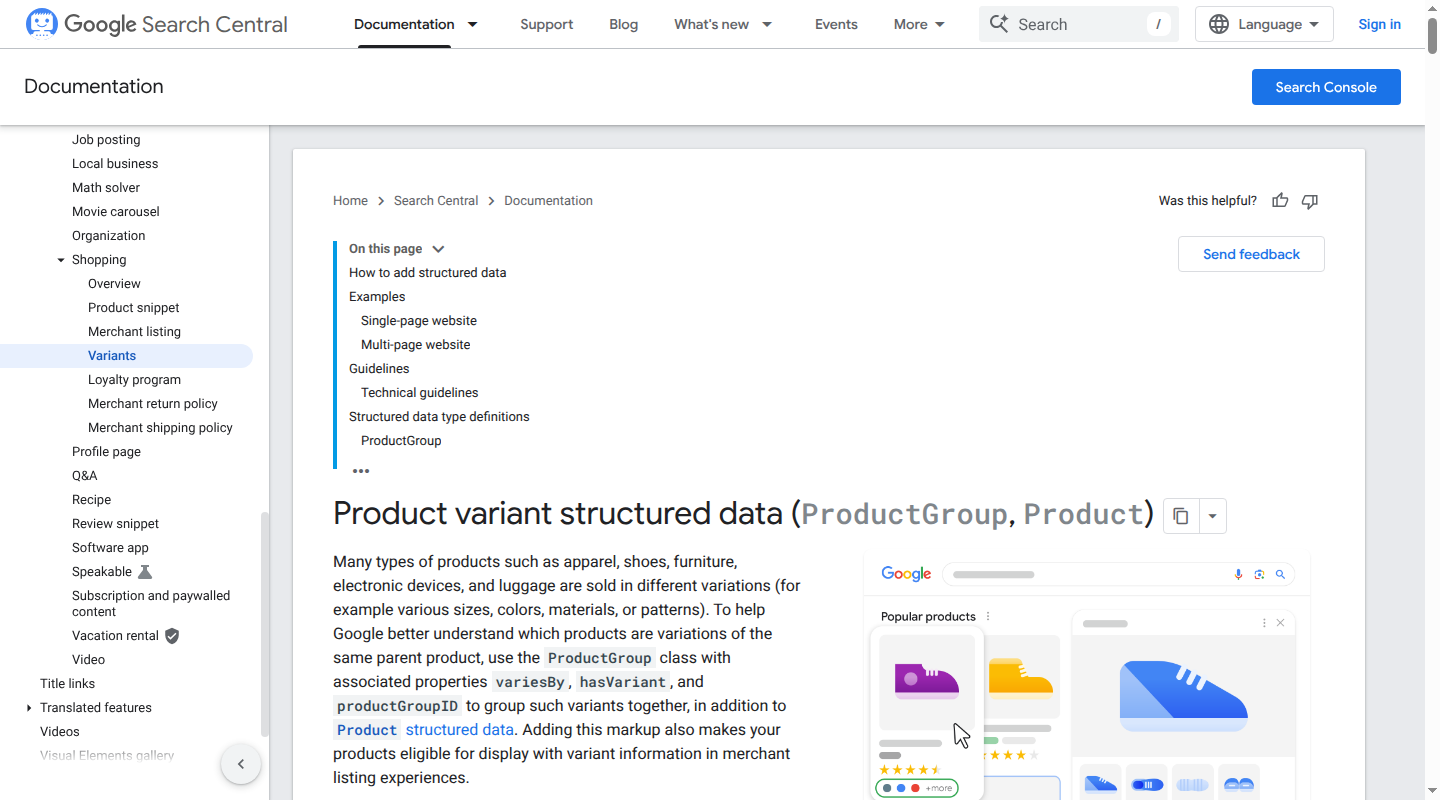
For web and feed outputs, Google uses a parent grouping model for variants. Its variant structured data documentation separates the product group from each Product, then declares which properties vary. That same separation makes an identity graph safer: common content can be inherited while size, color, price, inventory, and identifier remain attached to the correct child record.
A product matching workflow that scales
Automation works when the workflow makes every decision inspectable. Use this sequence.
1. Define the matching grain
Decide whether the job matches product families, sellable variants, packages, parts, or offers. Write down what counts as an equivalent replacement and which differences are disqualifying. A pricing project usually needs exact variant and condition matches. A recommendation project may allow related or substitute relationships.
2. Inventory sources and assign owners
List every source and destination. Assign an owner to each field, such as GTIN, title, dimensions, price, inventory, and condition. Retain the raw source record beside the normalized value so a reviewer can see what changed.
3. Normalize without destroying evidence
Normalize case, whitespace, punctuation, locale, units, and known abbreviations. Convert 1.5 L and 1500 ml to a canonical quantity while retaining the original text. Preserve meaningful model punctuation when it can distinguish a part. Normalize color families only through a controlled mapping.
Do not flatten a variant into the parent title. Parse attributes into typed fields such as size=medium, color=navy, pack_quantity=6, and condition=refurbished.
4. Generate candidates
Avoid comparing every record with every other record. Block candidates by safe signals such as a valid GTIN, brand plus MPN, category, manufacturer, or compatible model family. For records without identifiers, use normalized tokens, attribute overlap, image or document evidence, and semantic retrieval to create a shortlist.
Candidate generation optimizes recall. It should bring plausible pairs into review. It should not approve them.
5. Score positive and negative evidence
Evaluate identifiers first, then model and part numbers, brand, category, variant attributes, dimensions, pack quantity, title, description, image, and source context. A match on brand and title cannot overcome a conflicting capacity or pack quantity. Missing data is different from a mismatch. The Microsoft Research approach likewise treats matches, mismatches, and missing attribute values as separate signals.
Use a transparent score or reason code, for example:
match_status: accepted
match_type: same_variant
confidence: 0.98
reasons: [valid_gtin, brand_match, size_match, color_match]
negative_evidence: []
source_records: [supplier:JKT884-NM, store:SKU-1048-NVY-M]
reviewed_at: 2026-10-20T08:00:00Z
The score is a routing signal. It is not proof by itself.
6. Route the middle to human review
Set thresholds by category and error cost. Auto-accept a high-confidence exact match only when the identifier is valid and the variant checks pass. Queue a likely match with missing or conflicting attributes. Reject a pair with decisive contradictory evidence.
A reviewer needs side-by-side source values, normalized values, images or documents when relevant, the proposed relationship, and the reason codes. Capture the decision as labeled data for future rules or model training.
7. Publish a match ledger and recheck it
Store the accepted pair, relationship type, confidence, evidence, reviewer or rule, model version, and decision time. Recheck mappings when a source changes its URL, variant structure, identifier, title, or product content. Run a scheduled reconciliation so a stale match cannot quietly feed current prices into an old product.
How to review matching quality
A single accuracy percentage hides the trade-off between false matches and missed matches. Measure both sides on a labeled sample:
- Precision: the share of accepted matches that are correct.
- Recall: the share of true matches that the system found.
- F1: a combined measure that balances precision and recall.
- Review rate: the share of records sent to a person.
- Stale-match rate: the share of accepted links whose source evidence has changed.
Prioritize precision when a wrong match can change price, compatibility, safety information, or a customer order. Prioritize recall when a missed match hides a large assortment gap and a human will inspect the result before publication.
Results vary by category and training data. A 2022 product-matching study reported F1 scores of 94.29 on the Abt-Buy benchmark and 79.28 on Amazon-Google. Those results are useful research benchmarks, not a promise for a retailer's catalog. Evaluate on your own accepted and rejected pairs, and report performance separately for high-volume categories and difficult variant types.
Use a review policy that the team can operate:
| Decision tier | Example rule | Action |
|---|---|---|
| Auto-accept | Valid exact identifier, same brand, same variant attributes, no negative evidence | Publish the link and retain evidence. |
| Review | No shared identifier, strong title and attribute agreement, one important field missing | Compare source evidence and approve or reject. |
| Reject | Conflicting model, size, capacity, pack quantity, or condition | Keep records separate. |
| Recheck | Source content, identifier, URL, or variant structure changed | Pause downstream updates until rematched. |
What accurate matching unlocks
Matching is valuable because it gives every downstream system a stable answer to “which item is this?”
Enrichment with provenance
Join supplier specifications, manuals, certifications, dimensions, and approved copy to the right canonical variant. Keep the source, timestamp, confidence, and approval with each enriched field. A low-confidence description should enter a review queue rather than overwrite a trusted value.
Catalog helps brands turn this approved context into live, normalized product data that stays useful across channels. The match ledger remains the evidence for why a source attribute belongs to a product.
Pricing and competitive intelligence
A price comparison is only meaningful when the compared offers represent the same item. Matching must account for pack quantity, condition, seller, currency, and fulfillment. Keep offer-level facts separate so a price update changes the offer while the product and variant IDs stay stable.
With that structure, pricing teams can compare like with like, detect assortment gaps, and explain why an offer moved. They avoid treating a refurbished bundle or a larger pack as a cheaper equivalent.
Search and recommendations
Search needs exact identity for a query such as JKT-884 and structured attributes for a query such as “a medium navy rain shell under $150.” Matching gives the index one consistent product object instead of disconnected titles and duplicate variants.
Semantic retrieval can expand language and use cases, while hard filters protect size, compatibility, price, and availability. Catalog's guide to semantic search for ecommerce explains how lexical, semantic, and structured retrieval work together.
AI shopping surfaces
A shopping agent cannot reliably compare products when the facts for one variant are attached to another. It needs a typed product object with stable identity, variant relationships, attributes, price, availability, and source context. The same identity graph that supports internal reporting can feed that object.
Catalog is our product data layer for this handoff. We structure product information, normalize identifiers and variant relationships, keep commercial fields synchronized, publish machine-readable product data to AI shopping surfaces, and measure downstream visibility. Your storefront, PIM, ERP, and inventory systems can remain the systems of record.
The operating model is straightforward:
source records
  → normalized identity and variant links
  → approved enrichment and offer state
  → live structured product objects
  → storefront, feeds, search, and AI shopping surfaces
The important boundary is identity. Enrichment, pricing, search, and AI distribution can only be as accurate as the product-to-record links underneath them.
A practical implementation checklist
Before selecting a matching tool or building one in-house, confirm that it can:
- model product families, variants, packs, bundles, replacements, and offers separately;
- preserve every source identifier and its namespace;
- normalize units, locales, abbreviations, and identifiers without losing raw values;
- combine deterministic rules with attribute, text, image, and semantic evidence;
- distinguish missing fields from contradictory fields;
- show confidence, reason codes, and source evidence for every proposed match;
- support category-specific thresholds and a human review queue;
- write accepted links to a versioned ledger or API;
- recheck matches when source records or variant structures change;
- report precision, recall, review rate, freshness, and downstream errors;
- publish canonical variants and offers to the systems that consume product data.
Start with one high-value slice, such as the top 1,000 products in a price-sensitive category. Label positive and negative pairs, define the variant rules, measure the review workload, then expand to the next source. A smaller, auditable identity graph is more useful than a larger graph that quietly joins incompatible items.
Frequently asked questions
Can you match products without GTINs?
Yes. Use brand, MPN, model, category, dimensions, pack quantity, variant attributes, titles, descriptions, images, and source context. Treat the result as probabilistic evidence and route ambiguous pairs to review. Do not replace a missing global identifier with a guessed value.
Is product matching the same as SKU matching?
No. SKU matching links source-specific stock-keeping units. Product matching determines whether those records represent the same product or variant. Two merchants can use different SKUs for one product, and one merchant can use separate SKUs for variants that must remain separate.
Should variants share one product ID?
They can share a parent product or group ID, while each sellable variant keeps its own stable ID and relevant identifiers. Price, stock, image, size, color, and package quantity belong at the variant or offer level. Google documents the same parent-and-variant separation for product structured data.
How accurate does product matching need to be?
Set the threshold from the downstream risk. A wrong compatibility match can create returns or safety problems. A missed competitor match can reduce price coverage. Measure precision, recall, and review rate on a representative labeled sample, then set different policies for different categories and relationships.
What should a product matching output contain?
Return the canonical product or variant ID, source system and source ID, relationship type, confidence, positive and negative evidence, source timestamps, decision status, reviewer or rule, and model version. Include offer IDs separately when price, stock, condition, or fulfillment differs by seller.
Build a product identity layer you can trust
Product matching turns scattered listings into a governed map of products, variants, and offers. Keep the mapping explicit, preserve identifiers in their original namespaces, review uncertainty, and recheck links as source data changes.
If your team needs that identity map to become live, machine-readable product data for search and AI shopping, talk to Catalog.
