
Product identifiers: An ecommerce crosswalk that stays intact
Map GTIN, UPC, EAN, ISBN, SKU, MPN, ASIN, and offer IDs across variants, feeds, schema, marketplaces, and AI catalogs without corrupting data.
Product identifiers fail when one code is expected to do five jobs. A GTIN identifies a trade item. A SKU tracks a seller's stock. An ASIN belongs to Amazon. An offer ID identifies a seller's terms. These values can point to the same product, while living in different namespaces.
This guide gives you a crosswalk you can implement: define scope and grain, model variants and packaging, preserve leading zeros, validate values, and map one canonical record to feeds, product schema, marketplaces, and AI catalogs. Catalog structures normalized product data and publishes typed product objects without turning one identifier into another.
A product identifier is a value with a scope
A product identifier is a value that lets a system distinguish one product, item, variant, package, or offer from another. The useful question is not only “what does this code mean?” It is also:
- Who assigned it? GS1, an ISBN agency, a manufacturer, your business, or a channel.
- Where is it unique? Globally, within a manufacturer, within your catalog, or inside one feed.
- What does it identify? A title, trade item, sellable variant, package level, listing, or offer.
- How long must it stay stable? Usually across price and inventory changes, and sometimes across channel or catalog migrations.
Treat those answers as data. A robust identifier record has at least namespace, value, authority, entity_level, market, and status. For example:
{
  "namespace": "gtin",
  "value": "0012345678905",
  "authority": "GS1",
  "entity_level": "each",
  "market": null,
  "status": "assigned"
}
The value above is illustrative. A check digit can catch a transcription error, but it cannot prove that a number was assigned to your product. Keep assignment evidence and source provenance beside the value.
The ecommerce identifier crosswalk
Start with one canonical product model. Store every external identifier in its own field, then map it to destination-specific names. Never use a generic product_id column as a container for values with different owners.
| Field or identifier | Namespace and authority | What one value identifies | Primary use | Stable when price or stock changes? |
|---|---|---|---|---|
catalog_id | Your catalog | Your canonical product or record | Joins, APIs, lineage, and internal updates | Yes |
variant_id | Your catalog | One sellable variant | Inventory, URLs, media, and variant updates | Yes |
sku | Merchant | Your stock-keeping unit | Inventory, fulfillment, and reporting | Yes |
gtin | GS1 | An exact trade item at a defined package level | Cross-retailer matching and feeds | Yes |
upc | GTIN-12, commonly called UPC | An exact GTIN-12 trade item | North American retail workflows | Yes |
ean | GTIN-13, commonly called EAN | An exact GTIN-13 trade item | International retail workflows | Yes |
isbn13 | ISBN system | A book or book-like title, edition, and format | Book supply chains and feeds | Yes |
mpn plus brand | Manufacturer | A manufacturer model or part | Technical matching and channel identifiers | Yes for the same model |
asin | Amazon | An item in Amazon's catalog | Amazon listing and offer matching | Yes |
item_id or feed id | Channel or feed | One row or item in that destination | Updates, deduplication, and diagnostics | Yes |
item_group_id or group_id | Channel or feed | A parent listing or variant family | Connecting variants | Yes |
offer_id | Seller and channel | One seller's offer for an item | Price, stock, fulfillment, and seller state | Yes |
This table is a crosswalk, not a conversion chart. A SKU does not become a GTIN because a feed calls its column gtin. The mapping preserves the original namespace and records the destination field separately.
Catalog's product schema guide and SKU guide cover the adjacent concepts. The operating rule is simple: one canonical record can hold many identifiers, while each identifier keeps its own scope.
Global and standard identifiers
GTIN, UPC, EAN, and the barcode carrier
A GTIN is the GS1 identifier value for a trade item. GS1 defines GTIN-8, GTIN-12, GTIN-13, and GTIN-14 formats. GTIN-12 is commonly called UPC, and GTIN-13 is commonly called EAN or JAN. GTIN-14 is commonly used for cases and packaging. The exact value depends on the trade item and the package level. GS1's GTIN guidance explains the distinction.
A barcode is the printed or digital carrier. The GTIN is the number encoded by that carrier. A UPC-A or EAN-13 symbol can carry a GTIN value, and the same value can also travel in a feed or schema field without an image of the bars. Store the number as a string, with the exact digits and no display formatting in your outbound feed.
A GTIN identifies a specific trade item. It does not identify a variant family. If a manufacturer assigns separate GTINs to a red shirt and a blue shirt, retain both values on their respective variants. If a case, inner pack, and each unit are separate trade items, model their package-level GTINs separately. Catalog's GTIN explanation provides a reference for teams documenting the policy.
ISBN
An ISBN identifies a book or book-like product within the ISBN system. It identifies a title or particular edition from a publisher, so each format or binding, such as hardcover, paperback, ebook, or audiobook, can require its own ISBN. A revised edition also needs a new ISBN. ISBN.org's FAQ documents those edition rules.
ISBNs assigned under the current system are ISBN-13 values. ISBN-10 values still appear in older records. Keep both in a migration field when you need historical lookup, then send the format required by the destination. Google Merchant Center accepts an ISBN as a GTIN, while the current OpenAI product feed specification says to submit ISBN-13 and omit ISBN-10.
An ISBN is a number. A barcode is a graphic that carries numerical data. Keep isbn13 and barcode_image as separate fields, just as you keep gtin and the barcode asset separate.
Merchant, manufacturer, and platform identifiers
SKU: your inventory namespace
A SKU is a seller-defined stock-keeping unit. It is useful for inventory, picking, fulfillment, reporting, and internal integrations. Shopify describes SKUs as internal codes for tracking inventory and sales, and recommends a unique SKU for each product variant in its admin. Read Shopify's SKU guidance for that implementation context.
A SKU has no universal meaning outside the merchant that created it. Two retailers can use different SKUs for the same GTIN. A single retailer should keep each sellable variant's SKU unique within the scope used by its inventory and order systems. If you operate multiple stores or regions, document whether uniqueness is global, per legal entity, or per location.
Use a stable SKU that helps people operate the catalog, while keeping the canonical variant_id independent. If an ERP migration changes SKU policy, you can preserve the product relationship and retain the old SKU as an alias instead of breaking every destination join.
MPN and brand: a manufacturer pair
An MPN is the manufacturer's part or model number. Its authority is the manufacturer, and its meaning depends on the associated brand. Store mpn and brand as separate fields, then validate them as a pair when a channel expects both.
Do not promote a merchant SKU into an MPN. Do not invent an MPN when a manufacturer has not assigned one. For a product with multiple manufacturer variants, use the most specific manufacturer value available and keep the variant relationship explicit. Google's unique identifier rules warn against guessing values or placing internal SKUs in the wrong identifier fields.
Brand is descriptive identity and matching context. It is not a replacement for GTIN or MPN. A brand name alone can describe thousands of products, so keep it alongside the identifier it qualifies.
ASIN: Amazon's catalog namespace
An ASIN is Amazon's 10-character alphanumeric identifier for an item in the Amazon store. Amazon assigns it to a catalog listing, and Amazon's own ASIN guide explains how sellers use it to match an offer to an existing product page. Books use their ISBN as the underlying book identifier in Amazon workflows, as Amazon's listing guide explains.
An ASIN is platform-scoped. Keep it in an amazon.asin field and never use it as your global product key. A product sold on Amazon, Google, and your storefront can have one ASIN, one GTIN, one merchant SKU, and three different feed IDs. Those values form a crosswalk; none replaces the others.
When the same record travels through several marketplaces, keep those channel mappings beside the core identity. Catalog's guide to third-party marketplaces explains why each listing is a structured offer with its own rules.
Items, groups, offers, and packaging are different grains
The hardest identifier errors come from mixing the thing being sold with the listing that presents it and the offer that makes it purchasable.
- Product or group: A family such as “Commuter jacket.” It can contain color and size choices.
- Item or variant: “Commuter jacket, navy, medium.” It has its own inventory, URL or selected options, image, and often its own SKU and GTIN.
- Offer: A seller's commercial promise for that item, including price, availability, seller, fulfillment, region, and returns. Multiple sellers can offer the same item.
- Package or trade item: A unit, inner pack, case, or pallet that can have its own quantity, dimensions, and GTIN.
A parent ID groups records. It does not identify a purchasable unit. An item ID identifies the row or sellable item in a destination. An offer ID identifies seller-specific commercial state. Keep them as separate columns even when a destination uses a single word such as “id.”
Variants
Define a variant rule before assigning IDs. A color or size creates a new variant when it changes the sellable item, inventory, price, image, fulfillment, or identifier. A seller-created display option that does not change the item can remain an attribute. Record the decision in your catalog policy instead of letting each channel decide independently.
For every sellable variant, keep:
- a unique
variant_idand merchant SKU; - a stable parent or group relationship;
- the variant's own price and availability;
- the selected option values, such as
colorandsize; - the exact GTIN or MPN when assigned to that variant;
- a selected-variant URL and image when the destination supports them.
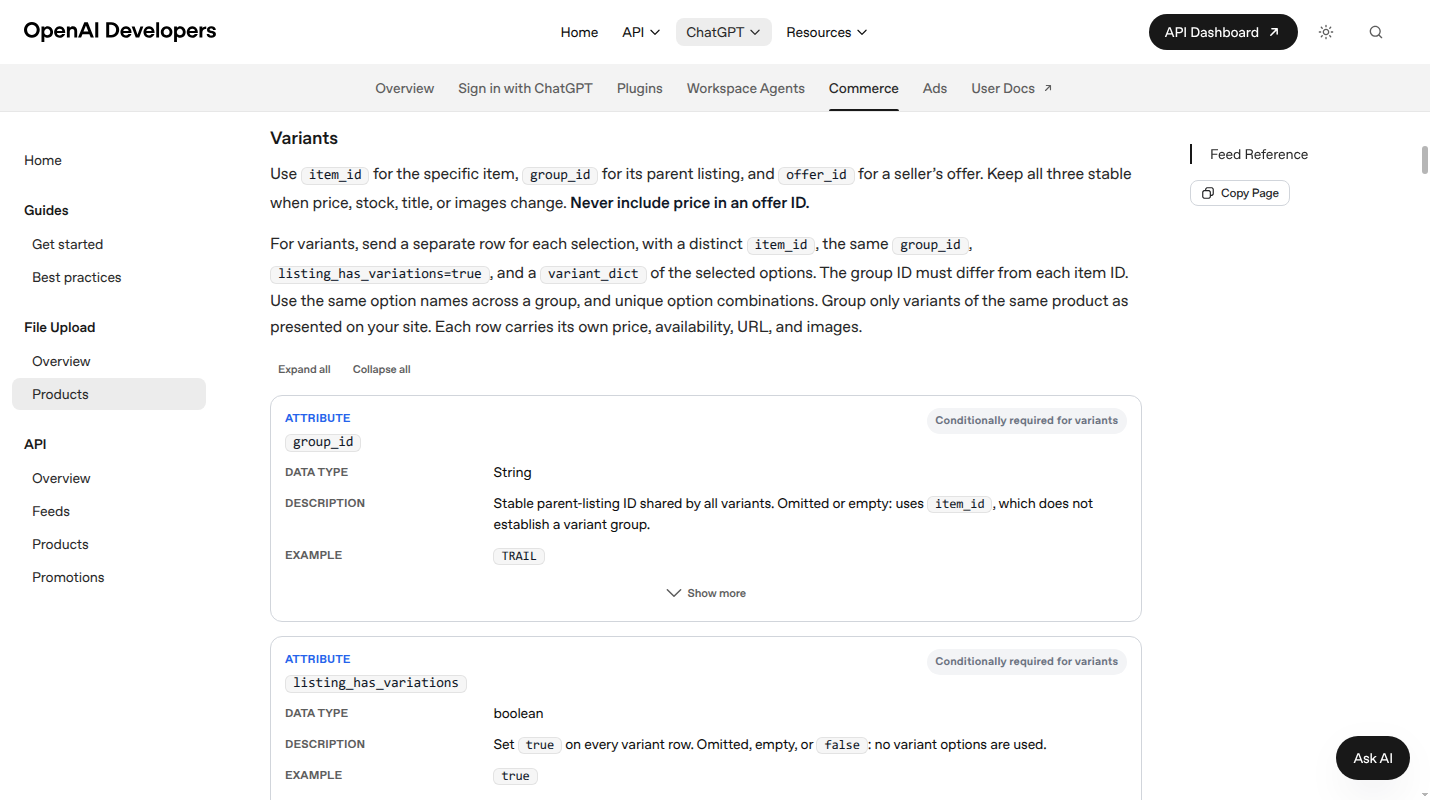
OpenAI's current feed model makes this separation explicit: item_id identifies the specific item, group_id identifies the parent listing, and offer_id identifies the seller's offer. It asks for a separate row per variant, with a distinct item ID and the same group ID. Google's feed model uses id and item_group_id for a similar distinction. These are destination contracts, so map them from your canonical model rather than renaming your source fields.
Packaging and multipacks
Add a package-level field such as package_level with values like each, inner, case, or pallet, plus units_per_package. That makes a 12-pack distinguishable from one unit even when the product title looks similar.
A manufacturer-created multipack can be its own trade item with its own GTIN. A retailer-created bundle may have no manufacturer GTIN, so represent the bundle with your own catalog_id, SKU, offer, and component relationships, then follow the destination's bundle rules. Never send the single-unit GTIN as though it identifies the bundle. That makes the feed describe a different quantity than the shopper receives.
Store identifiers as typed strings and validate them in layers
Identifiers should be handled as typed strings. A numeric import can turn 0012345678905 into 12345678905, permanently changing the value.
Keep a normalized value for machine output and an optional display value for people. For example:
{
  "gtin": "0012345678905",
  "gtin_display": "00 123456 78905",
  "sku": "NL-JKT-NVY-M",
  "mpn": "NL-JKT-24-NVY-M"
}
The display value is optional. The canonical value must preserve leading zeros. Do not remove punctuation from an MPN unless the destination explicitly requires it. Do not trim or convert ISBN values with a generic GTIN function.
Use layered validation:
- Syntax: Check allowed characters and the expected length for GTIN-8, -12, -13, or -14, ISBN-10 or ISBN-13, ASIN, and each channel ID.
- Check digit: Validate GTIN and ISBN check digits with their own algorithms. For a GTIN, calculate from the rightmost digit before the check digit using alternating weights of 3 and 1, then require the total to be divisible by 10.
- Assignment: Confirm the value came from the relevant GS1, ISBN, manufacturer, or channel record. A mathematically valid value can still be unassigned or assigned to a different item.
- Scope uniqueness: Reject duplicates within the namespace and entity level. The same string can be valid in separate namespaces, such as a merchant SKU and an ASIN.
- Cross-field consistency: Check brand plus MPN, GTIN plus package level, ISBN plus format, and variant attributes against the source record.
- Relationship integrity: Ensure each item belongs to one intended group, each offer points to one item, and package components resolve to real records.
- Destination rules: Validate the final feed, schema, and marketplace output after mapping. A clean source value can fail if a destination expects a different field, format, or omission rule.
Use null or an explicit missing state when an identifier does not exist. Empty strings and guessed values create ambiguous records. Google advises omitting GTIN, brand, and MPN when no assigned identifier exists, and using the destination's missing-identifier flag where applicable. Catalog's product data quality guide covers the broader checks for invalid, duplicate, mismatched, and stale values.
Map the canonical record to feeds, schema, and AI catalogs
The source catalog remains the system of record. A feed, page schema, or AI catalog object is a view with its own contract.
| Canonical field | Google Merchant Center | Schema.org | AI catalog feed example |
|---|---|---|---|
variant_id | id or stable feed ID | Product.sku when it is the merchant SKU | item_id |
Parent catalog_id | item_group_id | ProductGroup and isVariantOf relationships | group_id |
gtin | gtin | gtin, gtin8, gtin12, gtin13, or gtin14 | gtin |
isbn13 | gtin when the destination accepts ISBN as GTIN | gtin13 | gtin as ISBN-13 |
mpn | mpn | mpn | mpn |
brand | brand | brand | brand |
| Seller-specific offer | Channel offer fields | Offer and seller context | offer_id |
| Variant options | color, size, and other destination fields | hasVariant and typed properties | variant_dict |
Google defines its feed id as a stable value for the same item and says a SKU can be used where appropriate. That field still sits beside gtin, mpn, brand, and item_group_id; it does not replace them. Its product data specification also warns that incorrect identifiers and variant relationships can cause disapprovals, limited eligibility, or incorrect displays.
Schema.org provides distinct properties for merchant SKU, GTIN forms, MPN, brand, and generic identifiers. Use the property that matches the value, then make the markup agree with the visible product page. Google's Product structured data documentation describes eligibility and variant relationships; it does not guarantee a particular display.
For an AI catalog, expose the same typed object rather than flattening it into a title. OpenAI's current product-feed spec requires a stable item ID per item or variant, separates group_id and offer_id, preserves GTIN leading zeros, and pairs MPN with brand. It also says to keep IDs stable when price, stock, title, or images change. Feed access and supported fields depend on the integration, so keep your mapping versioned.
This is where Catalog fits. We normalize product records, retain identifier provenance, map fields to channel contracts, publish live product data to AI shopping surfaces, keep updates synchronized, and measure outcomes. We do not manufacture a missing GTIN or treat an SKU as a global identity. The value is a product data layer that keeps the crosswalk intact as each destination changes shape.
Common identifier mistakes
- Putting a barcode image in the GTIN field: A barcode is a carrier. Extract and validate the encoded value separately.
- Treating UPC, EAN, and GTIN as unrelated systems: UPC and EAN are common names for GTIN formats. Keep the source format and normalized GTIN representation.
- Loading identifiers as numbers: Leading zeros disappear in spreadsheets, JSON transforms, and databases. Store strings from ingestion through export.
- Using one value for every variant: A parent listing can share a group ID, while each sellable variant needs its own item and inventory identity.
- Using the unit GTIN for a case or bundle: Match the identifier to the quantity the shopper receives.
- Sending a SKU as GTIN or MPN: A merchant-defined value cannot stand in for a manufacturer or GS1 value.
- Guessing an identifier: A valid-looking code can belong to another product. Preserve missing state and assignment evidence.
- Using an ASIN as a global key: ASIN belongs to Amazon's catalog. Keep it as a channel mapping.
- Reusing an ISBN across formats: Hardcover, paperback, ebook, audiobook, and revised editions can have separate ISBNs.
- Changing IDs with commercial state: Price and stock updates should change offer fields, not the item or group key. Keep price out of offer IDs.
- Letting each feed define the source model: Destination schemas change. Version the mapping and fix the canonical record upstream.
Product identifier implementation checklist
Use this sequence when you build or repair a crosswalk:
- List namespaces: Document every authority, including GS1, ISBN, manufacturers, your catalog, Amazon, marketplaces, and feed contracts.
- Set the grain: Decide whether each field identifies a family, variant, package, feed row, or offer.
- Define ownership: Name the source and accountable owner for every identifier field.
- Create typed fields: Separate
catalog_id,variant_id,sku,gtin,isbn13,mpn,brand, platform IDs, group IDs, and offer IDs. - Store strings: Preserve leading zeros, exact MPN casing, ISBN format, and source formatting in separate canonical and display fields.
- Model relationships: Add parent, variant, package, component, seller, and offer relationships before exporting.
- Validate in layers: Run syntax, check-digit, assignment, uniqueness, cross-field, relationship, and destination checks.
- Map by contract: Create versioned mappings for feeds, Schema.org, marketplaces, and AI catalog integrations.
- Test the rendered output: Compare each sample product page, feed row, schema object, and channel record against the same source variant.
- Monitor the loop: Track rejected rows, duplicate values, stale mappings, variant mismatches, and time from source change to destination update.
FAQs
Is a product identifier the same as a SKU?
No. A SKU is one kind of product identifier, scoped to the merchant that created it. A GTIN or ISBN can identify an item across trading partners, while a SKU supports one seller's operations. Keep both when you have both.
Are UPC, EAN, and GTIN the same thing?
UPC and EAN are common names for GTIN-12 and GTIN-13 values. They describe formats within the GTIN family. A barcode symbol is the carrier, so the barcode image and the GTIN value still belong in separate fields.
Can I use a SKU as a GTIN?
No. Use a SKU in the destination's item or merchant-ID field when allowed. Submit a GTIN only when the manufacturer or relevant authority assigned that value. If no identifier exists, use the destination's supported missing-identifier state.
Does every product need a GTIN?
No. Some products, custom goods, and bundles have no assigned GTIN. Keep the field empty, retain the reason and source evidence, and follow each destination's rules for identifier_exists or an equivalent field. Never fill the gap with a guessed number.
Should variants share a GTIN?
A GTIN identifies a trade item, so variants with different assigned trade-item identities need different values. Variants can share a parent or group ID. The correct split depends on the physical item, package, manufacturer assignment, and destination rules.
Is an ISBN also a GTIN?
ISBN-13 is a book identifier that can be carried in a GTIN field where a destination accepts it. Keep isbn13 as its source field so you retain the book-specific meaning, and follow the destination's format rules for older ISBN-10 records.
What is the difference between an item ID, group ID, and offer ID?
An item ID identifies one destination item or variant. A group ID connects related variants under one listing. An offer ID identifies a seller's commercial offer for an item. They can all refer to the same product while representing different grains and ownership.
How does Catalog help with product identifiers?
Catalog gives merchants a structured product data layer for normalizing identifiers, mapping variants and offers, publishing machine-readable product objects, keeping updates synchronized, and measuring how downstream AI shopping surfaces use the catalog. Your existing storefront and operational systems can remain in place.
Keep the crosswalk intact
A product identifier only works when its namespace, authority, and entity level travel with the value. Give every sellable item a stable internal key, preserve assigned external IDs, model groups and offers separately, validate before publishing, and map each destination from the same canonical record.
Catalog helps brands turn that model into live, normalized product data for feeds, structured pages, marketplaces, and AI commerce. See how Catalog can structure and distribute your catalog while your storefront stays in place.
