
Shopping feed audit: Diagnose blockers before performance
Run a practical shopping feed audit across destinations, variants, fields, diagnostics, landing pages, and checkout. Fix eligibility blockers first.
A shopping feed can upload successfully while products are missing, disapproved, stale, or linked to the wrong offer. The failure may live in the source catalog, a mapping rule, the emitted file, a destination diagnostic, or the checkout path.
A shopping feed audit follows one product through that chain. It checks whether a destination can parse the offer, whether the offer is eligible to show, and whether a shopper can buy what the listing promises.
When feed problems keep starting upstream, we use Catalog as a product data layer to structure and normalize records, keep changes synced, publish machine-readable outputs to channels and AI shopping surfaces, and measure what happens after the fix.
What a shopping feed audit checks
It is a diagnostic review of a feed and the systems around it. The output is evidence for each failure, the affected products, the stage where it started, and the owner who can fix it.
It is narrower than general feed operations. Keep the terms separate:
| Work | Primary question | Typical result |
|---|---|---|
| Shopping feed audit | Where does an offer fail between source and checkout? | A scoped issue list with evidence, owners, and a recheck plan |
| Product feed management | How do we collect, map, deliver, and monitor feeds over time? | An ongoing channel workflow |
| Product feed optimization | How can eligible products match better and perform better? | Measured field improvements and experiments |
| Product data quality | Is product information accurate, complete, consistent, current, and fit for use? | Quality rules and ownership across systems |
| Google Merchant Center feed setup | How do we configure one Google destination? | A configured data source and initial submission |
An audit can expose a management problem or a quality problem. It does not replace either one. Its job is to locate the break and make the next fix specific.
Google is a useful worked example because its product data specification defines required, conditional, and optional attributes.
The same audit logic applies to Meta, marketplaces, retail media, and AI shopping surfaces, but each destination has its own schema, policies, limits, and status model.
Set the scope before you inspect a row
An audit of “the feed” is too vague to prioritize. Write the scope in three dimensions: destination, cohort, and business risk.
1. Destination
Record the exact destination and context:
- channel and marketing method, such as Google Shopping ads or free listings;
- target country, currency, and language;
- source type and version, such as XML export, TSV file, JSON payload, or API update;
- fetch or submission timestamp;
- the landing-page and checkout environment a shopper will use.
A field can pass one destination and fail another. Do not turn a Google output into a universal schema. Keep a normalized source record, then audit the channel-specific mapping and emitted format.
2. Product cohort
Choose a cohort that answers a business question. Useful scopes include:
- every active product, for a baseline audit;
- products with destination errors or disapprovals;
- the top products by revenue, margin, or traffic, plus new launches and seasonal products;
- products with variants, bundles, multipacks, subscriptions, or fast-moving price and inventory;
- products in one category or country where a rule changed.
Keep an all-catalog sample alongside the focused cohort. A 100% pass rate on 50 high-value products does not tell you whether a mapping change broke 20,000 long-tail variants.
3. Business risk
Rank the cohort before you fix it. A wrong price on a high-margin hero product has a different cost from a missing optional attribute on a low-volume item. Give each finding an impact, reach, and recurrence value:
| Factor | High value means |
|---|---|
| Impact | The issue blocks purchase, visibility, or a commercially important offer |
| Reach | It affects many products, variants, countries, or destinations |
| Recurrence | The same failure returns on every publish or source refresh |
Use those values to decide what to fix first. Do not let an easy title cleanup outrank a recurring availability mismatch.
Run the checks in operational order
The sequence below moves from identity and eligibility to quality and performance. It keeps a valid-looking export from hiding a broken offer.
Check IDs and variants first
Every sellable offer needs a stable identity. Check that:
- each emitted
idis unique within the destination and stable across updates; - the ID identifies the purchasable variant when price, stock, image, or URL differs by variant;
- a shared
item_group_idor equivalent joins variants that shoppers understand as one product; - color, size, material, pack size, and other distinguishing options are explicit;
- SKU, brand, GTIN, and MPN values come from authoritative sources and are not invented;
- a bundle, multipack, refill, or accessory is modeled as the right type of offer rather than forced into a variant group.
A variant row should make the relationship obvious:
id: jacket-navy-m
item_group_id: jacket
sku: NORTH-JKT-NVY-M
color: Navy
size: M
price: 148.00 USD
availability: in_stock
link: https://example.com/products/jacket?variant=navy-m
image_link: https://example.com/images/jacket-navy-m.jpg
Do not infer variant logic from a title. A title that says “Navy, Medium” cannot repair a shared ID, an unselected variant URL, or an image for the wrong color.
Check required and conditional fields
Start with the destination’s current specification. For Google, the core product fields include id, title, description, link, image_link, price, and availability.
Brand is required for most new products, while identifiers and category attributes depend on the product, country, and destination.
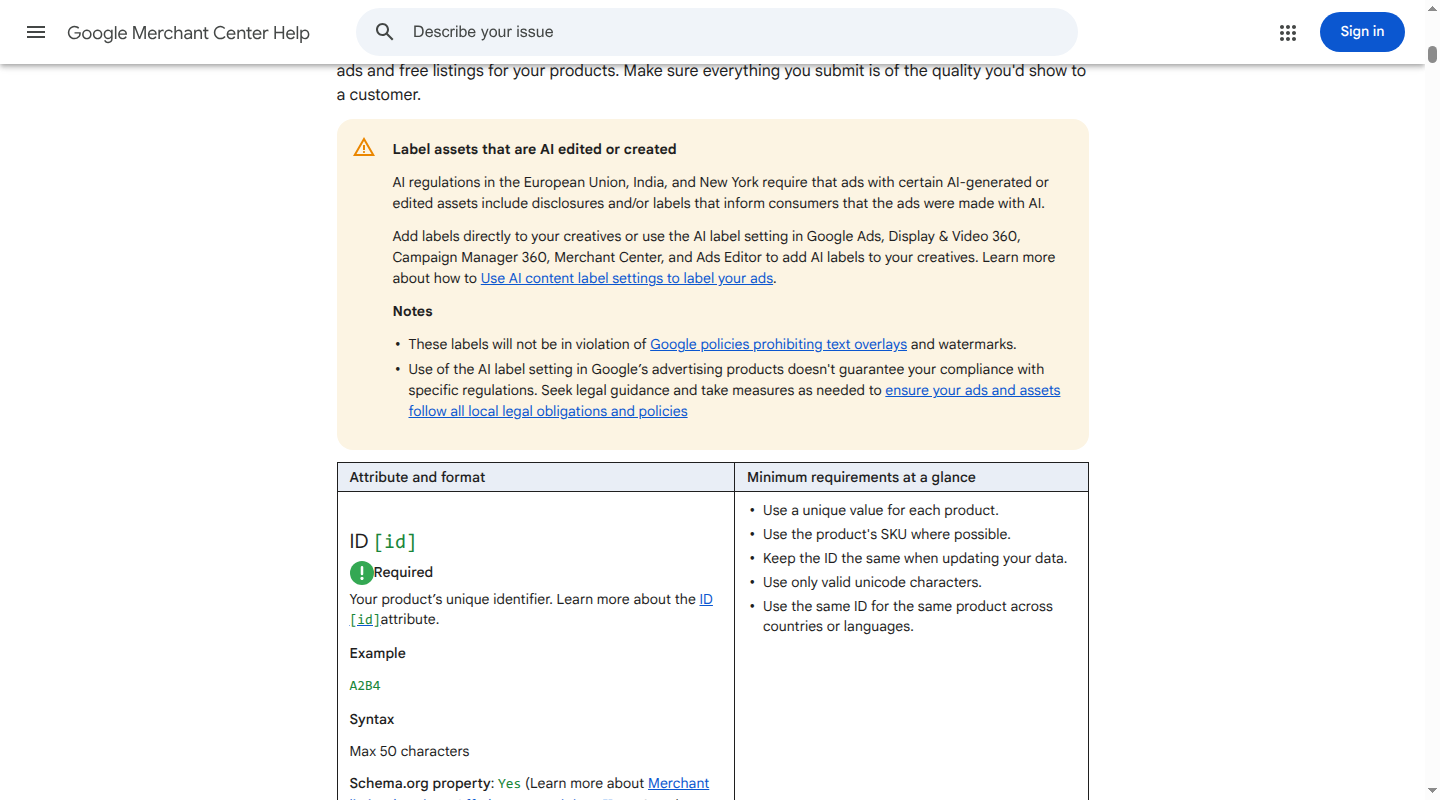
Build a field matrix rather than one universal checklist:
| Field group | Check | Evidence to save |
|---|---|---|
| Identity | IDs are unique and stable; identifiers are accurate where available | Source value, emitted value, validation result |
| Description | Title and description identify the product and follow destination limits | Character count, language, source link |
| Offer | Price, currency, availability, condition, and sale dates are present when relevant | Feed row, page value, checkout value |
| Variant | Parent relationship and distinguishing attributes are complete | Parent ID, option values, variant URL |
| Taxonomy | Internal and destination categories map to the right product type | Mapping rule and category value |
| Fulfillment and policy | Shipping, returns, age, adult, or other conditional data is supplied when applicable | Destination rule and affected products |
A missing conditional field is still a blocker when the product or destination makes it mandatory. Label each field as required, conditional, recommended, or out of scope for this audit. That prevents teams from treating every recommendation as a disapproval.
Validate mappings and formats
Compare the source record with the final emitted row or API object. Check transformations that are easy to miss in a database view:
- field names and headers use the destination’s exact spelling;
- enums use accepted values, such as
in_stockinstead of an internal “available” flag; - numbers, currency, dates, and units use the destination's formats;
- delimiters, encoding, escaping, line breaks, and XML or JSON structure are valid;
- URLs are encoded, use the expected protocol, and do not point to an interstitial page;
- exclusions, country filters, and destination labels do not remove the wrong products.
Run these checks against the whole emitted file, then inspect representative rows from every category, variant pattern, price state, and availability state. Keep the mapping version with the row so an issue can be reproduced after the next publish.
Inspect images as product data
An image URL that resolves is not enough. Check the image that a destination and shopper will receive:
- the URL is crawlable and returns an image, not an HTML error page;
- the file type, dimensions, and size meet destination rules;
- the primary image shows the product clearly without prohibited placeholders, promotional text, or watermarks;
- the image matches the exact variant, and additional images are useful;
- the asset still resolves after cache, CDN, or DAM changes.
For a red shoe, a feed row with a blue image is an eligibility and trust problem. Fix the variant-to-asset relationship upstream when possible. Do not solve it by changing a title to match the wrong image.
Reconcile price and availability
Treat price and availability as four-way parity checks. Compare the emitted row with:
- the product or variant page;
- structured data in the page’s initial response;
- the checkout or cart state;
- the destination’s captured value and timestamp.
Check base price, sale price, currency, sale window, tax treatment, minimum quantity, and regional rules.
For preorder or backorder, check the availability date on the page and in checkout. For out-of-stock products, make sure the page communicates that state clearly instead of leaving an active buy control.
A feed can be syntactically valid and still advertise an offer a shopper cannot buy. A price mismatch that appears only after a location or variant selection is still a mismatch for the affected market.
Measure freshness by field
One refresh schedule for every field hides risk. Record at least four timestamps for important products:
- source update;
- feed or API publish;
- destination fetch or receipt;
- processed-product or landing-page observation.
Set field-specific freshness targets. Price and inventory usually need event-driven or frequent updates. New and discontinued products should publish with the catalog snapshot and alert on unexpected additions or removals.
Approved copy and attributes can follow a daily or workflow-based release. Validate a new image URL before removing the old asset.
Measure the lag between each timestamp. Alert when price or availability exceeds its allowed lag, when a source row count changes sharply, or when the destination keeps serving an older version after a successful publish.
Read destination diagnostics separately from file status
A source upload or API response only proves that a destination received something. It does not prove that every row parsed, passed policy, or became visible.
For each destination, record separate evidence for:
- fetch or upload success and file or payload processing;
- item-level errors and warnings;
- approval or eligibility and visibility on the selected surface;
- landing-page and checkout access.
Google’s optimization guidance recommends prioritizing valuable products, maintaining accurate data, matching product data to landing pages, and using experiments to learn what helps a specific audience.
Use that as the quality and performance layer after blockers are under control.
Trace one issue from source to checkout
When a product is missing or disapproved, start with one concrete item. Record the destination, country, source version, product ID, variant ID, diagnostic text, and timestamps. Then walk outward in this order:
- Source record: Is the product active, sellable, and assigned to the expected variant, price, inventory, image, and URL?
- Mapping rule: Which source field populated the destination field? Did a fallback, default, exclusion, or country rule change it?
- Emitted output: Does the final file or payload contain the expected value, format, and relationship?
- Destination diagnostic: Did the destination reject the transport, field, product, policy, or landing page? Is the item approved but hidden on the selected surface?
- Landing page: Does the URL resolve directly to the product and preselect the submitted variant? Do the title, image, price, currency, and availability describe that same offer?
- Checkout: Can a shopper add that variant and complete the purchase under the stated price, currency, quantity, and availability?
Use the earliest failed stage as the likely owner. This table keeps the investigation focused:
| Symptom | Inspect first | Likely fix owner |
|---|---|---|
| Destination cannot fetch the file | URL, access, redirects, filename, response content | Feed delivery or infrastructure |
| File is fetched but rows fail to process | Headers, delimiters, encoding, required fields, accepted values | Mapping or feed engineering |
| Products are missing from the output | Source status, exclusions, country filters, row-count change | Catalog or merchandising operations |
| Wrong variant or image appears | Variant ID, group ID, option values, URL parameters, media join | Catalog, PIM, or storefront owner |
| Price or availability differs | Source event, feed timestamp, page markup, cart state, currency | Commerce platform or inventory owner |
| Products are approved but do not appear | Destination visibility, campaign or surface settings, policy, account state | Paid media or destination owner |
Fix the earliest broken link and then rerun the same trace. If you change only the final feed rule, the next source refresh can recreate the issue.
Prioritize eligibility blockers before quality work
Use two queues. The first is for eligibility and trust. The second is for quality and performance.
Eligibility blockers come first:
- failed fetch, upload, or parsing;
- missing required or conditionally required fields;
- duplicate or unstable IDs;
- broken variant relationships;
- invalid identifiers where a correct identifier is required;
- inaccessible product or image URLs;
- price, currency, availability, or checkout mismatches;
- policy, country, language, shipping, or destination violations.
Quality and performance opportunities come next:
- titles that hide the product type or key variant details;
- thin descriptions or missing category attributes;
- weak taxonomy, inconsistent controlled values, or unhelpful images;
- cohorts with high impressions and weak engagement.
An eligible product can benefit from better copy. A blocked product cannot benefit from a title experiment. Within each queue, sort by impact, reach, and recurrence.
Assign the issue to the source owner, mapping owner, destination owner, or site owner, and write the evidence required to close it.
Recheck, monitor, and close the audit
A fix is incomplete until the original failure disappears from the same scope. Recheck in this order:
- compare pre-fix and post-fix row counts and affected IDs;
- rerun schema, identity, variant, mapping, image, price, and availability checks;
- publish the corrected output and read destination diagnostics after processing;
- open high-risk landing pages and add the exact variant to cart;
- record timestamps and close the issue only when the expected status is visible and purchasable.
Keep these states distinct:
| State | What it proves |
|---|---|
| Emitted | Your system produced a row or payload |
| Received | The destination fetched or accepted it |
| Processed | The destination parsed it into a product record |
| Eligible | The product can show for the selected destination or method |
| Visible | The product is appearing on the selected surface |
| Purchasable | The linked offer can be bought under the submitted terms |
Monitor the fields at the speed they can change. Set alerts for new blockers, recurring diagnostic codes, material row-count changes, stale price or inventory timestamps, image failures, and landing-page parity breaks.
Keep the source version, emitted row, diagnostic, page result, owner, and fix together. That evidence turns the next audit into a comparison instead of a reset.
Shopping feed audit checklist
Use this as the final pass for a scoped audit:
- Destination, country, language, marketing method, source version, and cohort are recorded.
- Business impact, reach, recurrence, and owner are assigned to each issue.
- IDs, parent groups, and variant attributes are unique, stable, and consistent.
- Required and conditional fields are checked against the destination specification.
- Mappings, formats, units, encoding, and URL behavior are validated in the emitted output.
- Primary and additional images resolve and match the exact offer.
- Price, sale dates, currency, availability, and condition match the page, structured data, and checkout.
- Freshness lag is measured by field, with alerts for stale commercial values.
- Destination processing, eligibility, visibility, and landing-page diagnostics are recorded separately.
- One affected product has been traced through checkout, blockers were fixed first, and the same scope was rechecked.
FAQ
Is a shopping feed audit the same as feed management?
No. Feed management is the ongoing work of collecting, mapping, delivering, and monitoring feeds. An audit is a scoped investigation that finds where an offer fails and what evidence supports the fix.
How often should you run a shopping feed audit?
Run a full baseline audit when a destination, source, or mapping changes. Schedule focused checks around launches, promotions, inventory events, and recurring diagnostics.
Monitor price, availability, and transport continuously at the cadence your catalog requires.
Why did my feed process successfully while products stayed disapproved?
Processing only shows that the destination accepted and interpreted the input. Item eligibility can still fail because of missing fields, policy, identifiers, images, landing-page content, price, availability, or checkout.
Read item-level diagnostics and trace one product to its page and cart.
Should every variant have its own feed row?
If variants have distinct IDs, price, availability, images, or purchasable options, model them as distinct offers and group them with the destination’s variant relationship.
Do not create separate rows for related products that are not variants, and do not collapse sellable variants into one generic row.
Can a better feed guarantee more clicks or sales?
No. A reliable feed removes avoidable eligibility and trust failures. Performance still depends on the offer, audience, campaign setup, competition, site experience, and demand. Measure changes with a defined cohort and a control where possible.
A shopping feed audit is most useful when it ends in an upstream fix and a repeatable monitor.
If the same issues keep returning because product data is fragmented across systems, run a Catalog audit to find the source conditions before you add another destination rule.
