
Product feed optimization: a Google Shopping-first guide
Learn product feed optimization with a Google Shopping-first workflow for eligibility, field quality, feed validation, freshness, testing, and measurement.
A product feed is the version of your catalog a shopping channel can read, validate, and use. A product can be available in your store yet miss Shopping, match the wrong query, or show the wrong price when its feed record is incomplete or stale. Optimization fixes that at the data level.
Use Google Merchant Center as the primary example, then carry the same record into marketplaces and other channels. Separate eligibility from performance, improve fields in order, and close the loop with diagnostics, landing-page checks, controlled tests, and business metrics.
What product feed optimization means
Product feed optimization is the process of improving product records and their channel-specific output so products are eligible, understandable, discoverable, and useful after a shopper clicks. It includes the content of each field, the relationships between fields, the format emitted for a destination, the freshness of changing values, and the evidence that the output matches the offer a shopper can buy.
A feed row usually represents a product or a purchasable variant. Its fields can include an ID, title, description, URL, image, brand, identifiers, category, attributes, price, currency, availability, and variant relationships. Google calls the submitted row an item and distinguishes it from the underlying product and its variants in the product data specification.
Optimization has two separate gates:
- Eligibility and compliance: the channel can parse the record, accept its values, and show the offer without violating its requirements.
- Performance: the record gives the channel enough relevant, specific information to match the product to useful searches and gives shoppers a reason to click and buy.
Passing the first gate does not prove the second. A feed with a valid title, image, price, and availability can still use generic language, omit the attributes shoppers compare, or send every variant to the same landing-page state.
How this differs from related product-data work
The terms overlap, but they describe different jobs. Keep the distinction clear so a feed project has the right owner and success measure.
| Term | Primary job | Typical output |
|---|---|---|
| Product feed optimization | Improve product fields and channel outputs for eligibility, matching, clicks, and sales | A better feed record, a validated channel output, and measured test results |
| Product feed management | Collect, normalize, map, deliver, and monitor feeds over time | A repeatable feed operation with source ownership and sync workflows |
| Product data quality | Keep product information accurate, complete, consistent, current, valid, and fit for use | Quality dimensions, audits, controls, and ownership across systems |
| Product attributes | Define the facts that describe, classify, compare, and filter a product | Typed fields such as material, size, compatibility, dimensions, and finish |
| Product data syndication | Transform and distribute product information to many destinations | Channel-specific listings, feeds, APIs, and synchronized updates |
The product feed glossary entry covers the concise definition. This guide focuses on the optimization loop after you have a source record and a destination to serve.
Start with an eligibility and performance audit
Do not begin by rewriting every title. First separate hard blockers from opportunities. A disapproved product cannot benefit from a better title, and a product with no impressions needs a different diagnosis from one with many impressions and few clicks.
Audit eligibility first
For a Google Shopping feed, start with the required core fields: id, title, description, link, image_link, price, and availability. Brand is required for most new products, and category-specific rules can add fields. Identifiers such as GTIN and MPN are conditional, yet accurate values help Google identify the product. The Merchant Center data specification is the source of truth for a product type, country, and destination.
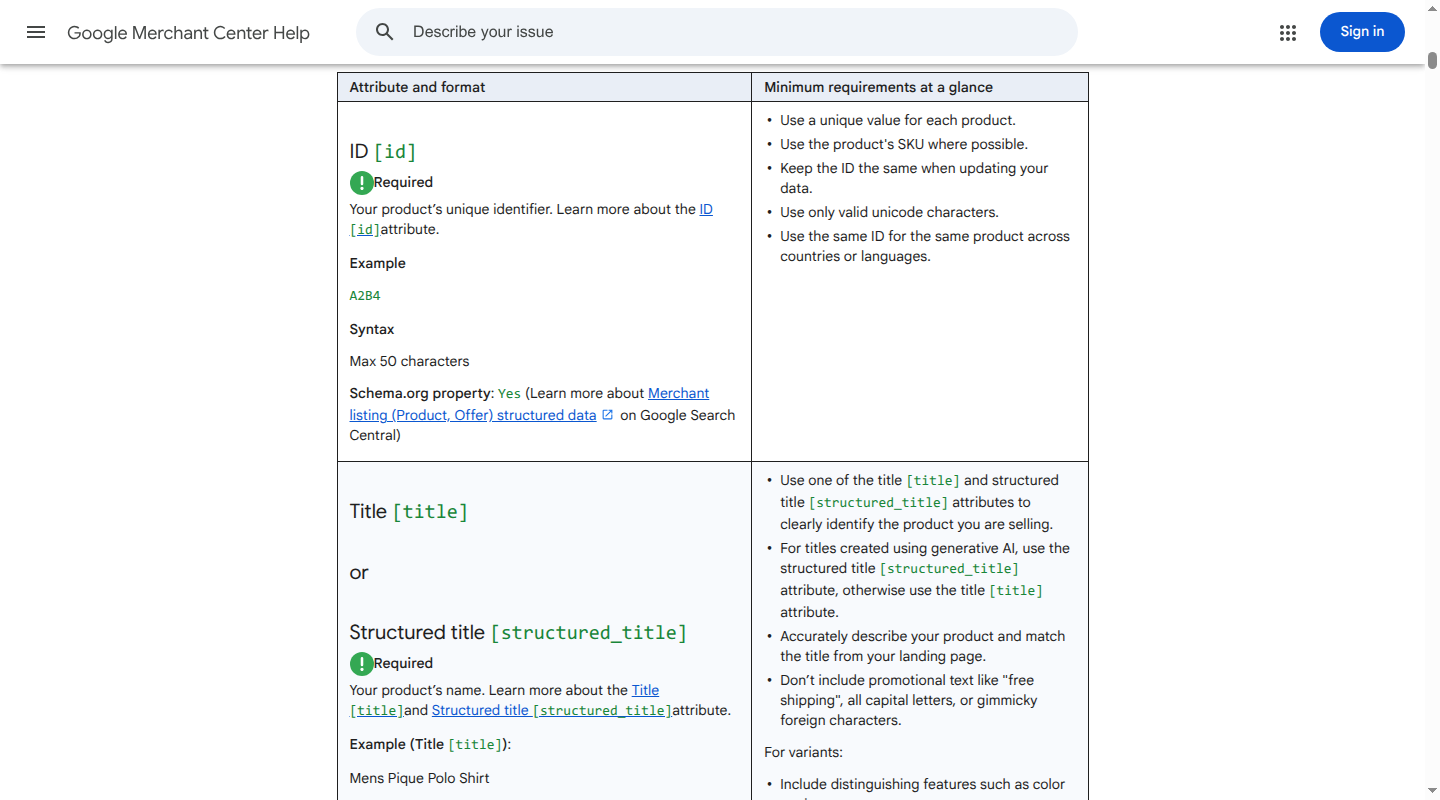
Check each emitted item for:
- required fields present and in the accepted format;
- stable, unique IDs and valid variant relationships;
- accurate identifiers, with no invented GTINs or MPNs;
- crawlable URLs and images;
- price, currency, availability, and sale dates that match the landing page and checkout;
- category and attribute values that fit the product;
- policy, shipping, returns, language, and destination requirements;
- no duplicate or contradictory data across the feed, page, structured data, and checkout.
Record both item-level and field-level results. “98% of rows uploaded” hides whether the 2% are your highest-revenue products or whether every row has a stale availability value.
Then audit performance
For eligible products, group the work by a measurable problem:
| Signal | What it can indicate | First place to look |
|---|---|---|
| High impressions, low click-through rate | The product is eligible and visible, but the listing is unclear or uncompetitive | Title, primary image, price, and variant detail |
| Clicks, low conversion rate | The listing creates an expectation the page or offer does not meet | Variant URL, price, availability, delivery, description, and page content |
| Low impressions, accurate eligibility | The channel lacks product context or the product has little demand | Taxonomy, identifiers, category attributes, and title language |
| Repeated disapprovals | A source, mapping, or channel rule is failing | Diagnostics, emitted values, and the owning source field |
| High revenue or margin | A small improvement can have a meaningful business effect | Complete data, freshness, and controlled tests before broad rollout |
Prioritize high-value products, products with high impressions and weak engagement, and products with recurring diagnostics. Google also recommends focusing resources on valuable products and using experiments to identify what works for your audience in its optimization guidance.
Improve the fields that shape every output
Use one trusted source record, then create channel-specific outputs from it. The fields below are the practical order for a Google Shopping-first implementation. Eligibility checks come before copy tests.
1. Stabilize IDs, identifiers, and variants
Identity is the layer that lets a channel accumulate history and connect price, inventory, images, and performance to the right item.
For Google:
- Keep
idunique and stable. Use the SKU where possible, keep it the same when updating data, and use the same ID for the same product across countries or languages. Google limits the field to 50 characters. - Send one row for each purchasable variant when the variant has its own price, stock, image, or landing state.
- Give variants a shared
item_group_id, keep that value stable, and use variant fields such ascolor,size, ormaterialto distinguish children. The group ID is required for variants in the US and several other markets. - Send the product's real
brandwhen it has one. Do not use values such asN/A,Generic, orNo brandas a substitute for missing brand data. - Send a valid manufacturer GTIN when you have one. If no manufacturer-assigned GTIN exists, use the manufacturer-assigned MPN and brand when the category requires them. Never guess an identifier. An incorrect GTIN or MPN can cause a disapproval.
A useful variant record looks like this:
id: JKT-001-NAVY-M
item_group_id: JKT-001
brand: Northline
gtin: GTIN_FROM_MANUFACTURER_IF_AVAILABLE
color: Navy
size: M
price: 148.00 USD
availability: in_stock
link: https://example.com/products/waterproof-commuter-jacket?color=navy&size=m
image_link: https://example.com/images/jkt-001-navy-m.jpg
The parent group is shared. The ID, URL, image, price, availability, and distinguishing options belong to the variant. Do not group separate products simply because they look similar, and do not collapse a multipack or a bundle into a single item when the offer and identifier represent something different.
2. Write titles for matching and scanning
The title is both product language and a compact display field. Put the details that identify the item and distinguish the variant near the front. A practical order is:
brand + product type + key differentiator + material or use case + variant detail
For example:
| Weak title | More useful title |
|---|---|
Jacket | Northline Women's Waterproof Commuter Jacket, Recycled Nylon, Navy, Medium |
Bottle | Trailmark Insulated Stainless Steel Water Bottle, 32 oz, Black |
Use the product's real terms, including the same color and size names that appear on the landing page. Current Google specifications allow up to 150 characters for title, prohibit promotional text and gimmicky characters, and require the title to describe the product accurately. Google also advises placing details that are not visible in the image near the beginning because titles are truncated in many formats.
A title is not a place to add every query or claim. Do not stuff synonyms, shipping messages, discount language, or claims the product page cannot support. If a title change makes the feed more relevant while making the landing page feel inconsistent, the source record and page need attention together.
3. Make descriptions specific and factual
A description should answer the questions that a title cannot. For the jacket example, state the fabric, weather protection, construction, fit, care, and included features. Keep claims tied to a source such as approved product content or a manufacturer specification.
Google's current description field accepts up to 5,000 characters. It should contain product information, match the landing page, and exclude store links, sales language, competitor references, and details about unrelated accessories. Use paragraphs or lists when the destination supports them. Do not turn the description into a keyword list.
Descriptions are performance work after the core record is valid. They help when shoppers need more context to compare products, yet they cannot compensate for a missing variant, wrong price, or broken image.
4. Map taxonomy deliberately
Google has two different category concepts:
google_product_categoryis Google's predefined taxonomy. It is optional in general, except for particular products and programs. When you send it, use one relevant category as either its numeric ID or full path, not both.product_typeis your own hierarchy. Use a detailed path such asApparel > Women's Clothing > Outerwear > Rain Jackets. Google says the firstproduct_typevalue is used for organizing bidding and reporting in Shopping campaigns.
Use category values to describe what a product is. Keep search phrases, synonyms, promotions, and audience labels in the fields intended for them. A wrong category can trigger category-specific requirements and can make otherwise accurate attributes look contradictory.
For each category, define the minimum set of attributes that a shopper or channel needs. Apparel often needs color, size, gender, age group, fit, and material. Electronics may need model, compatibility, dimensions, capacity, operating system, and included components. A category map should state which values are required, controlled, recommended, and optional for each destination.
5. Add attributes that explain the buying decision
Attributes are useful when they reduce uncertainty or help a system match a constraint. Prefer explicit values over vague copy:
| Category | Useful structured facts |
|---|---|
| Apparel | color, size, fit, material, pattern, gender, age group, size type |
| Furniture | width, depth, height, material, finish, assembly, room, weight capacity |
| Electronics | model, compatibility, ports, capacity, dimensions, power, warranty, included components |
| Beauty | ingredients, skin or hair type, volume, form, concerns addressed, fragrance information |
Normalize values before mapping them. If one variant says Midnight Sky, another says Dark Blue, and the landing page says Navy, the channel and the shopper receive three versions of one fact. Keep units consistent, use controlled values where a channel expects them, and retain the source value so every transformation is traceable.
Custom labels can help you segment campaigns, reporting, or testing groups by margin, season, launch status, or inventory risk. Google describes them as tools for organizing bidding and reporting. Treat them as campaign segmentation, not a ranking signal. They do not make a product more eligible.
6. Use images that pass policy and represent the item
The primary image should show the product accurately, use a crawlable URL, and match the variant in the row. Google lists JPEG, WebP, PNG, non-animated GIF, BMP, and TIFF as accepted formats for image_link. It prohibits promotional text, watermarks, borders, placeholders, and generic images. Additional images can show the product in use or provide relevant detail, and Google supports up to 10 additional image links.
Google's current specification announces a minimum of 500 by 500 pixels for product images, with enforcement beginning January 31, 2027. Treat that as an announced future enforcement date in your image pipeline. This is a dated requirement, so image validation should record dimensions as well as URL status, file type, and variant match.
For a color or size variant, send the image that a shopper expects after clicking. Do not use a black product image for a white variant simply because the image URL is convenient. A clear image can improve engagement, but it cannot rescue a wrong offer or an unavailable item.
7. Keep price and availability current
Price and availability are eligibility fields and trust signals. For Google, send price with a numeric amount and ISO 4217 currency. Match it across the feed, landing page, structured data, and checkout. Send sale_price alongside the non-sale price, and use sale_price_effective_date when the sale has a defined window.
For bulk products, minimum order quantities, bundles, and multipacks, the submitted price must represent the minimum purchasable quantity and be shown clearly on the landing page. In the US and Canada, Google says the price value excludes sales tax; other countries can require VAT or GST in the submitted price. Regional rules belong in the channel adapter, not in a single global value.
Send one of Google's supported availability values, such as in_stock, out_of_stock, preorder, or backorder. Match the page, checkout, and structured data. For preorder or backorder items, supply the required availability date and show that date clearly to shoppers. When an item is out of stock, its price still needs to be visible on the landing page.
Set a freshness policy by field rather than using one schedule for the entire catalog:
| Field group | Baseline update trigger | Why |
|---|---|---|
| Price, sale price, and availability | Every source change, or frequent intraday delivery | These values can invalidate an offer quickly |
| Titles, descriptions, and attributes | Approved content change or scheduled daily publish | These fields need review and consistency |
| Images | Asset approval and URL validation | A replaced asset can break a listing or misrepresent a variant |
| Taxonomy and mappings | New product type, channel taxonomy change, or rule change | Classification affects required fields and reporting |
| Diagnostics and landing-page parity | Daily monitoring, plus an alert on a material change | Accepted files can still create bad live offers |
Google recommends automated or intraday delivery, the Merchant API, or structured data for price and availability freshness. The right cadence depends on how quickly the source changes. Keep a timestamp and source version for every emitted value so a mismatch has an owner.
Keep the output channel-aware
One normalized product record can support several destinations. One unmodified feed should not be expected to satisfy all of them. The adapter should translate field names, controlled values, limits, category rules, and eligibility without changing the underlying product truth.
| Destination | What to preserve from the source record | What needs a channel-specific adapter |
|---|---|---|
| Google Merchant Center | Stable IDs, variants, identifiers, title, description, image, price, availability, taxonomy, and attributes | Google attributes, country and language rules, image requirements, shipping and returns, and diagnostics |
| Amazon | Product identity, variation relationships, approved content, media, offer state, and inventory | Product-type inventory-file template, required and conditional fields, variation theme, accepted values, and offer columns |
| TikTok Shop | Accurate product facts, brand, images, variants, price, and disclosures | Listing policy, category rules, variation grouping, and content restrictions |
| AI or developer-facing commerce feeds | Stable item and variant IDs, structured product facts, price, availability, and regions | The destination's schema, eligibility flags, update contract, and freshness behavior |
Amazon's US inventory-file guidance uses product-type-specific templates with required, conditional, and optional fields. TikTok Shop's listing policy requires accurate listing details and groups valid variations under one product page, while prohibiting misleading titles, brands, attributes, and duplicate listings. Those are different data contracts from Google Merchant Center. Map from a trusted record instead of copying a Google export and hoping the destination accepts it.
For custom Google integrations, account for the API transition as part of feed operations. Google's sunset notice says the legacy Content API for Shopping was sunset on August 18, 2026. Requests without an active extension can fail intermittently from September 1, 2026, and full decommissioning is planned for early 2027. Move custom integrations to the Merchant API, and keep API migration separate from field-level optimization so a transport change does not hide feed-quality regressions.
Validate the emitted feed, not only the source record
A source catalog can look complete while the emitted feed drops a field, maps the wrong value, or points every variant to one page. Validate the final output that a channel receives.
Use this sequence for each feed release:
- Freeze the input version. Record the source snapshot, mapping version, target country, language, destination, and product cohort.
- Run schema checks. Confirm required columns or object properties, accepted enums, character limits, number and currency formats, URL encoding, and unique IDs.
- Run relationship checks. Confirm each variant has one stable parent group, each ID is unique, and variant-specific price, availability, image, and URL values are coherent.
- Run semantic checks. Compare title, description, category, attributes, image, and identifiers. Flag contradictions such as
redin the title andBluein the color field. - Inspect the emitted file or API payload. Review representative rows from high-value products, each category, each variant pattern, each price state, and each availability state. Do not rely on the source database view.
- Read channel diagnostics. In Merchant Center, use the product issue details and diagnostics to separate errors, warnings, limited eligibility, and item-level disapprovals. Classify each recurring issue by source field, mapping rule, or channel rule.
- Open the landing page from the emitted link. Confirm it resolves, shows the submitted product and variant, exposes the same title, description, image, price, currency, availability, and relevant structured data, and allows the submitted offer to be purchased.
- Check the checkout path. A page can show one price while checkout applies a different currency, membership condition, minimum quantity, or availability state. The submitted offer must be purchasable on its stated terms.
- Measure freshness. Compare the event time in the source, emitted feed, channel receipt, landing page, structured data, and checkout. Alert when a field exceeds its allowed lag.
- Save the evidence. Keep the row, diagnostic reason, page result, source version, owner, fix, and next observation window together.
This workflow catches both gates. Diagnostics answer whether a channel accepted the data. Landing-page and checkout checks answer whether the accepted data describes an offer a shopper can trust.
Test changes and measure business impact
Feed optimization is a series of hypotheses. Treat it like an experiment rather than a permanent rewrite.
Build a clean test
- Choose one field family and one product cohort. For example, add color and fit to titles for a sample of apparel variants.
- Define a control group that keeps the old output and a treatment group that receives the new rule. Match groups by category, price band, historical impressions, and sales where possible.
- Record a baseline for eligibility, diagnostics, completeness, impressions, clicks, click-through rate, conversions, conversion rate, revenue, cost, and return on ad spend. Add gross margin, return rate, and stock-out rate when those are available.
- Keep campaign budget, bids, promotion, price, image set, landing page, and inventory policy steady during the observation window. If another change is unavoidable, record it as a confounding event.
- Compare rates and product-level distributions, not only totals. A larger group can produce more clicks without improving the product record.
- Roll out only when the treatment improves the intended metric without breaking eligibility, margin, inventory, or customer experience guardrails.
A title test might ask whether Women's Waterproof Commuter Jacket, Navy, Medium earns a better qualified click rate than Jacket. A description test might add material and care facts. An attribute test might fill compatibility or dimensions. Change one family at a time so the result explains what moved.
Track two scorecards
Keep operational and commercial measures separate:
| Scorecard | Measures |
|---|---|
| Eligibility and data health | Required-field completeness, valid identifier coverage, variant integrity, diagnostic error and warning rate, disapproval rate, image dimension and URL pass rate, price and availability mismatch rate, freshness lag |
| Performance and business | Impressions, click-through rate, qualified clicks, conversion rate, revenue, cost per order, return on ad spend, gross margin, return rate, and stock-out rate |
Use product groups and custom labels to connect the scores. For example, report the title treatment by product type, margin band, and inventory status. Custom labels organize analysis and campaign controls. They do not replace product relevance or fix missing data.
A successful upload is the start of an observation window, not the result. Keep the old and new emitted rows, diagnostics, landing-page evidence, and business metrics tied to the same product IDs. That gives you a defensible answer when performance changes and makes it possible to reverse a rule without losing history.
A practical optimization order
When the catalog is large, use this sequence:
- Fix disapprovals and missing required fields for high-value products.
- Stabilize IDs, identifiers, variants, and canonical URLs.
- Remove price, availability, and landing-page mismatches.
- Validate primary images, variant images, dimensions, and crawlability.
- Improve titles and descriptions with facts shoppers use to choose.
- Complete category attributes and taxonomy for each product family.
- Add channel-specific mappings for Amazon, TikTok Shop, or other destinations.
- Establish field-level freshness and diagnostic ownership.
- Run one controlled test at a time.
- Scale rules that improve performance without degrading eligibility, margin, or trust.
Catalog helps teams structure product data into live, normalized product records, keep changes synced, and measure outcomes across channel outputs and machine-readable commerce surfaces. If your channel work is blocked by thin or inconsistent source data, explore Catalog's product data layer.
FAQ
How often should a product feed be optimized?
Review diagnostics and freshness continuously, then schedule a recurring performance review. Price and availability should update whenever the source changes. Titles, descriptions, attributes, and mappings should change through an approved workflow or a measured test. A fixed monthly rewrite is less useful than a field-level process tied to changes, errors, and performance signals.
Can one product feed serve every channel?
One normalized source record can support every channel. The emitted output should still be channel-specific because Google Merchant Center, Amazon, TikTok Shop, and other destinations use different schemas, required fields, taxonomies, limits, and policies. Share product truth. Adapt the contract.
Which fields should be optimized first?
Start with eligibility and trust: IDs, variant relationships, identifiers, image URLs, price, availability, and landing-page parity. Then improve titles, descriptions, taxonomy, and category attributes for products with meaningful impressions or commercial value. This order prevents copy work from masking a broken offer.
Is google_product_category required for Google Shopping?
It is optional for general products, with exceptions for certain products and programs. Google automatically categorizes products. When you provide google_product_category, send one relevant Google taxonomy value as an ID or a full path, not both. Keep it separate from your own product_type hierarchy.
Do custom labels improve product ranking?
Custom labels are useful for campaign grouping, reporting, and testing. They help you decide where to spend or how to compare cohorts. They are not a substitute for complete product data and are not a direct product-ranking signal.
