
Product information management implementation: start with data
Product information management implementation with clear requirements, field owners, clean data, integrations, rollout phases, and practical success metrics.

A product information management (PIM) implementation changes how product facts move through your business. The hard decisions happen before configuration: what a record contains, who owns each field, who approves changes, and what a good listing looks like. A workable plan carries those decisions through scope, data cleanup, integration, rollout, and measurement, then identifies whether another PIM project or an AI-focused product data layer fits the remaining gap.
What the implementation has to deliver
A PIM centralizes product content, attributes, taxonomy, variants, localized copy, approvals, and channel-ready records. An implementation puts those operations into production. It defines a usable data model, assigns authority for each field, configures workflows and validation, connects sources to destinations, migrates records, and trains the people who will maintain them.
A PIM rarely owns every fact about a product. Your enterprise resource planning (ERP) system or product master may own identifiers and lifecycle state. Your pricing service may own price. An order or warehouse system may own availability. A digital asset management (DAM) system may own approved files and their usage rights. The PIM may own approved descriptions, category attributes, and localization. Your stack can differ. Name one authoritative source for each field so that a correction does not create another conflict.
For AI commerce, we can add a product data layer alongside a working PIM. We can also help you avoid a new PIM project when your only missing job is AI-facing distribution. Choose based on the work your teams need to manage. The word “AI” in a project brief does not answer that question.
Turn requirements into acceptance tests
Start with a business outcome, then write the system requirement and a pass condition. “Support a global catalog” is too broad. “Publish a French-market product with an approved translation, a size variant, a valid price in euros, and a channel-accepted image” gives the team something to build and test.
| Product job | Requirement to define | Acceptance test |
|---|---|---|
| Launch a new product | Required fields, owner, review steps, and first destination | Create a product from its source record, complete it in the PIM, approve it, and confirm the destination accepts it |
| Manage variants or bundles | Parent, child, pack, and component relationships; stable identifiers | Add or change one size or color and confirm the correct offer publishes without changing its siblings |
| Localize a catalog | Locale-specific content, units, claims, and destination rules | Publish one product in each pilot market and confirm the language, currency, and required fields are correct |
| Update price or availability | Authoritative source, update cadence, and stale-data behavior | Change a test value and verify the correct destination updates within the agreed window |
Record the scope behind each test: product families, active stock-keeping units (SKUs), variants, suppliers, markets, languages, destinations, update cadence, roles, permissions, audit history, and support needs. Classify must-haves and later releases.
Set an owner and pass condition for each requirement. A clean demo item can hide edge cases such as multiple identifiers or regional data.
Give every field a human owner
Bring merchandising, product, ecommerce, operations, IT, data, finance, and compliance into design. Let each group contribute where it has expertise. Name the decision owner for each topic and agree on how to resolve conflicts.
| Field | Common authoritative source | Accountable owner | Example publish check |
|---|---|---|---|
| Global Trade Item Number (GTIN) or internal item ID | Product master or approved brand record | Master-data lead | ID is unique and belongs to the correct sellable item |
| Product description | PIM or approved content source | Product marketing or category lead | Copy is approved for the destination and locale |
| Price and currency | ERP or pricing service | Pricing operations | Effective price matches the market and currency |
| Availability | Order, warehouse, or commerce system | Inventory operations | Value is current and joined to the correct item |
| Material or technical claim | Manufacturer specification or approved evidence | Product or compliance lead | Value matches evidence and is approved for the market |
| Image or manual | DAM | Asset owner | Correct asset is linked and its usage rights are current |
Name one product-data owner for model, definition, and quality decisions. Assign field stewards to authoritative sources and exception paths, and a separate IT owner for access, monitoring, and recovery. One person may hold more than one role on a small team.
For important fields, document the definition, source, allowed editors, approval trigger, destination mapping, and exception path. Our field-level governance guide shows this policy at field level. Bring users into design early. Training cannot repair a workflow that does not match how your team launches products.
Model product data before migration
Design around product relationships, not old spreadsheet columns. Define families, sellable items, variants, multipacks, bundles, accessories, and replacement parts. Assign attributes to the right level, then set field types, units, allowed values, localization, evidence, and channel requirements.
Keep the shared model extensible. The GS1 Global Data Model defines a consistent set of product attributes and accounts for needs that vary by category, region, and location. Use it as a reference for separating shared fields from category- and market-specific requirements, then shape your PIM model around your own products and destinations.
Identifiers and variant relationships deserve a specific test. Google's product data specification requires a unique ID that stays consistent when a product is updated. Use the same item_group_id value for each variant of one product to group them, and variant_option to specify the attributes that distinguish each variant. When color or size identifies a variant, submit that standard attribute as well as the corresponding variant option; other properties can define variants too. Do not collapse several sellable variants into one record or invent a GTIN when the authoritative source is missing one.
Before configuration is locked, test the model against a typical item, a variant-heavy product, a multipack or bundle, and a product with market-specific claims or instructions. A model that handles the easy case may still flatten variant data or attach a shared image to the wrong item.
Clean data in scoped batches
Profile the sources you plan to use before loading them. For each product family and market, count active records, duplicates, missing required fields, invalid identifiers, inconsistent units or values, orphaned variants, stale media, and conflicting price or availability. This baseline tells you what the migration must fix and what can stay in a later cleanup queue.
Give each record a clear action: migrate as-is, normalize by a documented rule, correct it at the authoritative source, enrich it with evidence, merge it with a duplicate, or archive it. Preserve the source identifier and enough provenance to trace each correction. Do not convert a guess into an approved product fact. Claims about safety, performance, certification, or ingredients need evidence and an owner.
Fix identity errors, duplicates, invalid units, and model-breaking gaps before the first load. Smaller completeness issues can be routed to stewards inside the new workflow. Rehearse the migration with a representative slice, compare record counts and important fields, and review every rejection with its owner. The product data quality guide covers the checks that help separate complete-looking data from data a channel can trust.
A PIM should prevent new errors after launch. Configure category-specific required fields, controlled values, and exception workflows as part of the build. A one-time cleanup without ongoing rules will drift as new products and suppliers arrive.
Design integrations as data contracts
Make an integration inventory before you configure connectors. For every flow, document its source, destination, field mapping, direction, stable key, update trigger or cadence, validation, error owner, and recovery path. A connector can move an incomplete record just as quickly as a good one.
| Flow | Typical data | Design decision |
|---|---|---|
| ERP, product lifecycle management (PLM), or supplier feed to PIM | Item ID, lifecycle, specifications, supplier values | Preserve source IDs and provenance; define who resolves conflicting values |
| DAM to PIM or product record | Approved images, manuals, and usage rights | Link the correct asset and keep rights or expiry metadata attached |
| PIM to storefront or channel | Approved copy, attributes, taxonomy, and locale | Publish on a clear approval gate and capture acceptance or rejection |
| Price or inventory source to destinations | Price, currency, promotion, availability | Set a freshness target and stale-value behavior for each destination |
Product descriptions usually move on an editorial approval. Price and stock can change much faster. Do not force every field through one batch schedule. Define how each destination handles a missed update, a duplicate event, a deleted item, a bad identifier, or a rejected record. Use retries for temporary failures, quarantine invalid data, and name the person who resolves the exception.
Test the complete path from a source change to the final destination, including partial failures and recovery. The PIM integration guide explains how to separate ownership, synchronization, enrichment, validation, and publishing. Your project plan should treat each important connection as its own deliverable, with a business owner as well as a technical owner.
Roll out one complete slice, then expand
Choose a first release by product family, market, and destination. It should be small enough to learn from and complete enough to prove the whole path from source record to an accepted listing.
- Discover. Confirm business outcomes, data sources, owners, first-release scope, and baseline metrics.
- Model. Approve the data model, field rules, permissions, workflows, and destination mappings. Test the model on difficult real products.
- Build and migrate. Configure the PIM, connect the first source and destination, load a data slice, and reconcile it against the source.
- Test with users. Run user acceptance tests for a new item, a variant change, a missing field, a source conflict, a channel rejection, and an update that must be rolled back or retried.
- Pilot and cut over. Publish one product family to one or two destinations. Compare the new output with the old process, train each role, and keep a documented recovery plan.
- Expand and operate. Add product families, markets, and channels in waves. Hand over the model, integrations, runbooks, and quality backlog to named owners.
Set a milestone for platform readiness, first products loaded, first destination acceptance, each market or channel, and full adoption. Alium's published buyer interviews separate PIM go-live from later product loading and channel connections. Those cases do not establish a typical timeline. For project planning, set separate milestones for platform launch and full rollout.
Measure data flow and business outcomes
Set a baseline before the first release. Report by product family, market, and channel; one company-wide average can hide a broken category or destination.
| Metric | Useful definition |
|---|---|
| Required-field completeness | Accepted required values divided by all required values in scope, by category and destination |
| Identifier and relationship quality | Duplicate IDs, invalid IDs, and broken parent-variant or bundle links |
| Time to first accepted listing | Time from approved source data to destination acceptance, reported as the median and 90th percentile |
| Freshness | Time from a source change to a correct downstream value for price and availability |
| Channel quality | Rejection, correction, and stale-data rates by destination |
| Adoption | Share of launches managed in the agreed workflow, plus updates still made in external spreadsheets |
| Business outcome | Launch time, product discovery, add-to-cart, returns, support contacts, or AI referrals tied to stable product IDs |
Google’s product data specification notes that missing, inaccurate, or incorrectly formatted data can cause disapprovals, limited eligibility, or incorrect displays. Use validation and rejection rates as direct operating measures. Track conversion, returns, and AI referrals as business outcomes, with product IDs and time windows that let you investigate the connection. These outcomes have other causes, so do not treat a change in one metric as proof that the PIM alone caused it.
Pick a small set of metrics, name an owner for each, and review them after every rollout wave. When a metric changes, assign a data or process fix rather than adding a new field without a reason.
When to add a product data layer instead of another PIM project
Use our PIM versus Catalog comparison for the broader product-fit decision. In the implementation plan, scope the product data layer as a downstream distribution workstream with named sources, field mappings, synchronization and freshness rules, and destination acceptance criteria.
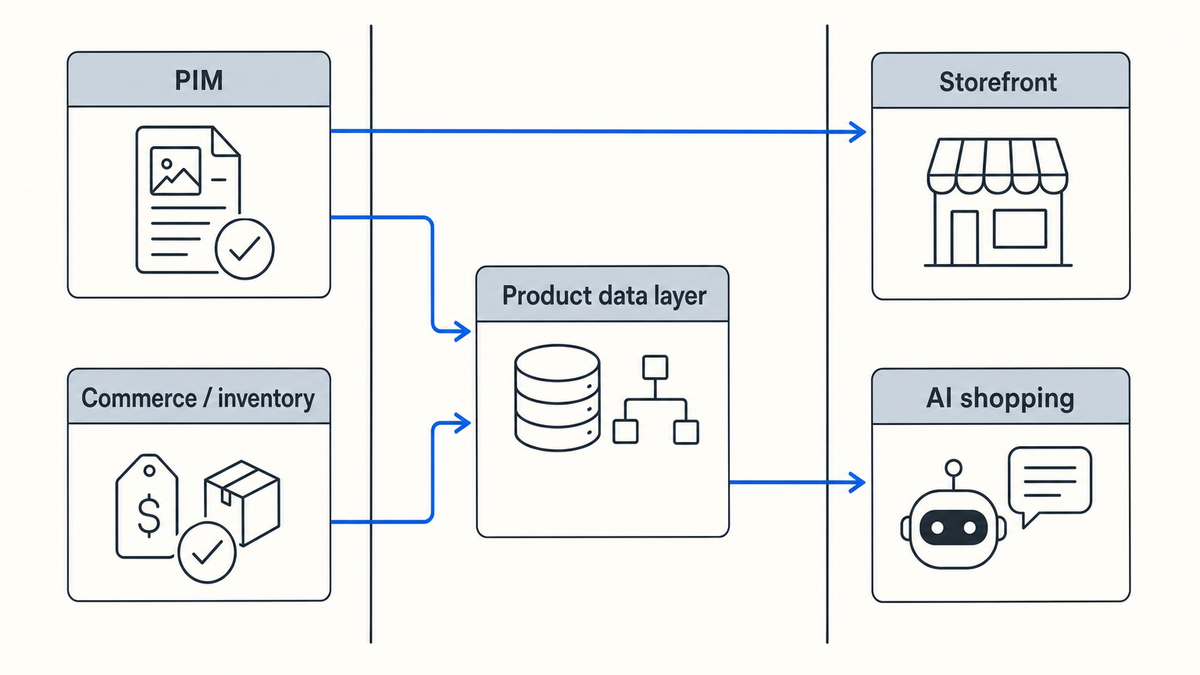
With Catalog, connect the approved PIM, ERP, commerce platform, DAM, supplier feed, or another permitted source. Normalize the required data into machine-readable product objects, test updates through each destination, and measure data quality and distribution outcomes by product family and destination.
A downstream layer will not repair an untrusted source. If identifiers, claims, prices, or availability are wrong, resolve authority and quality before distribution. Add a product data layer when the output contract is the gap. Repair broken source data first.
Go-live checklist
Before moving beyond the pilot, confirm that:
- Each critical field has a definition, source, owner, and exception path.
- The model preserves product, variant, pack, and bundle relationships.
- Migration counts and critical fields reconcile to the source records.
- Each integration has a tested retry, rejection, stale-data, and recovery path.
- The pilot destination accepts the output and the team can maintain the workflow.
- Baselines exist for completeness, freshness, rejection rate, time to publish, and adoption.
- A named owner has the runbooks, training plan, and post-launch backlog.
If your PIM already governs the internal catalog and your next need is live, machine-readable data for AI shopping, talk with us about adding Catalog alongside it.
