
Manufacturer part number: How to use MPNs in ecommerce
Learn what a manufacturer part number is, how it differs from SKUs and GTINs, where to find it, and how to map it into feeds and product schema.
A product record can contain several numbers that look interchangeable. They are not. A merchant SKU, manufacturer part number, GTIN, model number, and channel item ID each answer a different identity question. Mixing them can split one product across listings, attach the wrong variant to an order, or make a feed fail validation.
This guide explains how MPNs work in ecommerce, how to find and validate one, and how to keep the same manufacturer-assigned value aligned across your catalog, product pages, feeds, marketplaces, and structured data.
What is a manufacturer part number (MPN)?
A manufacturer part number, or MPN, is a code the manufacturer assigns to identify a particular product or part in its catalog. It can contain letters, numbers, and punctuation, and formats vary by manufacturer. An MPN is meaningful with its manufacturer or brand, so the pair brand + MPN is the reliable product identity for matching.
An MPN usually identifies an orderable product configuration. A different connector, voltage, color, capacity, or revision can have a different MPN. Some manufacturers reuse one MPN across apparel sizes or other variations, so your product model should follow the manufacturer’s own catalog rather than an assumption about variants.
An MPN identifies a product type. It is not a serial number for one physical unit, a lot number, or a code that a retailer should invent. It can help a buyer find a replacement part, help a distributor join records, and help a shopping channel distinguish products from the same brand. It does not replace the product title, specifications, or variant relationship.
Google defines MPN as identifying a specific product among the products from the same manufacturer. Its Merchant Center guidance says to use the manufacturer-assigned value, avoid guesses, and submit the correct value for each variant when one exists. Google’s MPN requirements are a useful baseline even when another destination has its own rules.
MPN vs. SKU vs. GTIN
The fields can contain similar-looking strings. Their owners and scopes are different.
| Identifier | Assigned by | Scope | Typical ecommerce use |
|---|---|---|---|
| MPN | Manufacturer | The manufacturer’s catalog, in combination with its brand | Parts lookup, product matching, feeds, marketplaces, and technical catalogs |
| SKU | Merchant or seller | One seller’s inventory and operating systems | Stock, fulfillment, purchasing, reporting, and internal updates |
| GTIN | Brand owner through the GS1 system | A trade item that can be priced, ordered, or invoiced across trading partners | Barcode scanning, product feeds, marketplace matching, and retail exchange |
| Model number | Usually the manufacturer | A product family or model naming system | Product naming, customer support, and manufacturer lookup |
| Channel item ID | Destination or merchant | One feed or channel account | Row-level updates and offer management |
A SKU is a merchant-specific identifier. A GTIN is a global trade-item identifier. GS1 describes GTIN as a number a company can use to uniquely identify its trade items. An MPN belongs to the manufacturer and is interpreted with the brand. A model number may describe a family, while the full MPN can identify the exact orderable version.
A store SKU can happen to match an MPN. Keep the fields separate anyway. If you manufacture a private-label product, the same code may be the value you use internally and the manufacturer-assigned part number. Record both roles and their source instead of relying on a naming coincidence. Google specifically warns merchants not to put ordinary store SKUs into MPN, GTIN, or brand fields.
A concrete identity map
Google’s product-identifier example uses a green small T-shirt with these values:
| Field | Google’s example |
|---|---|
| Merchant item ID | 9876-S-GRN |
| Brand | Google |
| GTIN | 9504000059422 |
| MPN | 00638HAY |
| Variant | Green, small |
The item ID is the channel row key. The MPN identifies the product within Google’s brand catalog. The GTIN identifies the trade item. The color and size explain which variant the row represents. The example comes from Google’s unique product identifier guidance; the roles apply to any catalog that keeps its identity fields distinct.
Where to find an MPN
Start with a source controlled by the manufacturer. Use a reseller listing as a lead only when you can confirm it against manufacturer documentation.
- Inspect the product and packaging. Look for a label, plate, box, barcode panel, or printed specification. An MPN may be next to terms such as
part number,model,P/N, oritem number. Do not assume every number on a label is the MPN. A serial number and a lot code identify a unit or production run. - Search the manufacturer’s catalog. Open the product page, ordering table, technical drawing, manual, or data sheet. Use the full orderable string, including suffixes that encode size, package, voltage, finish, or revision.
- Ask the supplier for the manufacturer record. Request the brand, exact MPN, product description, variant details, and source document together. A supplier SKU or distributor stock code is useful for procurement, yet it is not automatically the manufacturer’s part number.
- Reconcile the value before importing it. Confirm that the brand, product family, variant, pack quantity, and condition match the item you sell. Store the source URL or document, retrieval date, and reviewer with the value.
Do not manufacture a value to fill a blank. If you are the product manufacturer and the product has no assigned MPN, a destination may provide a narrow path for a self-assigned identifier. Google describes that exception for a manufacturer who is the only seller, and it still requires a unique value paired with the store or product brand. That exception does not turn a merchant SKU into an MPN for a product made by someone else.
How MPNs work in feeds and marketplaces
An MPN is one field in a destination record. It does not replace the row ID, brand, GTIN, title, variant, or offer data. Map each field from your canonical product record to the destination’s schema.
| Destination | MPN field or workflow | What to do |
|---|---|---|
| Google Merchant Center | mpn, alongside brand, gtin, and id | Send the manufacturer-assigned MPN when available. Google documents a 1 to 70 character, non-repeated string, recommends ASCII, and requires it for products without a manufacturer-assigned GTIN unless the product has no associated MPN or is custom-made. |
| eBay | Category-specific product identifier workflow | Product identifiers are required in most categories. Use the identifier that exactly matches the item and choose “Does not apply” when the product has no identifier or you are unsure. |
| Other marketplaces and retailers | Destination-specific identifier field | Check the category contract, then map the verified MPN with the manufacturer or brand field. Do not copy a channel’s seller SKU into the MPN field. |
Google can disapprove an item with an incorrect MPN. Its guidance also covers edge cases that frequently cause feed errors:
- A compatible or refurbished product should use the MPN from the company that actually built that product, not the OEM’s MPN to imply compatibility.
- A manufacturer-created bundle uses the bundle MPN. A merchant-created bundle uses the main product’s MPN when the destination’s bundle rules call for it.
- A manufacturer-created multipack uses the multipack MPN. A merchant-created multipack uses the individual product’s MPN under Google’s documented rule.
- A product variant needs its own MPN when the manufacturer assigned one. Google notes an apparel-size exception because sizes often share an MPN.
eBay’s product-identifier guidance also stresses exact catalog matches. Category requirements change, so treat this table as a mapping pattern rather than a universal marketplace rule.
For a broader operating model, see our guide to product feed management. A feed is a destination output. Your canonical record should remain the place where the verified MPN, its source, and its product scope are governed.
Store MPN as a governed identity field
The safest product model keeps MPN, SKU, GTIN, brand, and variant relationships separate. It also records why the value can be trusted.
{
  "product_id": "9876-S-GRN",
  "brand": "Google",
  "mpn": "00638HAY",
  "gtin": "9504000059422",
  "sku": "STORE-GREEN-S",
  "variant": {
    "color": "green",
    "size": "S"
  },
  "mpn_provenance": {
    "source_type": "manufacturer_catalog",
    "source_ref": "supplier-record-2026-09",
    "status": "verified",
    "verified_at": "2026-09-30"
  }
}
The identifier values above use Google’s published example for the brand, MPN, and GTIN. STORE-GREEN-S and the provenance fields are illustrative additions. Use your own approved source values in production.
Keep the raw MPN as text. Do not cast it to a number, strip leading zeros, or remove punctuation because another system prefers a normalized format. If you need search normalization, store a separate comparison key and retain the original value for feeds, pages, and audits.
A useful MPN field policy includes:
- Source and provenance: manufacturer page, product label, datasheet, or supplier record, plus retrieval date and reviewer.
- Scope: parent product, exact variant, bundle, or multipack. Avoid a value that silently applies to every child.
- Raw value: the exact manufacturer string, including meaningful zeros, case, and separators.
- Status: verified, pending review, conflicting, missing, or not applicable.
- Relationships: brand, manufacturer, product ID, variant ID, GTIN, and merchant SKU.
- Destination mappings: the feed field, schema property, or marketplace field that receives the value.
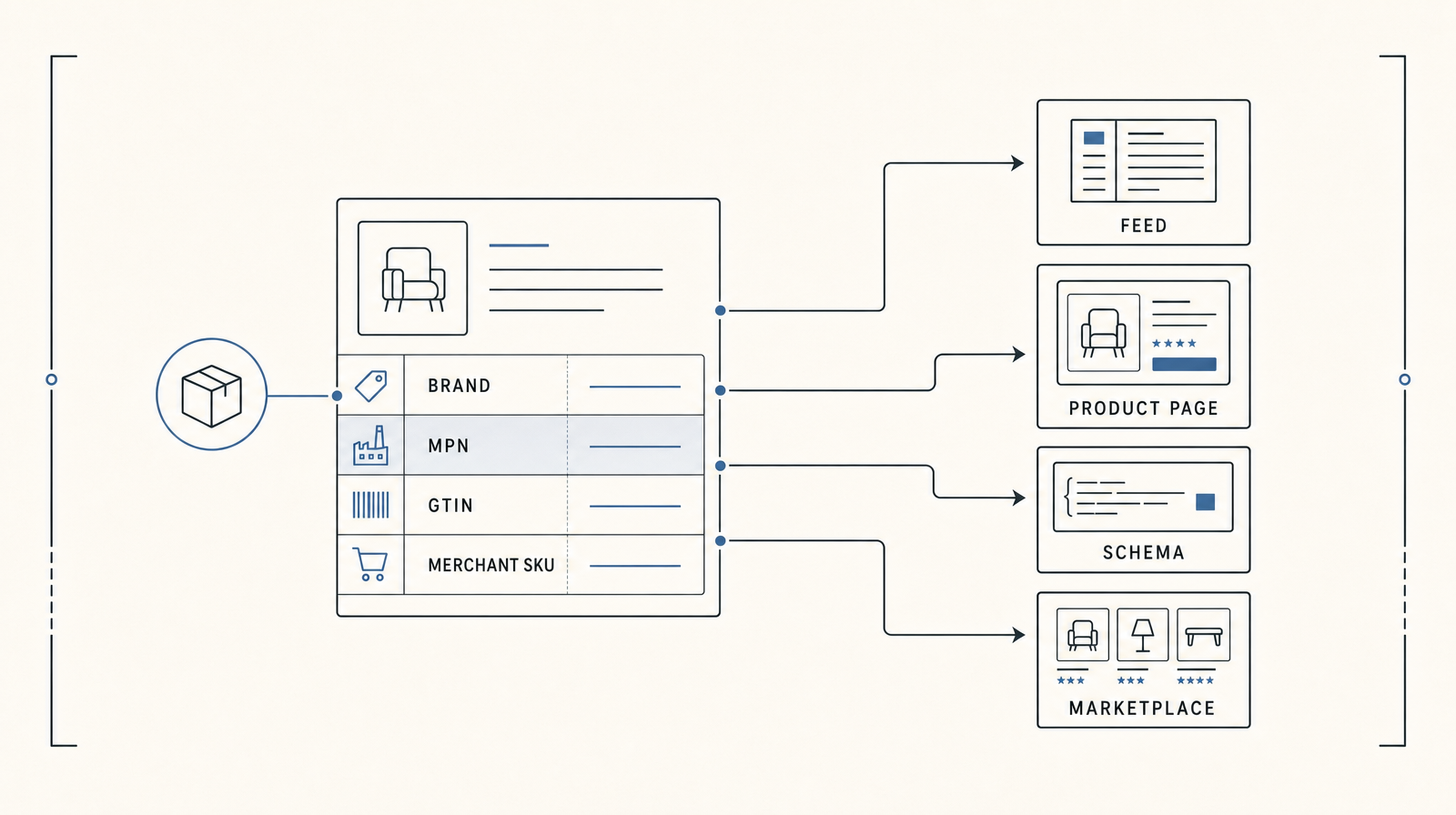
This separation is the foundation for product data syndication. Catalog helps teams structure product data, map fields to destination formats, publish live normalized product objects, and keep updates synchronized across AI shopping surfaces and other channels.
Add MPN to product structured data
Schema.org represents an MPN with Product.mpn, whose value is text. The same Product object can contain brand, merchant-specific sku, and a GTIN property such as gtin13. Schema.org’s Product definition distinguishes mpn as the manufacturer part number and sku as the merchant-specific identifier.
A JSON-LD record can look like this when the values are visible and approved on the product page:
{
  "@context": "https://schema.org",
  "@type": "Product",
  "name": "Google T-shirt, green, small",
  "brand": {
    "@type": "Brand",
    "name": "Google"
  },
  "sku": "STORE-GREEN-S",
  "mpn": "00638HAY",
  "gtin13": "9504000059422"
}
Structured data does not require an MPN for every product rich result, and adding one does not guarantee a rich result or a ranking. Add it when you have a verified value. Keep the MPN, SKU, GTIN, brand, title, variant, price, and availability consistent with the page a shopper sees and with the feed submitted to the destination. Google says structured markup must match the landing-page values and can support Merchant Center updates, while regular product-data updates remain necessary. See Google’s product structured-data documentation and its guidance on structured data for Merchant Center.
Our product schema glossary explains the larger markup model. The practical rule is simple: emit one approved identity model into every output, then test the rendered page and feed for drift.
Common MPN errors
Most MPN failures come from treating a field as a label instead of an identity relationship.
Putting a store SKU in the MPN field
A seller’s SKU may be useful for your warehouse and order system. It does not identify the manufacturer’s product. Keep it in the item ID or SKU field and leave MPN blank when you cannot verify the manufacturer value.
Guessing or copying a similar product
A near-match can differ in voltage, connector, material, capacity, or revision. Do not copy a number from a neighboring product, an old listing, or a search result. Resolve the conflict against the manufacturer record.
Assigning the OEM value to a compatible product
A third-party replacement can fit an OEM product without being made by the OEM. Use the third-party manufacturer’s brand and MPN. Describe compatibility separately.
Reusing one value across a variant, bundle, or pack
A color, size, capacity, bundle, or multipack can represent a different orderable item. Apply the manufacturer’s scope. Keep parent and child relationships explicit.
Mutating the code during normalization
Leading zeros, punctuation, and suffixes can carry meaning. Keep MPNs as text and preserve the raw value. A comparison key may support search, yet it should never overwrite the source string.
Letting outputs disagree
A page can show one MPN, the feed can send another, and structured data can omit both. Use the same approved record to generate each output. Monitor feed diagnostics, page markup, and marketplace warnings after catalog or template changes.
MPN validation checklist
Run this checklist for each new or changed product record:
- Source: Is the value from the manufacturer, its catalog, packaging, manual, or a supplier record that cites one of those sources?
- Brand: Does the brand or manufacturer match the company that assigned the MPN?
- Product: Does the description and technical specification match the item you sell?
- Variant: Does the value apply to this exact color, size, capacity, voltage, finish, condition, pack, or bundle?
- Exactness: Did ingestion preserve the complete string, leading zeros, case, and punctuation?
- Role: Are MPN, SKU, GTIN, model number, serial number, and channel item ID stored in their own fields?
- Destination: Does each feed or marketplace accept the value and its current category-specific format?
- Page: Does the product page display the same approved identity, when you choose to display it?
- Structured data: If
Product.mpnis emitted, does it match the visible page and the feed? - Absence: If no MPN exists, is the field blank or marked according to the destination’s no-identifier rules rather than filled with a guess?
For a wider quality framework, use our guide to product data quality. Identifier QA works best as part of the same validation pipeline as price, availability, taxonomy, attributes, media, and variant relationships.
Frequently asked questions
Is an MPN the same as a model number?
Sometimes a manufacturer uses “model number” and MPN for the same string. A model name can also describe a broader family. Use the full manufacturer-assigned part number for the orderable product, and keep the model or family value in its own field when the source distinguishes them.
Where can I find a product’s MPN?
Check the manufacturer’s product page, catalog, datasheet, manual, packaging, or product label. Then confirm the brand and exact variant. A supplier or marketplace listing can help you locate the record, yet the manufacturer source should resolve uncertainty.
Does every product have an MPN?
No. Custom-made, handmade, vintage, and some private-label products may not have one. Google says not to submit an MPN when no associated value exists. Use the destination’s identifier-exists or no-identifier process instead of inventing a code.
Can a merchant create an MPN?
A merchant that is also the manufacturer may assign a value for its own product where the destination permits it. Google documents a narrow case for a manufacturer that is the only seller of a product without an assigned MPN. A retailer or distributor should not create an MPN for another company’s product.
Is an MPN required in structured data?
No. Product.mpn is a supported Schema.org property, yet it is not a universal requirement for product rich results. Add it when the value is verified, and keep it aligned with the visible product and feed data.
What should I enter for an MPN on Amazon or eBay?
Use the manufacturer’s part number when the category workflow asks for it. Do not substitute your store SKU. eBay publishes category-specific identifier guidance and allows “Does not apply” when the item has no identifier or you are unsure. Amazon requirements vary by category and listing flow, so follow the current field instructions for the destination rather than applying one platform-wide rule.
Keep the identity layer consistent
An MPN is small data with a large joining role. When the manufacturer value, brand, variant, SKU, GTIN, feed row, product page, and schema all agree, every downstream system has a clearer product to match and update.
Catalog gives ecommerce teams a product data layer for that work. We structure product records, preserve provenance, map fields to feeds and structured data, keep live normalized product data synchronized, and publish it to AI shopping surfaces. Explore Catalog’s product data layer.
