
A line sheet gives buyers the details to place an order
Build a line sheet buyers can act on. Learn how to map products and variants to prices, dimensions, availability, images, pack rules, and order terms.

Wholesale buyers move through assortments quickly. If you have to guess at a variant, price basis, or ship date, you need a follow-up before placing an order. A useful line sheet puts the product and the buying terms in the same view. At Catalog, we treat it as a buyer-facing view over a separate source of truth for product data.
What is a line sheet?
A line sheet is a concise sales document a brand or distributor sends to wholesale buyers. It presents products available to order, along with the details a retailer needs to compare and select them: names, images, stock keeping units (SKUs), variants, wholesale prices, pack rules, availability, and delivery terms. It can be a dated PDF, a digital page, or part of a wholesale ordering portal.
A lookbook emphasizes collection story and styled photography. A line sheet organizes orderable products and commercial details so a buyer can compare them. A product catalog may hold a company's full range and all of its attributes, while a line sheet is a focused view for one season, category, buyer, or territory. An order form or purchase order records the products and quantities selected. Teams can combine these materials, as long as the buyer can tell what is for sale, at what price, and in what order unit.
Those fields also determine how an assortment can move into digital channels. When Faire builds a brand's shop page, its onboarding requirements ask for product names, individual or prepack options, variations, case size, regional wholesale and retail prices, descriptions, and active status in the line sheet. Faire's line sheet requirements show how the document can feed a wider digital assortment.
At Catalog, we structure and publish live, normalized product data to AI shopping surfaces, keep it synced, and measure outcomes. That work complements a line sheet: the sheet packages selected items and wholesale terms for human buyers, while a product data layer makes shared product facts machine-readable. Account-specific prices, minimums, and order capture still belong in the wholesale workflow. Our ecommerce product data guide explains how those product records fit together.
Who uses a line sheet?
| Team | How it uses the sheet | Details that matter |
|---|---|---|
| Brand or sales representative | Presents a collection to retailers, showrooms, or buying teams and collects product selections. | Style names, variant options, wholesale price, minimums, delivery window, and contact. |
| Distributor | Combines suppliers into an assortment and presents its own sellable offer to retail accounts. | Manufacturer identity, distributor SKU, case pack, regional price, stock, and fulfillment terms. |
| Retail buyer | Compares products across brands and decides which items, sizes, and quantities fit the store. | Clear variants, retail price, wholesale cost, order unit, minimum, and delivery timing. |
| Ecommerce and operations teams | Keep the product detail page, business-to-business (B2B) catalog, and buyer materials aligned. | Stable identifiers, variant data, product images, dimensions, current price, and availability. |
For a brand, the line sheet turns a collection into a commercial offer. For a distributor, it may combine products from several suppliers, with the distributor's own codes, prices, stock position, and delivery rules. The retailer uses it to compare assortment, budget, and timing before sending an order.
Start with the item a buyer can order
Many line-sheet errors start with a single row that represents too much. A style can have several colors and sizes. Each combination may have its own SKU, image, price, and stock state. A case or prepack can be a separate order unit with a different quantity and sometimes a different identifier.
Keep three levels clear in the product data behind the sheet:
| Level | Example | What belongs there |
|---|---|---|
| Product family or style | Arc bowl, 6 in | Shared product name, description, brand, material, and parent style identifier. |
| Variant | Arc bowl, 6 in, ivory | Color, size, finish, or other option, plus the SKU and offer details for that sellable item. |
| Orderable pack | Case of four Arc bowls | Pack count or size ratio, order minimum, price basis, and case dimensions when relevant. |
Use a parent style to group similar products and a distinct orderable SKU for each sellable variant. If a retailer orders a case, show the case quantity and whether the price applies per item or per case. For a distributor, keep the supplier's identifier mapped to the distributor's own order code, then make the buyer-facing code easy to spot.
This structure also matters after the sheet leaves the sales team. Google groups related options under a product family while keeping variant identifiers and offer details distinct. GS1 defines a GTIN as an identifier for a trade item that can be priced, ordered, or invoiced. Google's variant guidance and GS1's GTIN definition support the same practical rule: the selected item needs an identity that downstream systems can resolve.
Fields a useful line sheet should carry
The right field set depends on what the buyer needs to choose, stock, and reorder the product. These fields form a dependable starting point:
| Field | What the buyer should see |
|---|---|
| Brand and document details | Brand or distributor, collection or season, territory, currency, document date or revision, and sales contact. A date helps buyers distinguish the current offer from an older file. |
| Product name and description | A short, recognizable name and one useful detail. Use the same naming pattern across related items so the buyer can scan the assortment. |
| SKU and product identifiers | The code the buyer should put on the order, at the level the buyer can order. Include a Global Trade Item Number (GTIN) or Universal Product Code (UPC) when the account or channel needs it. Keep manufacturer and distributor codes mapped when they differ. |
| Variants | Available colors, sizes, materials, finishes, or other options. Make clear which options are active and show a separate SKU for each option a buyer can order independently. |
| Prices | Wholesale price and suggested retail price, labeled as manufacturer's suggested retail price (MSRP) or recommended retail price (RRP), in the same currency. State whether the amount is per item, pack, or case, and label any account-specific tier or quantity break. Show whether freight, tax, or other charges are separate. |
| Dimensions and specifications | Product dimensions with units, plus package or case dimensions and weight when they affect shelving, storage, or shipping. Add category-specific facts such as fabric, capacity, ingredients, compatibility, or included components. |
| Availability and timing | Current stock status or quantity, preorder or backorder status, expected ship date, lead time, and order deadline when relevant. Distinguish available-now inventory from a planned future delivery. |
| Images | A clear product image that matches the listed variant. Use a consistent crop and view across the assortment; add a detail image when a feature or finish affects the buying decision. |
| Ordering details | Opening-order minimum, product-level minimum, case pack or prepack ratio, order increments, payment and shipping terms, returns policy, delivery window, and how to submit the order. |
Dimensions deserve precise labels. Item: 6 × 2.5 in describes the bowl. Case: 14 × 14 × 9 in describes the carton. A buyer planning a shelf needs the item size; a buyer planning receiving or freight may need the case size and weight. Fashion may need a size run and fabric content instead. Include decision-making attributes for the category rather than a generic specification block.
Price labels should make the order math unambiguous. US$18 each wholesale means something different from US$72 per case of four. When buyers compare a wholesale price with a suggested retail price, put both figures near the product and name the price basis. If a buyer receives different pricing by region or account, the sheet should reflect the version that buyer is allowed to see.
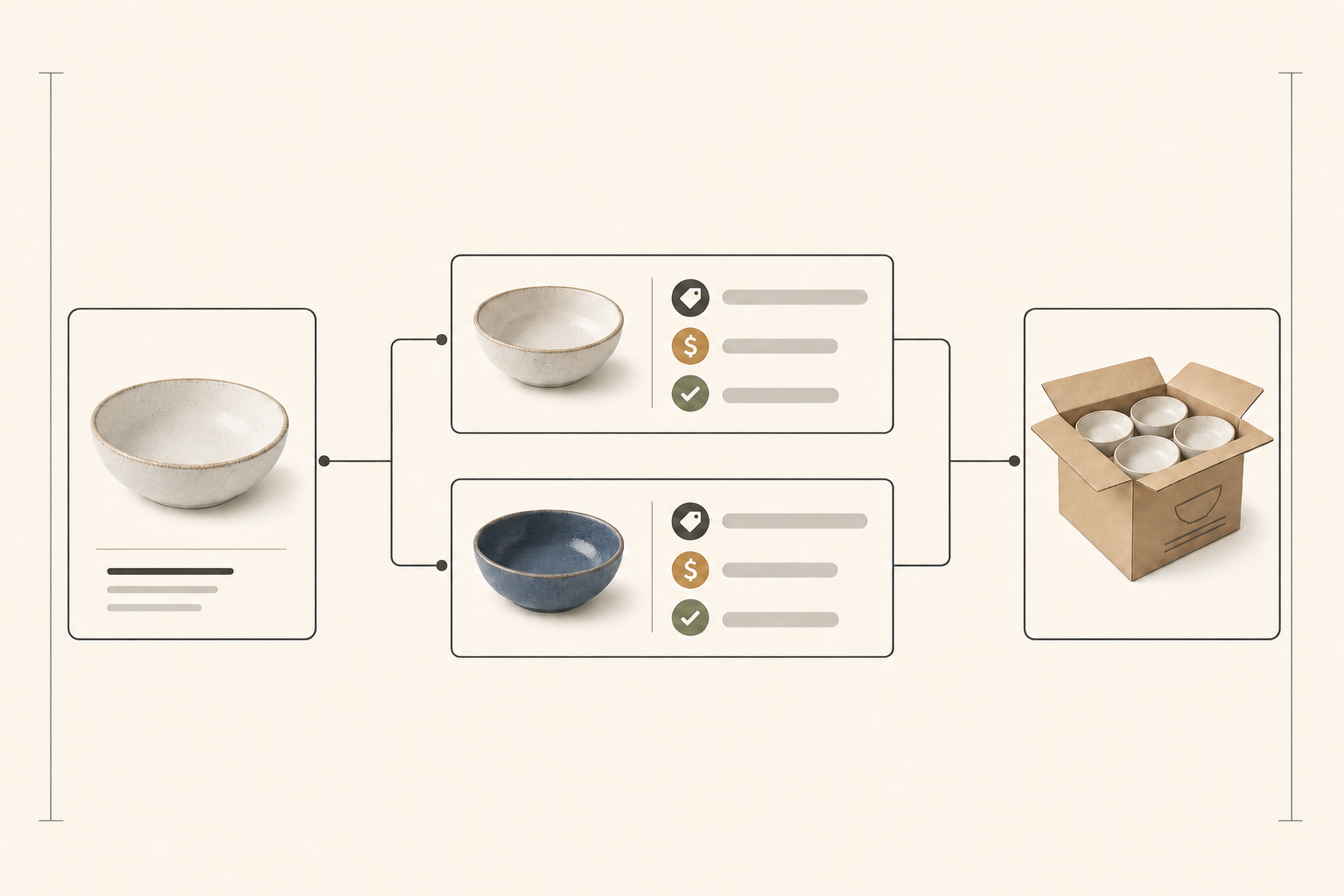
Example: one style, two orderable variants
The example below uses invented product details. It shows how two variants can share a style while keeping their own order codes and availability.
| Style and variant | Order SKU | Price and order rule | Dimensions | Availability |
|---|---|---|---|---|
| Arc bowl, 6 in, ivory | AB-06-IV | US$18 each wholesale; US$36 MSRP each; case of 4, minimum 1 case (US$72) | Item: 6 × 2.5 in; case: 14 × 14 × 9 in | 6 cases (24 units) available on issue date |
| Arc bowl, 6 in, cobalt | AB-06-CO | US$18 each wholesale; US$36 MSRP each; case of 4, minimum 1 case (US$72) | Item: 6 × 2.5 in; case: 14 × 14 × 9 in | Preorder; estimated ship date 8 weeks after issue date |
The buyer can identify the color, select the exact SKU, understand the case minimum, and see which offer is in stock. The finished sheet would pair each row with its matching product image and a clear order link or order form.
Choose a format that matches the order
A PDF works when the assortment is small, prices are stable for the buying window, or a sales rep needs a printable document for a meeting. Put the revision date and territory on every version. A sent PDF cannot reflect a later price or stock change, so its date is part of the offer context.
A digital page or B2B portal fits a large assortment, frequent changes, account-specific pricing, and direct ordering. A B2B catalog can show different products and prices to different company buyers and apply quantity rules or volume pricing. Shopify's B2B catalogs are one example of this online model. Use buyer-specific access for wholesale-only prices, and keep the order confirmation or purchase order as the record of final quantities and terms.
A team can use both formats. A rep can send a PDF for a focused collection review, then direct an interested buyer to an online catalog for current availability and ordering. The PDF supports the conversation; the order system records what the buyer actually selected.
Keep the sheet aligned with its source data
A line sheet should draw on approved product facts rather than become a second catalog maintained by hand. Product or merchandising teams can own names, descriptions, variant attributes, and dimensions. The image library owns approved product photography. Inventory or enterprise resource planning (ERP) data owns available quantity and fulfillment status. Wholesale systems own account price, order minimum, and payment terms.
The fields should still agree wherever the buyer sees the offer. Google Merchant Center, for example, expects product price and availability to match the corresponding offer on a merchant's landing page. Google's product-data specification reflects the same ecommerce requirement: a product's name, image, price, stock state, and selected variant need to describe the same item.
Our product data quality guide covers accuracy, completeness, and freshness across those records.
For a static file, generate a dated version from the approved records, then retire copies when the offer changes. For a live link, set ownership and refresh rules for the fields that change fastest, especially inventory, delivery windows, and account prices. In either format, a buyer's order should resolve to the same item and commercial terms shown in the sheet.
A line sheet is ready for a buyer when:
- Every selectable option has a clear name and order SKU.
- Each price has a currency and unit basis.
- Every pack, minimum, and availability status or date is explicit.
- The document carries its revision, territory, contact, and next step for ordering.
If product facts also need to stay current for AI shopping surfaces, talk with our team about a live product data layer that works alongside your existing wholesale process.
