
Ecommerce product recommendations: a practical build guide
Learn how ecommerce product recommendations work, which data and rules they need, how to build or buy a system, and how to measure relevance and lift.
An ecommerce recommendation is a decision about what deserves a shopper’s attention next. The visible carousel is only the last step. Behind it, a system chooses candidates, checks whether they can be shown, ranks them for the current context, and records what happened.
The quality of that decision depends on the placement, the product relationships, the shopper signals, and the freshness of the offer. Designing, building, evaluating, or buying the system starts with those operational details, rather than a black-box model.
What ecommerce product recommendations are
Ecommerce product recommendations are product suggestions selected for a shopper, a product context, or a shopping moment. Examples include similar products on a product detail page, compatible accessories in a cart, and recently viewed items on a home page.
A recommendation system usually does four jobs:
- Generate candidates from product similarity, shopper behavior, explicit rules, or a combination.
- Remove ineligible items such as unavailable products, incompatible variants, and products the shopper already owns when the placement calls for something new.
- Rank and assemble a set for the placement’s goal, with controls for price, diversity, category, or business priorities.
- Deliver and log the result with the exact product or variant shown, its position, and the recommendation strategy that produced it.
The distinction from adjacent systems matters:
| System | Primary question | Typical output |
|---|---|---|
| Recommendations | What should this shopper consider next in this context? | A ranked set of products related to a product, intent, or behavior |
| Search | Which products answer the shopper’s explicit query? | Results ranked against words, filters, and query intent |
| Merchandising | How should the business shape an assortment or ranking? | Boosts, pins, exclusions, campaigns, collections, or sort rules |
| Broad personalization | Which parts of the experience should adapt to this shopper or context? | Personalized content, ranking, offers, messages, navigation, or recommendations |
Recommendations can use personalization, merchandising rules, or search context. They remain a discovery layer with a specific next decision. Google’s recommendation overview describes recommendations as a way to surface items people might not have thought to search for. Search and recommendations should work together, rather than compete for the same job. For the broader storefront context, see our guide to site merchandising and the narrower rules in search merchandising.
Match the recommendation to the placement
A product relationship has meaning only in context. A second sofa may help someone compare styles on a product page, then distract them in the cart when the next decision is delivery. Define the shopper’s job before choosing a model.
| Placement | Shopper’s job | Recommendation intent | Useful fallback |
|---|---|---|---|
| Product detail page | Compare or complete the item being viewed | Similar or substitute products; compatible and complementary products | Attribute-matched products in the same category |
| Cart or add-to-cart page | Finish the purchase | Frequently bought together, accessories, consumables, or a bundle | Rule-based complements with verified compatibility |
| Home page or landing page | Start or resume discovery | Recommended for you, trending products, new arrivals, or category entry points | Category bestsellers with current availability |
| Category page | Narrow a broad assortment | Personalized ordering or alternatives within the category | Relevance-ranked in-stock products |
| Recently viewed module | Resume consideration | Exact products viewed in the current session or account | Popular products in the same category |
| Guided selling or quiz | Translate a stated goal into products | Goal-, preference-, or constraint-based recommendations | Rules that map answers to eligible products |
| Post-purchase or account area | Replenish or extend ownership | Reorder, consumables, compatible upgrades, or care products | Time-based replenishment rules |
| Email or notification | Continue a prior shopping task | Recently viewed, back-in-stock, replenishment, or personalized discovery | Consent-aware bestseller or category list |
Shopify’s recommendation documentation separates related products, which can be substitutes, from complementary products, which help complete a purchase. Treat those as separate intents in your data and reporting. A single “recommended for you” endpoint makes it harder to explain why an item appeared or whether it helped.
Choose a recommendation method
You do not need a complex model for every placement. Start with the method that matches your catalog quality, event volume, and control requirements.
| Method | How it works | Strength | Trade-off |
|---|---|---|---|
| Rule-based | A merchant or developer specifies conditions such as category, compatibility, price band, season, or campaign | Transparent, deterministic, and useful before behavioral data accumulates | Rules require maintenance and can become stale or overfit to a narrow use case |
| Content-based | Matches products using attributes, taxonomy, text, images, or learned product representations | Works for new products when their records are complete; easy to constrain to a category or use case | It can only see the properties represented in the catalog and may repeat similar items |
| Collaborative | Learns from co-view, co-click, cart, purchase, or other interaction patterns across shoppers | Finds relationships that a team may not have encoded, such as products often bought together | Needs joined event history; it can over-serve popular products and has a cold start for new items |
| Hybrid | Combines catalog similarity, behavioral signals, context, and rules | Balances cold-start coverage with behavioral relevance and operational control | Requires clear feature ownership, monitoring, and a way to resolve conflicting signals |
A practical system often uses several candidate sources. For a camera product page, content-based retrieval can find lenses with the right mount, collaborative signals can find a case commonly purchased with that camera, and a rule can remove accessories for a different mount. The final ranker should receive relationship type, price, availability, and confidence as explicit inputs.
Treat embeddings or generative models as techniques inside this pipeline. They do not remove the need for stable product identity, eligibility rules, or measurement.
Build the product and event data contract first
A recommendation engine cannot rank what it cannot identify, describe, or serve. Start with a canonical product record, then connect shopper events to the same IDs.
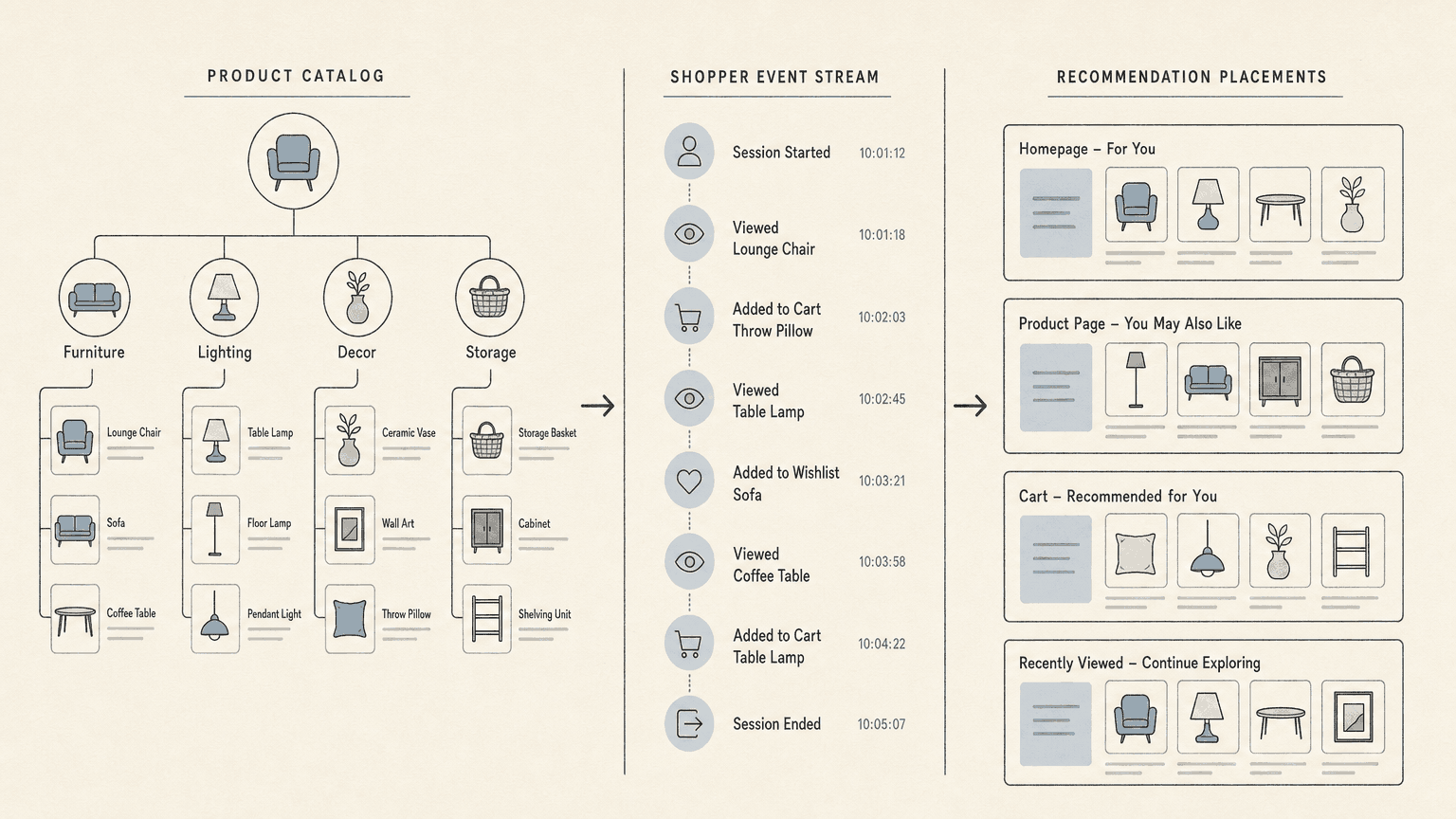
Product catalog fields
| Data group | Fields to include | Why it matters |
|---|---|---|
| Identity | Stable product ID, variant ID, parent ID, SKU, GTIN or MPN when available, canonical URL | Prevents duplicate items and joins recommendations to the product that can be purchased |
| Description and taxonomy | Title, product type, category path, brand, normalized attributes, use cases | Supports similarity, category constraints, filtering, and explanations |
| Variants | Size, color, pack, configuration, item-group relationship, variant URL and image | Keeps a product family together while preserving the sellable choice |
| Relationships | Substitute, complementary, compatible, bundle, accessory, replenishment, or successor relationship; source and confidence | Gives models and rules a clear meaning for each product pair |
| Offer state | Price, currency, sale dates, availability, inventory, region, fulfillment, channel eligibility | Stops the system from presenting an offer the shopper cannot buy |
| Media and trust | Primary image, variant images, ratings, reviews, policies, and compliance fields where relevant | Helps the shopper assess the item and lets the system distinguish products |
| Provenance | Source system, owner, last-updated timestamp, confidence, and validation status | Makes stale or inferred values visible before they affect ranking |
The right attributes vary by category. Apparel may need fit, fabric, size, care, and color family. Electronics may need ports, compatibility, power, and included components. Beauty may need ingredients, skin type, shade, and warnings. Catalog’s guide to product attributes explains why reusable, normalized fields support search, filters, feeds, and recommendations together.
Shopper events
Capture the events that explain both interest and opportunity:
- product and variant impressions, including the placement, position, and full set shown;
- product-detail views, search queries, category views, filter use, and wishlist actions;
- recommendation clicks, add-to-cart, removal, purchase, return, and replenishment events;
- session or visitor ID, timestamp, device or region context, and consent state where applicable;
- cart contents, order ID, revenue, currency, and the product or variant IDs involved;
- recommendation request ID, placement, model or rule version, candidate source, and attribution token.
Log impressions as carefully as clicks. Without the items actually shown, a click-through rate can hide whether the system had a fair chance to earn attention. Keep product IDs consistent between catalog and events. Google Cloud’s event guidance specifically calls out consistent visitor IDs, joined product IDs, revenue and currency on purchase events, and multi-item baskets for co-purchase patterns.
Keep behavioral data bounded by your privacy, consent, retention, and access requirements. An anonymous session can still supply useful context. It does not require a permanent identity profile.
Apply eligibility and business rules before ranking
A high score does not make an item eligible. Put hard constraints before model ranking so the system cannot trade safety or accuracy for engagement.
Use a policy layer that can:
- Check commercial state: remove inactive, out-of-stock, region-ineligible, restricted, or price-invalid offers. Use the right sellable variant alongside its parent product.
- Check relationships: enforce compatibility, bundle contents, category scope, age restrictions, and pack or size constraints.
- Suppress duplicates: remove the context product, duplicate variants, products already in the cart, and purchased items when the placement seeks discovery. Keep purchased items when the intent is replenishment.
- Apply business controls: enforce campaign dates, price bands, inventory thresholds, margin or brand policies, and channel eligibility. Give every rule an owner and expiry path.
- Shape the set: cap repeated brands or categories, remove near-duplicates, and set a minimum relevance threshold so diversity does not become noise.
- Choose a fallback: return a useful category, popular, recently viewed, or rule-based set when the primary method has too few eligible items.
AWS documents filtering recommendations to exclude items such as products a shopper has already purchased or to apply segment criteria. Filtering is a general design requirement, independent of the vendor you choose.
Handle cold starts and exploration deliberately
Every recommendation system starts with incomplete evidence. There are two cold starts: a shopper with little history and a product with little interaction data.
A new or anonymous shopper
Use the current product, query, category, session events, declared preferences, region, and available inventory. A category bestseller list or a broad popularity fallback is acceptable when it is labeled honestly in the experience. As the session develops, update the context from views, clicks, and cart actions. When consent is missing, keep the experience useful with session and page context instead of silently building a long-lived profile.
A new product
Use its structured attributes, relationships, launch date, availability, and category position. Content-based retrieval and explicit rules can place it before collaborative signals have enough history. Exploration can reserve a controlled share of impressions for items with limited interaction data, then learn from the resulting impressions and actions. Amazon Personalize’s exploration guidance describes this as testing less-established items to learn how shoppers respond.
Exploration needs guardrails: eligibility still applies, exposure should be measurable, and a new item should not displace a clearly better match in a high-intent placement. Track coverage and long-tail exposure alongside clicks and orders so popularity does not become a closed loop.
A practical implementation workflow
Use a narrow first release. One placement with one job gives you a clean baseline and a smaller debugging surface.
1. Define the decision
Write down the placement, context, eligible assortment, primary outcome, guardrail metrics, and fallback. “Increase revenue” is too broad. “Suggest compatible, in-stock camera accessories on the add-to-cart page” is testable.
2. Normalize the catalog
Create stable IDs, parent-child variant links, category paths, typed attributes, relationship labels, current offers, and provenance. Validate the records before you train or query a model. Fix missing product facts before adding model complexity.
3. Specify and instrument events
Create one event schema for the storefront, app, email, and recommendation service. Send impressions before clicks, preserve the list position, and attach a request or attribution ID to downstream actions. Test joins with real product and variant IDs.
4. Generate candidates
Use several sources where they make sense: related attributes, compatible relationships, co-purchase or co-view patterns, recent session items, a curated set, and a category-aware popular fallback. Keep the source and relationship for each candidate.
5. Filter and rank
Apply hard eligibility rules, then score the remaining candidates for the placement’s objective. Blend relevance with freshness, availability, price, diversity, and controlled business priorities. Store the model or rule version with every response.
6. Serve a stable response
Return a request ID, placement, context IDs, product and variant IDs, relationship or reason, position, and expiry or freshness metadata. Keep the rendering layer separate from candidate logic so a web module, app, email, or AI shopping surface can use the same contract.
A minimal response shape might look like this:
{
  "request_id": "rec-8f31",
  "placement": "pdp_complementary",
  "context_product_id": "camera-x200",
  "items": [
    {
      "product_id": "battery-bp1",
      "variant_id": "battery-bp1-us",
      "relationship": "compatible_accessory",
      "position": 1
    }
  ],
  "strategy_version": "hybrid-2026-09"
}
7. Test against a baseline
Start with the current hand-picked list, category popular list, or no-module experience. Randomize the treatment and control groups when traffic allows. Review results by placement, device, category, new versus returning shopper, and product freshness.
8. Operate the loop
Monitor stale offers, unjoined events, empty responses, latency, rule conflicts, and sudden concentration in a few products. Feed data-quality fixes back to the catalog owner. A model retrain cannot repair a broken variant relationship or an unavailable offer.
Measure relevance and incremental impact
Use offline metrics to diagnose the model and online metrics to decide whether the experience earns its place.
Offline and system metrics
| Metric | What it answers |
|---|---|
| Coverage | How much of the eligible catalog the system can recommend |
| Precision@k and recall@k | Whether relevant items appear in the top k and how many relevant items are retrieved |
| MRR and NDCG | Whether relevant items are near the top and whether the full order is useful |
| Diversity and novelty | Whether a list avoids near-duplicates and gives long-tail items a fair chance |
| Eligibility and variant error rate | Whether responses contain unavailable, duplicate, or wrong-variant items |
| Latency, empty-response, and fallback rate | Whether the service works reliably at the point of decision |
Amazon’s evaluation documentation defines coverage, mean reciprocal rank, normalized discounted cumulative gain, and precision for recommender evaluation. Use a time-based holdout for offline tests when possible so future events do not leak into the past.
Online and business metrics
- Recommendation CTR: recommendation clicks divided by recommendation impressions, segmented by placement and intent.
- Downstream action rate: add-to-cart, purchase, or other chosen action after an impression or click. Keep the denominator explicit.
- Attach rate: qualifying orders that include a recommended complement or accessory.
- Conversion rate, revenue per session, order value, and margin: useful business outcomes, compared with a control rather than reported as attributed totals alone.
- Returns, cancellations, and support contacts: guardrails against recommendations that look relevant but create poor fit or compatibility.
- Coverage, freshness, out-of-stock exposure, and fallback rate: operational measures that explain why a business metric changed.
A recommendation click is attribution. It is not proof of incremental impact. Run a randomized holdout or a sound experiment for each material strategy change. AWS recommends A/B testing recommendation strategies to compare groups and measure impact.
Buy, build, or combine
The right choice depends on your catalog, traffic, team, and need for control.
| Approach | Fits when | Watch for |
|---|---|---|
| Buy a service | You need a supported integration, production operations, and a shorter path to several placements | Opaque candidate logic, limited data ownership, weak variant controls, or pricing tied to requests or attributed revenue |
| Build in-house | You have a strong data and ML platform, distinct relationships or constraints, and the team to operate experiments and serving | Long time to production, missing instrumentation, and a model that works in notebooks but lacks storefront safeguards |
| Combine systems | You want managed retrieval or modeling with your own catalog, eligibility, ranking, or measurement layer | Ambiguous ownership between the model, catalog, and business rules |
Vendor-selection checklist
Ask each vendor to demonstrate the workflow on a representative sample of your catalog, including variants and unavailable offers. Evaluate:
- Intent and placement support: Can you configure related, complementary, replenishment, recently viewed, and goal-based experiences separately?
- Catalog ingestion: How are IDs, variants, relationships, category attributes, price, inventory, and freshness mapped? Can you export the normalized records?
- Event quality: Can the system ingest impressions, clicks, carts, orders, returns, anonymous sessions, and context in real time? Are raw events and recommendation responses available to you?
- Eligibility and controls: Can you enforce compatibility, region, stock, suppression, price, campaign, and diversity rules before ranking?
- Cold start and exploration: What does a first-time shopper see? How are new products introduced? Can you set exposure limits and inspect exploration?
- Serving contract: What are the API, SDK, batch, email, and app options? What latency, caching, rate limits, and rollback controls apply?
- Measurement: Does the system log the exact list shown? Can you compare against a holdout and export event-level data? Which metrics are diagnostic and which are business outcomes?
- Security and ownership: Who owns catalog and event data? How are consent, retention, access, deletion, and regional processing handled?
- Commercial fit: Is pricing based on traffic, items, requests, orders, or attributed revenue? What happens when you stop using the service?
Reject a demo that shows only a polished carousel. Ask for an explanation of candidate generation, an ineligible-item test, the selected variant, the fallback response, and a holdout plan.
Product data is the foundation
Recommendations can only be as reliable as the product objects underneath them. Missing material, inconsistent color values, disconnected variants, stale stock, or an untyped “accessory” relationship each creates a different failure mode. Better copy alone does not fix those joins.
We built Catalog around this product-data problem for AI commerce. Catalog structures product data into live, normalized, machine-readable records, keeps attributes, variant relationships, price, and availability current, and distributes those records to AI shopping surfaces. That work complements an onsite recommendation service. It does not replace your event pipeline, identity and consent controls, ranking model, or experiment design.
The same product object can support onsite search, filters, merchandising, recommendations, feeds, and AI shopping. Our product-data enrichment guide explains the workflow from messy source records to validated objects, while our product feed guide covers the operational work of keeping product facts current across destinations. If AI shopping is part of your distribution plan, start by checking whether the systems consuming your catalog can distinguish the right product, variant, relationship, and offer.
Frequently asked questions
Are product recommendations the same as ecommerce personalization?
No. Personalization can change search order, content, offers, messages, and navigation for a shopper or context. A product recommendation is one decision within that experience: which products to surface next, for a defined placement and intent. A recommendation can also be non-personalized, such as a category bestseller or a rule-based compatible accessory.
Do recommendations replace ecommerce search?
No. Search responds to an explicit query and its constraints. Recommendations help shoppers discover items they did not specify, continue a product decision, or complete a purchase. Use search for exact products, attributes, and filters. Use recommendations to extend that intent with relevant alternatives and complements.
What data does a recommendation system need?
At minimum, it needs stable product and variant identity, usable attributes and taxonomy, current price and availability, and a clear placement context. Behavioral systems also need joined impressions and actions such as views, clicks, carts, and purchases. Rules and content-based methods can start with catalog data while event history builds.
How should a system recommend new products?
Use attributes, relationships, category context, availability, and launch rules to create initial candidates. Add controlled exploration so selected shoppers can discover low-history products. Keep hard eligibility checks and measure exposure, coverage, and downstream actions separately from established products.
How do you know whether recommendations work?
Track relevance and system health with coverage, ranking metrics, eligibility errors, latency, and fallback rate. Track shopper and business outcomes with clicks, add-to-cart, conversion, attach rate, revenue per session, margin, and returns. Compare a treatment with a randomized baseline to estimate incremental impact.
Can Catalog provide the recommendation engine?
Catalog provides the product-data layer for AI commerce. It makes product records structured, current, and available to AI shopping surfaces. You still need a recommendation strategy and service for shopper-event modeling, placement ranking, eligibility decisions, and experimentation.
If you want to see how AI shopping surfaces currently read your catalog, run a Catalog product-data audit.
