
ASIN number: what it is and how to use it
Learn what an ASIN number is, where to find it, how Amazon assigns one, and how to map ASINs to GTINs, SKUs, and product variants for Amazon listings.
If your team sells on Amazon, one code determines whether you join the right detail page or create a duplicate. That code is the ASIN. It belongs to Amazon’s catalog, while your GTIN, SKU, and MPN identify the product elsewhere or inside your own operations.
Find the value in the URL, product details, or Seller Central. Then use it to decide whether to match an existing listing or submit a new one, model parent and child variations, and connect Amazon identity to normalized product data. Catalog helps teams structure that record. Amazon assigns the ASIN.
What is an ASIN number?
An ASIN, short for Amazon Standard Identification Number, is a unique 10-character alphanumeric identifier that Amazon assigns to a product in its store. It identifies the product record and its detail page inside Amazon’s catalog. A non-book example looks like B0D1XD1ZV3.
Amazon’s current ASIN guide describes the code as 10 characters, so “10-character” is the accurate description. “10-digit ASIN” is an older phrase that misses the letters in most product codes.
An ASIN has a narrow job:
- Owner: Amazon assigns and controls it.
- Scope: It identifies a product in the Amazon catalog, rather than across every retailer.
- Length: It contains 10 letters and numbers.
- Listing role: It anchors a product detail page where one or more sellers can place offers.
- Seller role: You use it to match inventory, manage listings, run Amazon Ads, and connect marketplace data to the right product.
An ASIN identifies the product page. A seller’s offer on that page carries changing facts such as price, quantity, condition, and fulfillment method. Several sellers can offer the same product through one ASIN, and each seller can use a different SKU for that offer.
Books have a special case. Amazon uses the book’s ISBN as its product identifier, and an Amazon book ASIN may match an ISBN-10 value. The current ISBN standard is 13 digits, and separate editions and formats receive separate ISBNs. Do not assume that an ISBN-13 can be copied into a generic 10-character ASIN field.
Where to find an ASIN
You can usually find an ASIN in three places.
- Product URL. In an Amazon product URL, look for the value after
/dp/. For example, inamazon.com/dp/B0D1XD1ZV3,B0D1XD1ZV3is the ASIN. Some Amazon URLs use a longer path or add tracking parameters, so use the/dp/value rather than the title slug. - Product information. On the detail page, scroll to Product information or Product details. The ASIN appears in the technical details table alongside fields such as manufacturer and model number.
- Seller tools. In Seller Central, the product’s listing and inventory views expose the ASIN. Amazon’s seller guide also points sellers to Manage All Inventory for lookup.
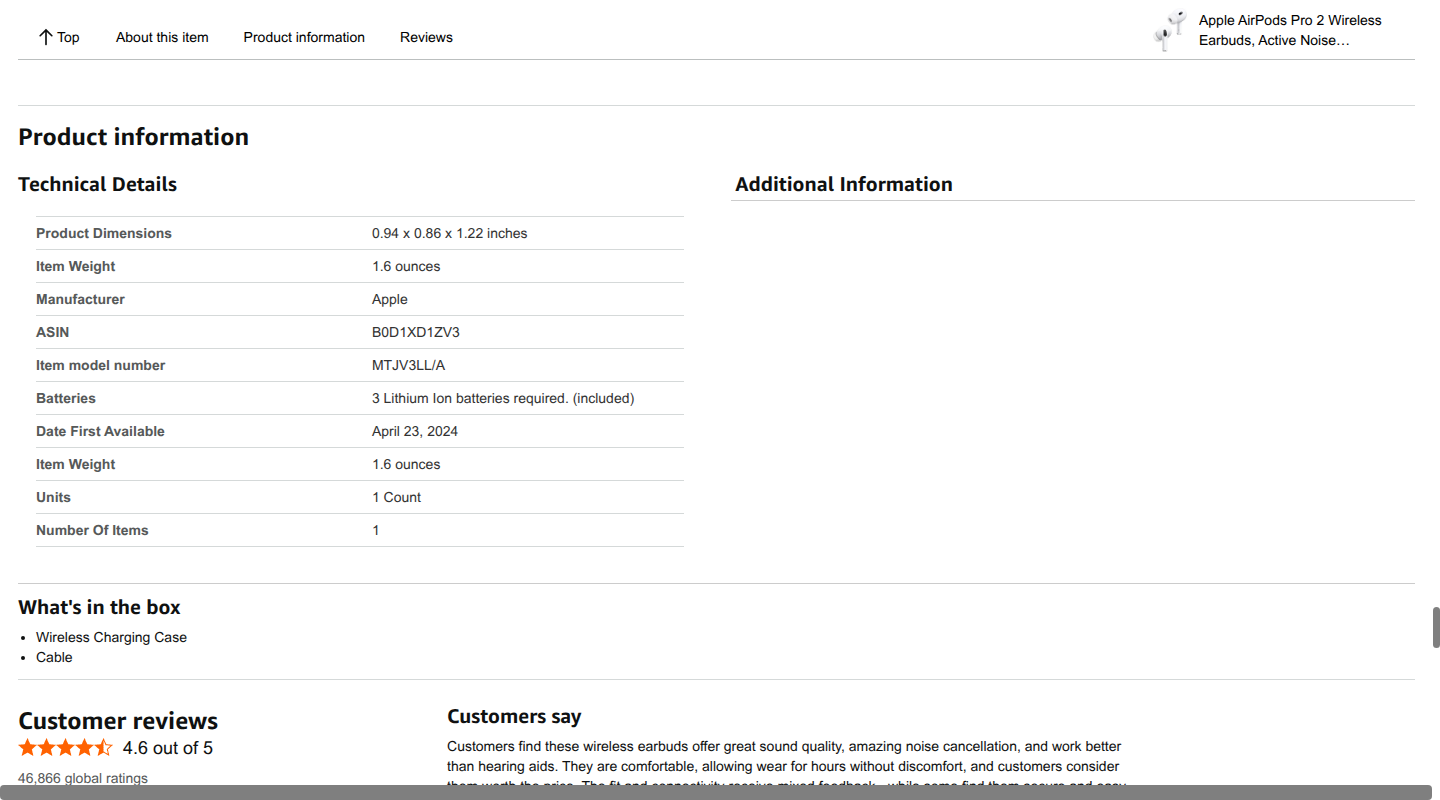
For a product with color, size, pack, or other variations, select the exact option before recording the value. A variation page can group several child products, and each buyable child has its own ASIN. Store the child ASIN for the item you stock and sell, along with the parent relationship.
The quickest programmatic lookup is usually the detail-page URL, but the URL alone is not a product-match decision. Confirm the brand, model, pack count, and variant attributes before you connect an ASIN to your catalog.
ASIN vs. GTIN, UPC, EAN, SKU, MPN, and ISBN
Product teams often put several identifiers in the same spreadsheet column. They answer different identity questions, so keep them in separate fields.
| Identifier | Who assigns it | What it identifies | Where it works |
|---|---|---|---|
| ASIN | Amazon | A product record in Amazon’s catalog | Amazon’s store and seller tools |
| GTIN | GS1 | A globally unique trade item | Retailers, marketplaces, feeds, and supply-chain systems |
| UPC | GS1 | A common 12-digit GTIN format, GTIN-12 | Retail and product matching, especially in North America |
| EAN | GS1 | A common 13-digit GTIN format, GTIN-13 | Retail and product matching, especially outside North America |
| Seller SKU | The seller or merchant | Your inventory item or variant | Your store, ERP, warehouse, and seller account |
| MPN | The manufacturer | A manufacturer’s part or model | Manufacturer, distributor, support, and product data systems |
| ISBN | An ISBN agency for a publisher | A specific book title, edition, and format | Publishing, bookselling, libraries, and book listings |
A GTIN is the global product identifier. UPC and EAN are common GTIN formats, not replacements for an ASIN. GS1’s identifier explainer distinguishes the number from the barcode that carries it. Amazon may use a valid GTIN to find or create a catalog record, then assign an ASIN for that record. For a commerce-operations view of formats and storage, see Catalog’s GTIN guide.
A seller SKU is your operational key. You can choose a value such as TEE-CRW-BLK-M, and another seller can choose a different SKU for the same Amazon product. Catalog’s SKU guide explains why that internal code should remain separate from global and channel identifiers.
An MPN comes from the manufacturer. It can help you confirm that the model is correct, especially when product titles are similar. It does not give Amazon permission to create a duplicate listing, and it does not replace a GTIN or ASIN.
An ISBN is for books and publications. The International ISBN Agency says that each edition and format should have its own ISBN. Amazon may use that book identifier as the ASIN value, but the two systems still have different owners and scopes.
The practical model is simple: a product can have a GTIN, MPN or ISBN, seller SKU, and ASIN at the same time. Keep all of them. Map them to one canonical product or variant record instead of forcing one code to serve every channel.
Match an existing ASIN or create a new one
Amazon’s listing workflow has a clear first decision: find an exact product in the catalog before creating anything.
When the product already exists
Use an existing ASIN when the Amazon detail page represents the exact product you sell. In Seller Central, the usual path is Catalog > Add Products > Product IDs. Search with the product’s GTIN or another accepted product ID, then inspect the result.
Before matching, compare:
- brand and manufacturer;
- model or MPN;
- GTIN, UPC, EAN, or ISBN where applicable;
- product version, language, region, or voltage;
- size, color, flavor, material, or other variant attributes;
- unit count, pack size, and included components;
- product images and the exact condition you offer.
If the result is exact, choose the option to sell that product and add your offer details, such as price, quantity, condition, and fulfillment method. Amazon may require approval for a brand or category before you can add the offer.
Matching the exact child ASIN prevents a common operational failure: the inventory record says “black, medium, 2-pack,” while the offer points to a single-unit, blue, small product page. Search by title alone makes that mistake more likely.
When the product is new to Amazon
If no exact product exists, submit a new product detail page through Amazon’s listing workflow. Amazon’s new-ASIN workflow describes the sequence:
- Search the catalog with a product ID.
- Select Create a new listing when no matching product appears.
- Enter product identity, description, product details, offer, and safety or compliance information.
- Submit the page for review.
- Receive an ASIN after Amazon accepts the new product record.
You do not choose the ASIN. Amazon assigns it after the listing is accepted. Catalog does not assign ASINs, and GS1 does not issue them.
Product ID, brand, category, and approval requirements vary. Use the identifier that belongs to the product, and follow the listing rules for the category and marketplace. A product that lacks an accepted GTIN may have an exemption path, while another category may require a specific identifier or approval. Never invent a GTIN or borrow one from a similar product to force a match.
For a large catalog, Amazon also supports spreadsheet templates that match existing products or create new listings in bulk. The file should still contain one accurate row per sellable variant, with the right identifiers and attributes. Bulk upload changes the delivery method, not the identity rules.
Parent and child ASINs for variations
A variation family connects related versions of one product. It has three parts:
- Parent ASIN: a virtual, non-buyable connector for the family.
- Child ASIN: a buyable product or variant with its own ASIN.
- Variation theme: the category-supported attribute that explains the relationship, such as size or color.
For example, a T-shirt family may have a parent that groups black, white, and navy options. “Black, medium” is a child product with its own ASIN, GTIN where applicable, SKU, and inventory. The parent helps shoppers navigate the family. The child is the record that should carry the offer and stock.
Amazon’s variation guidance limits variation families to products that share the same type, brand, and style or function. The allowed themes depend on the category. A new model, a materially different product, or an improvised multipack should not be attached to an old family just to combine reviews or traffic. A pack count can be a valid variation in some categories, so use the theme Amazon provides for that category and keep the packaging level explicit.
Model the relationship in your own catalog as well:
| Record | Store | Do not substitute |
|---|---|---|
| Product family | Parent product ID and, when present, parent ASIN | A sellable SKU or child ASIN |
| Sellable variant | Child ASIN, SKU, GTIN, MPN or ISBN, and structured variant attributes | The parent ASIN alone |
| Seller offer | Seller ID, offer status, price, quantity, condition, and fulfillment | Product identity fields |
This separation lets you update a price or stock level without changing product identity. It also prevents a parent code from leaking into a feed that needs the exact child product.
Common ASIN mistakes
Creating a duplicate detail page
A product already in Amazon’s catalog should receive another offer on the existing ASIN. Creating a second detail page splits sales, inventory, reviews, and product facts. Search with a product ID first, then match only after the result represents the exact item.
Treating an ASIN as a universal product ID
An ASIN works inside Amazon’s catalog. It is not a substitute for the GTIN, MPN, ISBN, or your internal SKU when you publish to another retailer, a shopping feed, a warehouse, or your own storefront. Keep the cross-channel identifier beside the ASIN.
Matching a similar variant
A title can look right while the unit count, size, voltage, region, or included accessory is wrong. Store those attributes as structured fields and compare them before matching. The safest match is an exact product and exact child variant.
Using a parent ASIN for inventory
The parent is a connector. It does not represent a buyable unit. Use the child ASIN and variant SKU for inventory, offer, fulfillment, and reporting records.
Reusing or editing an identifier value
Store ASINs as text and preserve every character, including letters, leading zeros, and capitalization. Do not derive an ASIN by changing a SKU, MPN, or GTIN. Do not recycle a retired value for a different product.
Sending an unauthorized or invented product ID
A GTIN should come from the product’s valid GS1 record and your authorized product source. An MPN should match the manufacturer’s part. An ISBN should match the book edition and format. A plausible-looking identifier is still the wrong identifier if it describes a different item.
Letting each channel become its own source of truth
A marketplace export may contain an ASIN, while the ERP has a SKU and the supplier file has a GTIN. If each system edits product facts independently, variant relationships and availability drift. Map channel IDs to one canonical record and keep ownership clear for every field.
ASINs in normalized product data
An ASIN becomes useful outside Seller Central when it sits beside the facts that give it meaning. A normalized record can represent the same product across your storefront, Amazon, retail feeds, and AI shopping surfaces without pretending those channels use the same identifier.
A variant-level record might look like this:
product_id: prod_482019
parent_product_id: prod_482000
variant_id: var_482019
brand: Northstar Apparel
identifiers:
  amazon_us_asin: B0ABC12345
  gtin: "00815587001234"
  seller_sku: TEE-CRW-BLK-M
  mpn: NS-TEE-CRW
variant:
  color: black
  size: medium
  pack_count: 1
channel_status:
  amazon_us: matched
  storefront: active
The useful rules are:
- Keep identifiers typed. An ASIN is an Amazon channel identifier. A GTIN is a global trade-item identifier. A SKU is an internal operations key. Separate fields make validation possible.
- Keep variants explicit. Color, size, pack count, model, and other attributes should be data fields, not information hidden inside a code.
- Keep channel status separate.
matched,create_pending,active, andretireddescribe the relationship with a channel. They are not product identity. - Keep provenance and ownership. Record whether a value came from Amazon, GS1, your ERP, a manufacturer, or a supplier, and define which system can correct it.
Catalog works at this product data layer. We can normalize identifiers, resolve variant relationships, enrich missing attributes, and publish machine-readable product objects to feeds, APIs, structured data, search, and AI shopping surfaces. We do not issue GTINs or assign ASINs. Amazon remains the source of ASIN assignment, and the identifier still needs an accurate product record around it.
ASIN number FAQ
Is an ASIN the same as a GTIN or UPC?
No. An ASIN is assigned by Amazon for its catalog. A GTIN is a GS1 identifier that can identify the same trade item across retailers. A UPC is one common GTIN format. Amazon can use a GTIN to match or create a listing, then assign an ASIN to the Amazon product record.
How many digits are in an ASIN?
An ASIN has 10 characters, which can be letters and numbers. Calling it a 10-digit code is inaccurate for most products. Books can use ISBN-based identifiers, so book values need separate ISBN handling.
Can a seller create or choose an ASIN?
A seller can submit a new product listing, but Amazon assigns the ASIN after accepting the product detail page. You choose your seller SKU. You do not choose an arbitrary ASIN or turn a GTIN into one yourself.
Does each product variation have its own ASIN?
Each buyable product variation receives its own child ASIN. A parent ASIN groups related children and is not the inventory identifier. The variation theme and category rules determine which products belong together.
Is an ASIN the same as a seller SKU?
No. Amazon assigns the ASIN, and it identifies the Amazon product record. You or your selling system assigns the SKU, and it identifies your inventory record or offer. Keep both values in your product data model.
Can I use an ASIN outside Amazon?
You can store an ASIN in a cross-channel catalog as an Amazon reference, but it does not replace the product’s GTIN, MPN, ISBN, or internal ID elsewhere. Use the identifier required by each destination and map those values to the same canonical variant.
If your team needs one normalized, machine-readable catalog that keeps ASINs beside GTINs, SKUs, MPNs, variants, price, and availability, explore Catalog’s product data layer.
