
XML feed: Ecommerce product data, structure, and validation
Learn what an XML feed is, how product feeds differ from RSS and Atom, how channel schemas work, and how to validate ecommerce data before delivery.
An XML feed is easy to mistake for a single standard. XML supplies the markup and hierarchy. RSS, Atom, Google Merchant Center, and marketplace specifications define what the tags mean. That distinction matters when a channel accepts your file but rejects products, or when a well-formed document carries stale price and availability.
Start with ecommerce use case, then compare XML with CSV, TSV, JSON, and API delivery and validate the output before a channel does. Catalog sits upstream as the product data layer: we help normalize IDs, variants, attributes, price, availability, and provenance before you publish a channel-specific output.
XML feed means markup plus a destination contract
An XML feed is a regularly delivered XML document that exposes records to another system. XML describes the document's syntax: elements, attributes, nesting, namespaces, and character encoding. It does not define a product's fields, an inventory vocabulary, an update mode, or a channel's approval rules.
An ecommerce product feed usually contains one record for each product or sellable variant. Common facts include:
- stable product and variant IDs;
- titles, descriptions, brands, and categories;
- product and image URLs;
- price, currency, sale price, and availability;
- GTIN, MPN, SKU, or other identifiers;
- color, size, material, dimensions, compatibility, and other attributes;
- shipping, tax, return, region, or channel-specific fields.
The element names vary by destination. One specification may use <item>, another <offer>, and another <product>. A file becomes useful when its vocabulary, required fields, value rules, and update behavior match the receiving system.
Catalog's product feed glossary covers the broader feed concept. Its data feed glossary explains how the same product data can move through files, hosted URLs, and APIs.
RSS and Atom are XML feeds too, but they solve a different job
The phrase “XML feed” often refers to web-publishing feeds. RSS 2.0 and Atom 1.0 are XML vocabularies for syndicating articles, news, podcast episodes, and other frequently updated content.
RSS 2.0 uses an <rss> root with a <channel> that contains channel metadata and <item> entries. Its required channel fields include title, link, and description, while item fields describe a published piece of content. The RSS 2.0 specification defines that vocabulary.
Atom uses a <feed> root in the http://www.w3.org/2005/Atom namespace. An Atom feed requires fields such as id, title, and updated, with each <entry> carrying its own identity and update time. The Atom 1.0 specification defines those rules.
A product feed borrows XML's structure and may use RSS as a container, as Google does. It then adds a destination vocabulary for products. A valid blog RSS file does not become a valid shopping feed simply because both files end in .xml.
| Feed type | What it distributes | Typical structure | Who reads it |
|---|---|---|---|
| RSS or Atom web feed | Articles, news, podcasts, or updates | <channel> and <item>, or <feed> and <entry> | Feed readers, aggregators, and publishing tools |
| Ecommerce product feed | Products, offers, and variants | Destination-defined product elements and fields | Ad platforms, marketplaces, retailers, search indexes, and commerce tools |
| XML sitemap | URLs and crawl hints | <urlset> and <url> | Search-engine crawlers |
A sitemap helps a crawler discover URLs. It does not carry the offer data a shopping channel needs, such as a sellable SKU, price, or availability.
Read the XML structure before mapping fields
The XML specification separates a document's well-formedness from its destination-specific validity. A well-formed document follows XML's syntax. A valid feed also follows the schema and business rules of the receiving channel.
Look for five building blocks:
- Declaration. The first line can identify XML version and encoding, such as
<?xml version="1.0" encoding="UTF-8"?>. - One root element. Every XML document has exactly one document element. All other elements sit inside it.
- Nested elements and attributes. Start and end tags must nest correctly. Attributes belong inside a start tag and use quoted values.
- Namespaces. A namespace maps a prefix or default name to a URI. The prefix is an alias; the URI is the identity. The XML namespaces specification explains why an almost-correct URI still identifies a different vocabulary.
- Escaped characters. Reserve
<and&for markup. Use<and&in product text, or use a correctly formed CDATA section where the destination allows it.
Example: abbreviated Google Merchant Center RSS 2.0 product feed
The example below is intentionally destination-specific. Google Merchant Center accepts RSS 2.0 and Atom 1.0 product files, and its RSS format uses the Google Merchant Center namespace. The g: fields and namespace URI belong to Google's contract. They are not universal product tags.
<?xml version="1.0" encoding="UTF-8"?>
<rss version="2.0" xmlns:g="http://base.google.com/ns/1.0">
  <channel>
    <title>Northline products</title>
    <link>https://www.example.com</link>
    <description>Current Northline product offers</description>

    <item>
      <g:id>JKT-001-NAVY-M</g:id>
      <g:title>Waterproof Commuter Jacket, Navy, M</g:title>
      <g:description>Waterproof recycled nylon jacket with a packable hood.</g:description>
      <g:link>https://www.example.com/products/commuter-jacket</g:link>
      <g:image_link>https://www.example.com/images/jkt-001-navy-m.jpg</g:image_link>
      <g:availability>in stock</g:availability>
      <g:price>148.00 USD</g:price>
      <g:condition>new</g:condition>
      <g:brand>Northline</g:brand>
      <g:gtin>00012345678905</g:gtin>
      <g:item_group_id>JKT-001</g:item_group_id>
      <g:color>Navy</g:color>
      <g:size>M</g:size>
    </item>
  </channel>
</rss>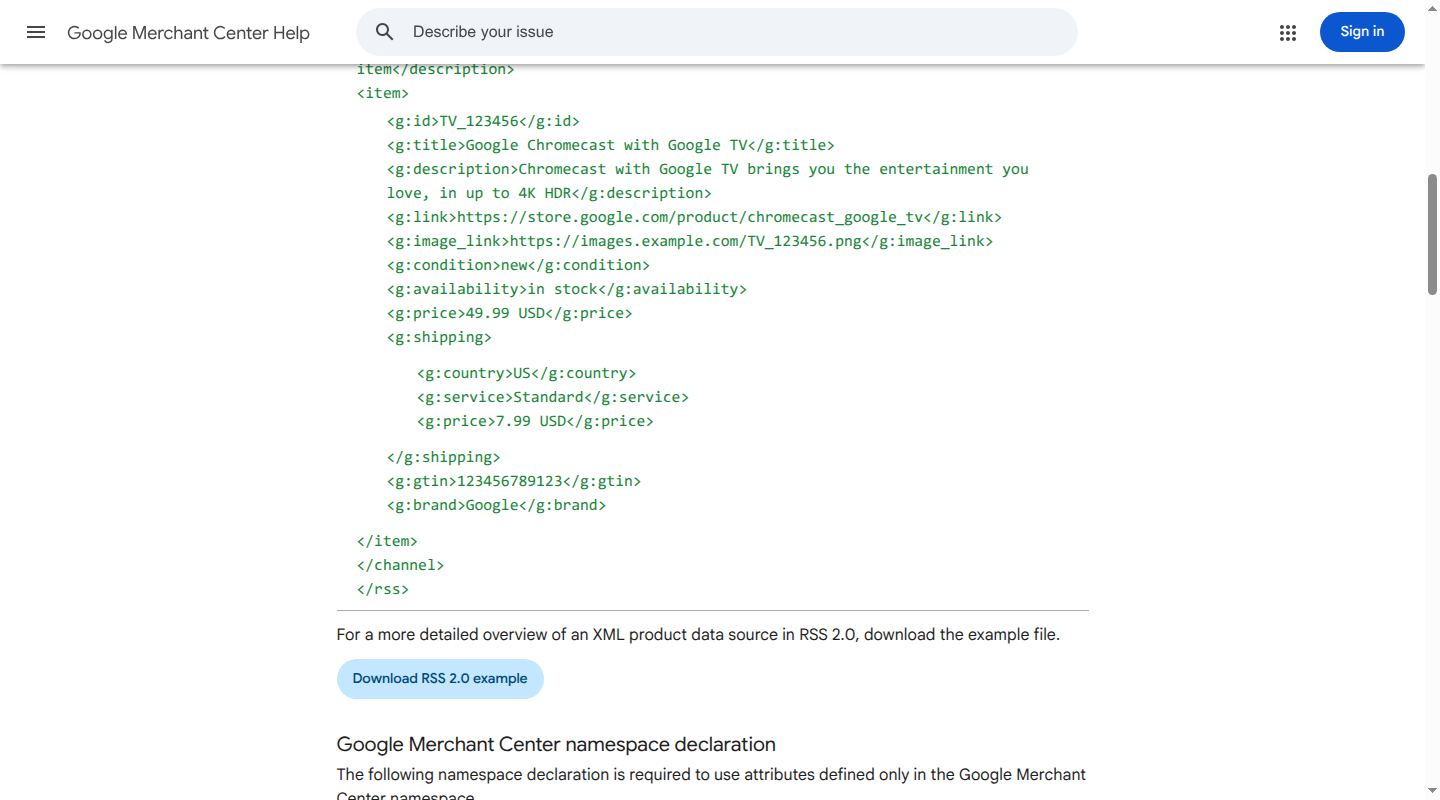
Here is what matters in the example:
<rss>and<channel>provide the RSS container Google expects.xmlns:gdeclares Google's exact namespace. Every Google attribute uses the matchingg:prefix.- The stable variant ID and
g:item_group_idlet the destination identify the offer and group it with related variants. g:price,g:availability, andg:conditionuse values defined by Google's product specification. Another destination can require different names or accepted values.- The file can be perfectly well-formed and still fail because a required field is missing, a value is invalid, or the product page disagrees with the feed.
Google's RSS guide also says to include every product you intend to keep in Merchant Center, rather than sending only recent changes. The live product data specification remains authoritative for category- and market-specific requirements.
How an ecommerce XML feed is produced
An XML feed is the last mile of a product-data workflow. The source catalog, PIM, ecommerce platform, ERP, DAM, supplier file, or inventory system owns different facts. A reliable flow keeps those facts governed before it serializes them into tags.
- Collect source records. Bring together identity, content, media, commercial state, variants, and policy data.
- Normalize the record. Standardize units, category values, identifiers, availability, and variant relationships. Resolve which system owns price and stock.
- Map to the destination. Translate the normalized record into the channel's field names, namespaces, value lists, conditional fields, and update mode.
- Generate and deliver. Produce the XML file or endpoint, then upload it, host it at a scheduled URL, or send it through the channel's integration.
- Monitor the result. Fetch status, parse errors, schema errors, rejected products, warnings, freshness, and page-to-feed mismatches all belong in the operating record.
The workflow around feeds is broader than the format itself. Catalog's guide to product feed management covers that operating model. This page stays focused on XML structure, delivery choices, and validation.
Where XML fits by channel
A channel's current specification determines whether XML is still the right output. The same product record may need XML for one destination, TSV for another, and JSON or an API for a third.
| Channel or use case | XML support and current caveat |
|---|---|
| Google Merchant Center | Accepts XML product files in RSS 2.0 or Atom 1.0. Google's g: namespace and product attributes are destination-specific. Parsing is only the first gate; Merchant Center also evaluates required attributes, values, policy, and consistency. |
| Meta Commerce Manager | The Meta feed API documents CSV, TSV, RSS XML, and Atom XML options, including scheduled product feeds. Meta has its own field rules and diagnostics, so a Google feed may need a separate mapping. |
| eBay MIP | The eBay MIP requirements support CSV and XML for that specific integration. eBay APIs and other listing workflows can have different contracts. |
| Amazon Selling Partner API | Amazon ended support for legacy XML and flat-file listing feeds in the Feeds API on July 31, 2025. Current developer workflows use the Listings Items API or JSON_LISTINGS_FEED, as described in Amazon's listing migration guidance. |
| Walmart Marketplace | Walmart's newer Item Spec v4.X is available in JSON Schema format only. A generic XML export does not satisfy that newer item contract. |
| Search, affiliates, and retail partners | XML remains common when a provider publishes an XML schema or a hosted-feed specification. The provider's root element, field names, update cadence, and authentication rules govern the integration. |
These caveats are why a single “universal XML feed” is a brittle design. Keep a shared, governed product record and generate the output each destination actually documents.
XML vs. CSV, TSV, JSON, and API delivery
The format is a delivery choice. The destination's schema is the contract.
| Method | Strengths | Trade-offs | Good fit |
|---|---|---|---|
| XML | Explicit hierarchy, namespaces, repeating elements, and mature schema tooling such as XSD | Verbose; tag and namespace mistakes can stop processing; requires destination-specific mapping | Channels that require RSS/Atom XML, or records with nested and repeating data |
| CSV | Easy to inspect and edit in spreadsheets; compact for flat records | Commas, quotes, line breaks, and encoding need careful escaping; nested data is awkward | Small or flat catalogs and destinations that publish a CSV template |
| TSV | Spreadsheet-friendly and less likely to collide with commas in product copy | Tabs and line breaks still need escaping; field hierarchy remains flat | Large tabular exports and channels that prefer tab-delimited files |
| JSON file | Natural for arrays, objects, conditional fields, and modern software workflows | Schema and validation rules still vary; human spreadsheet review is less convenient | Destinations such as current Amazon listing feeds that specify JSON |
| API delivery | Low-latency updates, partial changes, authentication, and response-level errors | Requires integration work, rate-limit handling, retries, and ongoing version maintenance | Inventory or price changes that need programmatic updates and immediate feedback |
Choose XML when a channel documents it or when hierarchical records reduce ambiguity. Choose CSV or TSV when a channel's template and team workflow are tabular. Choose JSON or an API when the destination defines those interfaces. Keep the underlying product model independent from every output format.
Validate in layers, then inspect channel diagnostics
A green XML parser result only establishes that the document can be read. A complete validation pass covers syntax, schema, data, delivery, and destination behavior separately.
1. Delivered file
- The exact URL or file the channel fetches is the validation target.
- An HTTP success response, expected content type, and complete file are required. An HTML login page or truncated response is a delivery failure.
- Authentication, redirects, file size, compression, and filename rules must match the destination's specification.
- Atomic file generation prevents a scheduled fetch from reading a half-written export.
2. Well-formedness
- One root element and correctly nested, closed tags are required.
- Reserved characters such as
&and<must be escaped in product text. - The declared encoding must match the bytes. UTF-8 is the safest default for most ecommerce exports.
- Invalid control characters and malformed CDATA sections must be removed.
3. Namespaces and channel schema
- Every namespace URI and prefix must match the destination's specification.
xmlns:g="http://base.google.com/ns/1.0"and a similar-looking URI are different contracts. - The root, container, element names, data types, allowed values, and required order must match the channel's XSD or schema when one is available.
- Empty optional elements and unsupported custom tags should be omitted. A parser can accept a tag that the channel ignores.
4. Identity and relationships
- Every product or variant ID must be stable and unique within the destination.
- Parent, child, item-group, bundle, and replacement-part relationships must remain intact.
- GTIN, MPN, brand, and other identifiers belong in the record when the destination and product type require them.
- Each variant needs its correct image, price, availability, color, size, and quantity.
5. Commercial facts and URLs
- Price, currency, sale price dates, and availability must agree with the product page and checkout.
- Product and image URLs need to work from a non-authenticated session, with redirect, canonical, locale, and parameter rules resolved before delivery.
- An out-of-stock or discontinued product must follow the destination's removal or availability rule.
6. Coverage, freshness, and diagnostics
- Feed product and variant counts should match the intended active assortment.
- The destination's full-catalog or partial-update semantics must be explicit. Google Merchant Center's RSS guidance expects all products intended for the data source; some APIs use partial operations.
- High-risk fields, especially price, availability, and sale dates, need a refresh cadence that matches how quickly they change.
- The destination's processing report supplies the final evidence after an upload or fetch. Warnings that affect eligibility deserve attention alongside fatal parser errors. Google's feed troubleshooting guidance makes the same distinction between ingestion and product status.
Common validation mistakes
| Mistake | What you see | What to fix |
|---|---|---|
| Unclosed tag or raw ampersand | XML parser stops at a line and column | Escape reserved characters and generate tags from an XML library or tested serializer |
| Wrong namespace URI or prefix | File parses, but channel fields are missing or ignored | Copy the exact namespace declaration and prefix required by the destination |
| Unknown field names | File parses, product is incomplete | Map to the channel's vocabulary; XML does not make custom names meaningful |
| Duplicate or changing IDs | Duplicate listings, overwritten variants, or new products on every refresh | Use a stable ID strategy across source, feed, and channel |
| Missing conditional fields | Some categories or variants are rejected | Apply rules based on category, country, condition, and other trigger fields |
| Stale price or availability | Disapprovals, mismatched offers, or unavailable products in ads | Source commercial facts from the system that owns them and refresh frequently |
| Feed and page disagree | Channel flags price, page, image, or availability mismatch | Reconcile the feed, product page, structured data, and checkout |
| Delta sent where a full file is expected | Products disappear or old records remain | Follow the destination's full-catalog and deletion semantics |
FAQs
Is an XML feed the same as an RSS feed?
No. RSS is one XML vocabulary for publishing content. An ecommerce feed may use RSS as a container, as Google's product format does, or it may use a different root and product schema. The receiving specification determines what the file means.
Is an XML feed the same as an XML sitemap?
No. A sitemap lists URLs and crawl metadata. A product feed carries product records and offer facts for a downstream commerce system. A product URL appearing in a sitemap does not supply price, stock, variants, or channel attributes.
Can I send one XML product feed to every channel?
Use one normalized product record as the shared source, then map it into each channel's documented output. Google, Meta, eBay, Amazon, and Walmart have different contracts and current format support. Reusing a file is safe only when the destination explicitly supports that vocabulary and update mode.
Does valid XML guarantee product approval?
No. Well-formedness is the first gate. A channel can still reject a feed for missing fields, invalid values, duplicate IDs, inaccessible URLs, policy issues, stale commercial facts, or mismatches with the product page.
How often should an XML feed update?
Match the cadence to the risk of the field. Price, inventory, and sale windows need frequent refreshes. Descriptions and attributes can follow a reviewed content schedule. Monitor the time between a source change and a successful channel fetch, then shorten it when shoppers could see an offer you cannot honor.
Keep XML as an output of a governed product-data layer
An XML file with a title, image, price, and URL can satisfy a basic listing contract. AI commerce and richer discovery need more context: attributes, variants, compatibility, constraints, policies, identifiers, provenance, and freshness. XML alone does not make a catalog machine-ready.
Catalog helps merchants and brands create normalized, enriched, machine-readable product records from the systems where product facts already live. Those records can feed a Google or Meta XML output, a marketplace-specific file, an API, a search index, or an AI-shopping surface. We keep the product data layer separate from each destination's syntax, so a namespace change does not become a new source of truth.
If your team is maintaining XML exports by hand or reconciling different prices, variants, and availability across channels, talk to Catalog about building a reliable product data layer.
