
What is an RMA? A guide to accurate ecommerce returns
Learn what an RMA records, how its number differs from a return label or tracking ID, and how to handle requests, receipt, inspection, refunds, and exceptions.

A return can move through customer service, a carrier portal, a stockroom, and finance before it is complete. If each team sees a different identifier or status, a package can become a lost case, a duplicate refund, or inventory counted before anyone inspects it. A clear return workflow keeps the shopper’s request, the parcel that arrives, and the decisions about the item and payment connected.
What is an RMA?
In ecommerce, RMA usually stands for return merchandise authorization. Teams use it for the approval step and the record that captures it. That record links the item and quantity to the original order, states what the merchant expects back, and records how the return is resolved.
Some supply-chain systems use return material authorization for a return order used to send goods back for repair or credit. Oracle’s RMA documentation uses that expansion. Other systems use a shorter label such as return authorization. Names and status definitions vary, so preserve the source system’s return ID and status meanings when connecting records. If the system assigns a separate customer-facing RMA number, link both.
A customer’s request and the merchant’s authorization are separate events. The request says what the customer wants to return. The authorization records which items and quantities the merchant approved under its policy. Many systems assign an approved return a unique RMA number so a customer, support agent, or warehouse operator can refer to the same case.
A return case may result in a refund, exchange, store credit, repair, replacement, or another outcome set by the business. Approval records what may come back. Receipt, inspection, inventory handling, and payment are separate steps. NetSuite’s returns process tracks authorization, approval, receipt, credit, and refund as distinct actions.
RMA number, return label, tracking ID, and refund
These records often appear together on a return, but each answers a different question.
| Record or ID | What it tells your team |
|---|---|
| Return request | What the customer asked to return and the reason they gave |
| RMA record | What the merchant decided to accept, the items expected, and the eventual outcome |
| RMA number | Which return case the customer or operations team means |
| Return label | How a parcel should travel back, including postage when it is prepaid |
| Carrier tracking ID | Where the parcel has scanned during transit |
| Refund, credit, or exchange ID | What the finance or order system actually processed |
An RMA number can be printed on a return label or included as a shipping reference, but it still identifies the return case. A carrier tracking ID identifies the shipment. For example, FedEx’s return workflow accepts an RMA number as an optional reference and issues a separate tracking number when the shipment is finalized.
An order number identifies the sale; an RMA number identifies a return case. If the same order produces a second return request, create a separate return event and link it to that order rather than reusing the earlier case ID.
Keep each ID in its own field and link it to the RMA record. A label created is not proof that the customer handed over the parcel. A carrier scan is not proof that the warehouse received the correct item. A refund transaction is not proof that inventory was inspected or restocked.
How an RMA process works
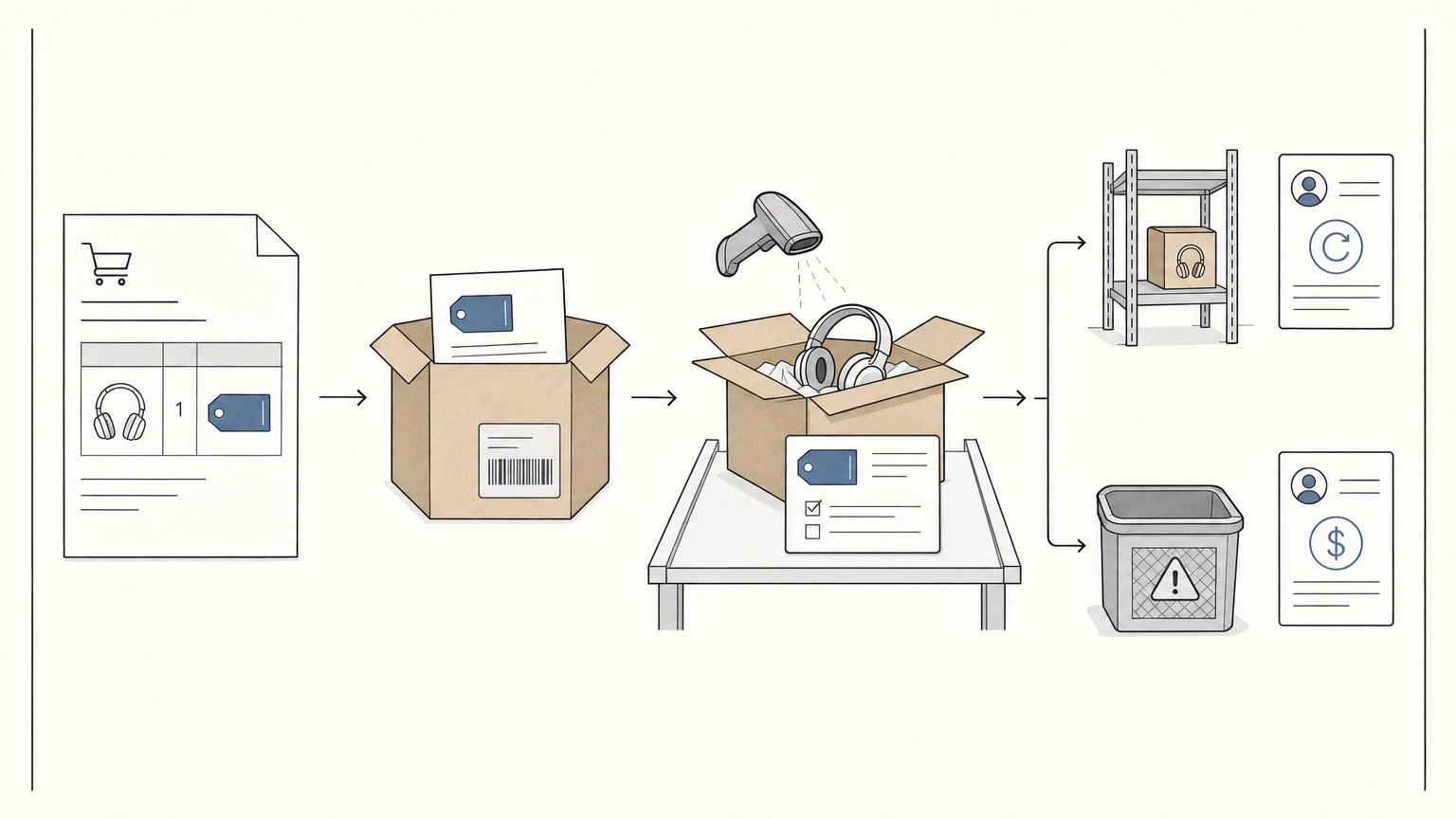
Use a small set of clear states from request to close. Status names differ across systems. Mark each status when a real handoff occurs. Sending a message or creating a label is a separate activity.
-
Capture the request. Link it to the original order, order line, product variant or stock keeping unit (SKU), and quantity. Record the customer’s reason and requested outcome, such as a refund or size exchange. Add a serial number, photos, or a lot code when the product or claim requires them.
-
Review and authorize. Apply the return policy to each item and quantity. Record the decision, the approved quantity, any denied lines, and the allowed resolution. If only one item from a multi-item order qualifies, authorize that line rather than the whole order. Assign the RMA number when your process creates the return record.
-
Send return instructions. Tell the customer which items are approved, where to send them, how to pack them, and the cutoff date for sending them. Include how your policy calculates the deadline, such as from delivery or approval. Explain whether you provide a label, who pays for return shipping, and what resolution is expected after the item arrives. If a physical return is not required, record that decision instead of waiting for a parcel.
-
Track the shipment. Store the label ID and carrier tracking ID separately from the RMA number. Use carrier events for movement through transit. Record carrier delivery and warehouse receipt as separate states because a delivery scan can happen before the warehouse checks the item.
-
Receive and inspect. Compare what arrived with the approved item and quantity. Record the actual variant, serial or lot number when relevant, receipt date, and observed condition. Hold partial, damaged, or mismatched returns for review before recording a disposition.
-
Resolve and close. Record the refund or credit transaction, exchange order, repair, or other customer outcome. Update inventory to reflect the inspected item’s disposition. Close each item line when its outcome is recorded; leave unresolved quantities open or close them with a documented reason.
Keep reason, condition, disposition, and resolution separate
Four fields help the warehouse, support, finance, and product teams understand different parts of the same return.
| Field | Whose information it represents | Example |
|---|---|---|
| Reason | The customer’s explanation | “Runs small” |
| Condition | The receiving team’s finding | Unworn, tags attached |
| Disposition | What happens to the returned unit | Restock |
| Resolution | What the customer receives | Exchange for size large |
The customer’s reason is a report, not an inspection result. A customer can choose “damaged” as the reason, then the receiving team may confirm damage or find the item intact. A saleable item may be restocked after inspection even when the customer receives an exchange. If you combine these fields into one generic “return reason,” it becomes harder to reconcile inventory and investigate recurring problems.
A practical return record includes:
-
Identity: Source-system return ID and any separate RMA number, original order ID, order line, SKU or variant, and serial or lot number when applicable.
-
Request and decision: submitted date, customer reason, requested resolution, policy decision, approved quantity, and return deadline.
-
Shipment: label ID, carrier, tracking ID, shipment date, and receipt date.
-
Inspection and result: received quantity, observed condition, disposition, refund or exchange transaction ID, and close date.
For example, a shopper orders a size M sweatshirt and requests an exchange for size L. The RMA can record one approved size M unit, the exact variant, the reason “runs small,” a separate carrier tracking ID, the condition found at receipt, and the exchange order for size L. If the returned item is unworn and saleable, the warehouse records its disposition as restock. The original order line, inventory action, and exchange order stay linked without treating the return as a second sale.
Handle exceptions without losing the return record
Returns often arrive in a different state from the one the customer described. Keep an explicit exception path so the team does not have to guess.
-
The parcel arrives without an RMA number. Route it to an unmatched-return area, then use the order number, packing slip, shipping address, or customer contact to match it. Record who resolved the match and when. Keep the item out of saleable stock until its order and condition are known.
-
The received quantity or variant differs from the authorization. Record the actual item and quantity beside the approved values. Leave the discrepancy visible for review rather than overwriting the original authorization.
-
A return is partial. Track approved, received, and resolved quantities separately. Close the returned line only after its refund, exchange, repair, or other outcome is recorded. Keep any expected remainder open until the return window or policy decision closes it.
-
No physical return is required. Record the approved no-return refund or replacement and mark that no parcel is expected. Reconcile inventory separately so the refund does not create an imaginary returned unit.
Use return data as an operations signal
An RMA can help teams investigate return patterns when each record points to the exact order line and product variant. A rise in “runs small” reports can prompt a review of size guidance or variant measurements. Repeated “not as described” reports can prompt a check of the listing’s images and attributes. A cluster of “arrived damaged” reports points toward packaging, handling, or carrier review. The reason code alone does not prove what caused the return.
Review patterns by product, variant, channel, and fulfillment location. Separate the customer’s stated reason from the warehouse’s condition finding so the team can compare claims with what arrived. If a pattern points to missing or conflicting product attributes, our guide to product data quality can help your team review the product record itself.
An accurate return record answers four questions for every item: what was approved to come back, what actually arrived, what happened to the unit, and what the customer received. Keep the shipping and payment IDs linked to the case but distinct from the RMA number. That gives customer service, the warehouse, and finance a shared record of the return without mixing up authorization, transit, inventory, and refund status.
