
Vendor onboarding process for ecommerce brands
Build a vendor onboarding process for ecommerce that covers approvals, documents, vendor-master setup, product data, validation, distribution, and KPIs.
A vendor can be approved and still be impossible to sell. The legal entity may be ready for a contract and a payment run while its product file contains duplicate SKUs, missing variants, and category values your channels cannot use.
A strong vendor onboarding process handles both gates. It moves the supplier into your approved vendor master, then turns the supplier’s product records into accurate, usable commerce data. Here is the baseline workflow, the product-data handoff, and the checks that keep a new vendor from creating catalog work after launch.
What vendor onboarding means for ecommerce
Vendor onboarding is the controlled process of moving a prospective supplier from intake to an approved, operational vendor record. It usually includes qualification, document collection, compliance and risk review, commercial terms, approvals, and activation in the systems that purchase from and pay the supplier.
Supplier onboarding and vendor onboarding are usually used interchangeably. Ecommerce teams need one extra distinction: approving a company is different from approving its items for sale.
| Gate | The question to answer | Exit record |
|---|---|---|
| Vendor approval | Can this business supply us under agreed terms and pass the checks that apply to it? | One approved vendor record, contract, owners, and operating rules |
| Product approval | Can shoppers and downstream channels identify, understand, and buy each item? | Validated product, variant, offer, and media records |
Keep these gates connected, but do not collapse them into one status. A supplier can pass finance and compliance review while its catalog needs remediation. A product file can be data-ready while the contract is still waiting for approval. Each gate needs its own owner and evidence.
The standard vendor onboarding process
The names and approvers vary by company. The baseline below works for a brand, retailer, or marketplace that adds suppliers for resale.
1. Start with intake and a process owner
A business owner should submit the reason for adding the vendor before anyone creates a record. Capture:
- legal and trading names, primary contacts, and operating countries;
- product categories, expected SKU or variant count, and launch markets;
- sales model, such as wholesale, dropship, marketplace, or direct fulfillment;
- expected order volume, fulfillment locations, lead times, and service contacts;
- the supplier’s product-data source, submission format, and update cadence;
- the target launch date and the teams that must approve the relationship.
Check the existing vendor master for a matching legal entity, trading name, address, or tax identifier. Assign one process owner to track the request from intake through activation. The owner can route work to procurement, finance, legal, compliance, information security, product operations, and merchandising without making all of those teams responsible for the whole workflow.
2. Qualify the supplier and set the review tier
Qualification asks whether the supplier can support the proposed relationship. Review the capabilities that affect your business, such as:
- product quality and category experience;
- production or inventory capacity;
- minimum order quantities, lead times, and replenishment rules;
- countries served, warehouse locations, and delivery coverage;
- returns, recalls, customer support, and escalation capability;
- data exchange options, technical contacts, and change-notification practices.
Use a tier that matches the exposure and complexity of the relationship. A supplier that provides a small, low-risk assortment does not need the same review as one that supplies regulated products, handles customer data, or supports a high-volume launch. The tier should determine which reviews and documents are required. It should not become a reason to skip the basic duplicate check or a product-data sample.
3. Collect compliance and commercial documents
Give the supplier one secure, versioned request for the documents that apply to its tier and jurisdiction. Common examples include:
- registered business name, address, and registration details;
- tax forms or tax identifiers, such as a US W-9 where applicable;
- bank and remittance details, collected through an approved secure process;
- insurance certificates, licenses, safety documents, or product certifications when required;
- ownership, sanctions, security, or privacy information required by your policy;
- signed terms, code of conduct, data-processing terms, or master agreement.
The exact list is policy- and jurisdiction-specific. Record who owns each document, when it expires, and what blocks activation. Do not treat an email attachment as a durable document system or let a product launch depend on a missing file that no one owns.
4. Validate the submission and route approvals
Review the submitted information for completeness, internal consistency, and policy requirements. Finance may validate tax details and independently confirm bank changes. Compliance or risk may run screening. Legal may review contract language. Information security may assess system access. Procurement or the category owner may approve the commercial case.
Use explicit statuses such as submitted, needs information, under review, approved, and rejected. Save the decision, approver, date, conditions, and follow-up work with the vendor record. If a document is incomplete, return a precise exception, such as “certificate expires before launch” or “remittance name does not match the registered entity.” A supplier should not have to guess which field is blocking progress.
5. Agree on terms and operating rules
Before the first purchase order or product launch, document the rules that teams will use every day:
- wholesale pricing, discounts, minimums, and price-change notice;
- payment terms and invoicing requirements;
- order cutoffs, fulfillment times, shipping services, and delivery regions;
- returns, cancellations, damages, recalls, and customer-service ownership;
- service levels, escalation contacts, and review cadence;
- product-data format, field definitions, update frequency, and change alerts;
- credentials, environments, permissions, and technical support contacts.
The contract and the product-data submission guide should agree. A vendor that promises a 48-hour dispatch window needs a record that can represent that promise. A brand that requires a GTIN for a channel should state that requirement before the first file arrives.
6. Activate one vendor-master record
After the required reviews and terms are complete, create or activate the vendor once in the appropriate ERP, procurement, accounts-payable, or vendor-management systems. Map the verified legal and remittance names, vendor ID, terms, currency, tax coding, locations, contacts, status, and owning team.
Limit access to what the integration and users need. Record the activation date and the conditions for suspension or re-review. Vendor-master activation means your company can transact with the supplier. It does not make every supplier item ready for sale.
7. Pilot the product data before launch
Request a representative sample before loading the full assortment. Include a simple item, a multi-variant item, a product with multiple images, and an item with a known exception. Run the sample through identity matching, mapping, validation, channel output, and approval. Fix the process and the supplier instructions before scaling the import.
This product-data gate is where many otherwise careful vendor onboarding workflows stop too early.
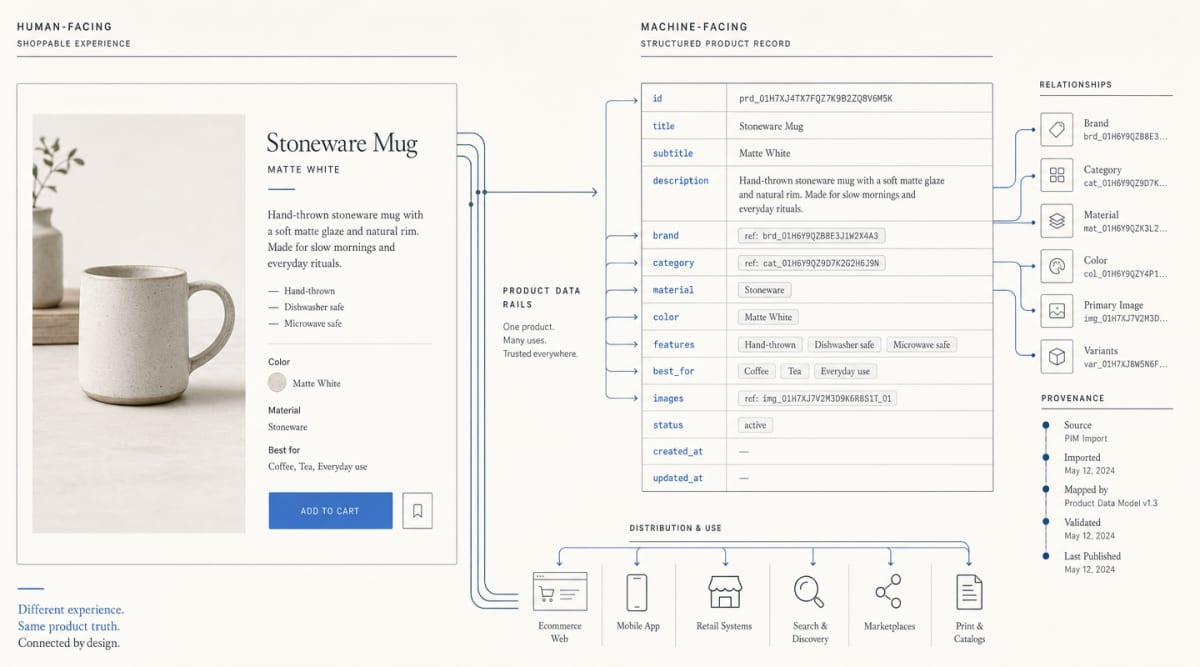
The goal of product catalog management is one product truth that can serve a storefront, a feed, a marketplace, and machine-facing commerce surfaces without rebuilding the record for each destination.
The product-data handoff: from supplier file to approved catalog
Treat the supplier’s file as a source submission, not as your canonical model. A source may be a CSV or spreadsheet, an XML or JSON feed, an EDI exchange, a PDF line sheet, or an API. If a supplier publishes through GS1 GDSN, define which values you accept and how you resolve conflicts with direct submissions. Choose the formats you will accept, define the required fields, and version the mapping rules.
1. Define the product submission contract
Tell the supplier what each field means, which values are accepted, and who owns corrections. A practical baseline includes:
| Record area | Example fields | Why it matters |
|---|---|---|
| Identity | Supplier SKU, internal SKU, GTIN or other assigned identifier, MPN, brand | Joins the item across systems and prevents duplicates |
| Content | Title, description, bullets, claims, care or usage instructions | Gives shoppers and machines useful product context |
| Variants | Parent ID, variant ID, size, color, pack, configuration | Preserves the relationship between a product family and its sellable items |
| Attributes | Material, dimensions, ingredients, compatibility, capacity, fit | Supports filtering, comparison, recommendations, and channel fields |
| Commercial state | Cost, price, currency, availability, lead time, minimums | Represents what can be bought and under which conditions |
| Media and evidence | Image URLs, manuals, certifications, source, last updated | Supports presentation, trust, validation, and traceability |
| Logistics | Weight, package dimensions, case quantity, shipping restrictions | Prevents fulfillment and channel surprises |
Separate vendor facts from product facts. A legal name and payment term belong to the vendor record. A product’s material, size, image, and GTIN belong to the item record. A cost or availability value may belong to an offer tied to a specific market or channel.
2. Resolve identifiers and variant relationships
Keep every useful identifier with its source and meaning. A supplier SKU is useful inside the supplier’s system. Your internal SKU is useful inside your catalog and operations systems. A GTIN identifies a trade item where the brand or manufacturer has assigned one. An MPN identifies a manufacturer’s part or model. They are related fields, not interchangeable values.
GS1 identification keys give trading partners globally unique identifiers for products, parties, locations, and other entities. Use an assigned identifier when it exists. Do not invent a GTIN to fill an empty field. Store the original value, the normalized value, the source, and any match confidence.
Model a parent product and its sellable variants explicitly. A linen shirt may have one parent record and separate child records for each size and color, with variant-specific images, availability, and identifiers. A two-pack may be a different sellable item from a single unit. A bundle may need relationships to its component products. Do not flatten those distinctions into one title or one stock value.
Google’s product data specification illustrates the operational principle: keep a stable item ID, group variants with an item-group identifier, and submit distinguishing fields such as color and size when they apply. The exact fields differ by destination, so keep the parent-child model in your own product data layer rather than making one channel’s feed the master.
3. Normalize attributes, units, and taxonomy
Supplier values are rarely consistent enough to publish directly. Normalize them into your model while retaining the source value for audit and correction.
- Map
navy,navy blue, andmidnightto the controlled color value your business uses. - Convert measurements into a canonical unit while preserving the supplier’s original measurement and precision.
- Split compound fields such as
cotton / elastaneinto the material structure your category needs. - Define accepted values for fields such as condition, gender, fit, finish, voltage, and pack size.
- Map supplier categories to your internal taxonomy and the taxonomy required by each destination.
For cross-company classification, GS1 GPC gives trading partners a shared product language. Use it as a reference where it fits your assortment, then maintain explicit mappings to your own and channel taxonomies. A mapping should be versioned and owned. It should not silently change because a supplier renamed a category in a spreadsheet.
Our product attributes guide explains why category-specific fields matter. A generic “color” field cannot replace width and fit for footwear, compatibility for electronics, or ingredients and shade for beauty.
4. Validate before publishing
Run validation at the record, relationship, and destination levels. Useful checks include:
- Completeness: required fields exist for the category, market, and destination.
- Format: identifiers, URLs, dates, units, currencies, and enumerated values follow the agreed rules.
- Uniqueness: vendor SKUs, internal SKUs, GTINs, and variant IDs do not collide where they must be unique.
- Relationships: every variant points to the correct parent, and every bundle or accessory relationship resolves.
- Accuracy: product facts match supplier specifications, approved documents, packaging, or another named source of truth.
- Media: image URLs resolve, images match the variant, and required assets meet destination rules.
- Commercial consistency: price, currency, availability, and lead time agree with the offer and the customer-facing page.
- Taxonomy: category and attribute values are valid for the destination.
- Provenance: each important value has a source, owner, and last-updated timestamp.
Google warns that missing or incorrect product information can cause disapprovals, limited eligibility, or incorrect displays, including when IDs, variant attributes, images, or feed and website values conflict. That is why validation belongs before distribution. A successful file upload is not proof that the records are useful.
Route failures to an exception queue with the vendor, record ID, field, current value, required correction, owner, and due date. Reject a record when a fact is missing or contradictory. Do not fill a product claim with a guess simply to raise the completion rate. For a broader framework, use our guide to product data quality.
5. Approve, distribute, and monitor the records
Product operations or merchandising should approve the validated sample and the full launch according to your policy. Then transform the approved model into the outputs each destination needs:
- storefront and search records;
- Google or other commerce feeds;
- marketplace and retail-partner submissions;
- APIs and partner exports;
- AI shopping and answer-engine product context.
The destination format is an output. Keep the normalized product model upstream so a taxonomy or channel change does not force another supplier re-onboarding.
This is where we fit. We built Catalog as the product-data layer for structuring and enriching product inputs, keeping live product records synchronized, distributing machine-readable product data, and measuring how AI shopping surfaces use it. We do not replace procurement approvals, tax or banking validation, payment setup, contract management, or vendor-risk screening. Those controls stay in the systems and teams responsible for them.
Read the guide to product data enrichment for the work that makes supplier records more useful, then use product data syndication for the distribution step. Track inventory signals through your inventory management process while monitoring both the supplier connection and the product records it produces.
| Data type | Update approach | What to watch |
|---|---|---|
| Price, availability, and inventory | Near real time or frequent scheduled updates when they change quickly | Stale offers, overselling, and source-to-channel lag |
| Content and category attributes | After approval, on a scheduled or event-based cadence | Unapproved edits, missing fields, and mapping drift |
| Images and supporting assets | After rights approval and URL validation | Broken URLs, wrong-variant images, and missing media |
| Identifiers and taxonomy mappings | On a controlled change with an owner | Duplicate IDs, changed categories, and downstream rejects |
| Vendor documents | Separate compliance calendar and re-review workflow | Expired certificates, changed terms, or suspended status |
Track what shoppers and channels actually receive. Our structured data glossary describes the difference between organized product facts and the feeds or APIs that deliver them.
Vendor onboarding checklist for ecommerce
Use the checklist as a handoff between teams. Adapt documents, approvers, and fields to your jurisdiction, category, risk tier, and destinations.
| Phase | Confirm before moving on | Primary owner |
|---|---|---|
| Intake | Business case, duplicate check, scope, markets, contacts, product count, process owner | Requesting team |
| Qualification | Capability, capacity, fulfillment coverage, category fit, review tier | Procurement or category owner |
| Documents | Legal, tax, banking, insurance, licenses, certifications, and policies required for the tier | Finance, legal, and compliance |
| Approval and terms | Approvers, contract, pricing, payment, shipping, returns, service levels, escalation path | Procurement and legal |
| Vendor-master activation | One vendor ID, verified names, terms, coding, locations, contacts, status, access controls | Vendor master or finance |
| Product-data intake | Submission format, field definitions, identifiers, variant model, media, source and update cadence | Supplier and product operations |
| Validation and pilot | Sample mapping, duplicate checks, required fields, taxonomy, media, offers, exception owners | Product and channel operations |
| Launch and monitoring | Sign-off, distribution outputs, sync schedule, dashboards, alerts, re-review dates | Operations and channel owners |
Keep the vendor approval record and product approval record linked. That gives teams a clear answer when a product is blocked because of a missing certificate, a bad identifier, or a contract condition.
KPIs for vendor and product-data onboarding
Cycle time is useful only when the controls remain intact. Measure the two gates separately:
| KPI | What it tells you |
|---|---|
| Request-to-vendor approval time | How long qualification, documents, review, and terms take by vendor tier |
| Approval-to-master activation time | Whether an approved vendor is getting set up without re-keying or queue delay |
| First submission-to-data-ready time | How quickly the supplier’s first product sample becomes publishable |
| First-pass validation rate | How often records clear checks without correction |
| Required-field completeness | Whether records meet category and destination requirements |
| Identifier match and duplicate rate | Whether records join cleanly without collisions or split items |
| Variant relationship accuracy | Whether parent, child, pack, and bundle relationships resolve correctly |
| Taxonomy mapping pass rate | Whether records reach the intended category in each destination |
| Channel rejection or warning rate | Which product data issues block distribution after approval |
| Freshness lag | Time between a source change and the updated value reaching each destination |
| Exception resolution time | Whether supplier and internal owners can clear failures quickly |
| Early post-launch issue rate | Whether the vendor or product setup creates returns, cancellations, or support work |
Review the metrics by vendor, category, destination, and tier. A high first-pass rate can hide weak requirements. A low rejection rate can hide products that never reached a channel. Pair operational metrics with a sample of live records.
Common failure points
- One approval status covers everything. Separate vendor eligibility from product readiness so a clean contract does not hide a broken catalog.
- A new vendor record is created before the duplicate check. Search legal names, addresses, tax identifiers, and existing relationships before assigning a new ID.
- The supplier taxonomy becomes the master. Keep your own taxonomy and versioned mappings to destinations.
- Variants are flattened into titles. Preserve parent-child relationships, variant-level identifiers, images, offers, and inventory.
- Teams clean the data only at the channel edge. Fix the source mapping or canonical record so the same error does not return in the next file.
- Missing values are guessed. A fabricated material, dimension, or compliance claim is worse than an explicit exception.
- No one owns the exception queue. Every failure needs a named owner, a correction, and a due date.
- Upload success is treated as launch readiness. Test what shoppers see and what the destination accepts, then monitor after launch.
- Vendor compliance is mixed with product-data tooling. Keep procurement, finance, legal, and risk controls in their systems. Use the product-data layer for the records that describe what you sell.
FAQs
What is the vendor onboarding process?
It is the repeatable workflow for collecting, qualifying, verifying, approving, contracting, and activating a supplier in the systems that transact with it. For ecommerce, it should also include a separate product-data gate that validates the supplier’s items before they go live.
Is supplier onboarding different from vendor onboarding?
Most teams use the terms for the same workflow. Some use supplier for a company that provides goods for resale and vendor for any company they pay. Choose one definition in your policy and keep the process and records consistent.
What documents are needed for vendor onboarding?
The list depends on the vendor type, jurisdiction, risk tier, and product category. Common examples are legal registration details, tax information, remittance and bank details, insurance, licenses or certifications, signed policies, and contract terms. Collect only what your policy requires, and track owners and expiry dates.
When is a vendor ready to transact?
A vendor is ready when the required reviews and terms are approved and one verified vendor-master record is active in the systems that handle purchasing and payment. That does not mean every product is ready for sale. Product records still need identity, attribute, variant, offer, media, and destination validation.
What product data should a new supplier provide?
Start with supplier and internal identifiers, GTIN or other assigned identifiers, brand, title, description, category, parent and variant relationships, category-specific attributes, images, price or cost, currency, availability, lead times, dimensions, packaging, and relevant certifications or restrictions. Define the exact fields and accepted values in the submission contract.
How long should vendor onboarding take?
There is no responsible universal timeline. A low-complexity supplier with complete documents and a clean sample can move faster than a high-risk or multi-market supplier. Measure each stage separately, then reduce waiting and rework without removing a required control.
Can Catalog replace vendor onboarding software?
No. We are the product-data layer. Catalog helps turn supplier and brand inputs into structured, normalized, machine-readable product records, keep them synchronized, and distribute them to commerce and AI shopping surfaces. Procurement workflow, tax and payment setup, contracts, and vendor-risk screening remain separate responsibilities.
If your vendors are approved but their product data still arrives as inconsistent files, run a Catalog audit to see what AI shopping surfaces can read and where the record needs work.
