
Referral traffic in Google Analytics: GA4 reporting
Learn what referral traffic means in Google Analytics, find it in GA4, clean unwanted referrals, and measure AI and Direct visits with honest proof.

Referral traffic is a visit that Google Analytics can connect to another website or app. That source can be a publisher, partner, review site, marketplace, or AI assistant. GA4 shows the source when the visit arrives with usable attribution data. It cannot recover a referrer that never reaches the property.
That boundary is important for ecommerce. A shopper can click a product recommendation in ChatGPT, arrive on a product page, and appear as Direct if the app or browser drops the source. You can find referral traffic in GA4, clean misleading referrals, and separate observed AI traffic from likely under-attributed visits.
What referral traffic means in Google Analytics
In GA4, referral traffic is a session that arrives through a non-ad link on another site or app and has a detectable source. A row such as example.com / referral means GA4 received enough information to identify the referring source and its medium.
The main traffic dimensions are:
| Dimension | What it tells you | Example |
|---|---|---|
| Session source / medium | The source and medium for the session | review-site.com / referral |
| Session source | The source without the medium | review-site.com |
| Session medium | The traffic type | referral, organic, cpc, or ai-assistant |
| Session default channel group | GA4's rule-based channel label | Referral, Direct, Organic Search, or AI Assistant |
| Landing page + query string | The first page in the session | /products/waterproof-jacket?color=navy |
| Page referrer | The referring URL when GA4 receives it | https://review-site.com/best-jackets |
The Traffic acquisition report is session-scoped. It answers, “Where did this session come from?” The User acquisition report is user-scoped and focuses on how new users first arrived. Their rows and metrics should not be compared as if they describe the same population. Google documents the scope difference.
GA4's Referral channel covers non-ad links from other sites and apps. Direct is the channel for a saved link or typed URL, yet the Direct bucket also receives sessions when a source is missing. GA4's own rule uses source (direct) with medium (none) or (not set). The default channel definitions are the reference for the current grouping.
How to find referral traffic in GA4
Use the session report first. It gives you a source, the sessions that began there, and the outcomes those sessions produced.
- Open Reports in the left navigation.
- Select Acquisition.
- Open Traffic acquisition.
- Set the date range and, when useful, turn on a comparison with the previous period.
- Open the primary dimension selector and choose Session source / medium.
- Search the table for
referral, or filter to individual sources such asreview-site.com / referral. - Compare Sessions, Engaged sessions, Key events, Purchases, and Total revenue. Add Average purchase revenue where available. In Explore, calculate revenue per session when you need an efficiency rate.
Use the report's dimension controls to add Landing page + query string or move that dimension into an Exploration. The landing page tells you whether a referral brought someone to a product detail page, category, buying guide, or a low-intent page such as an account screen.
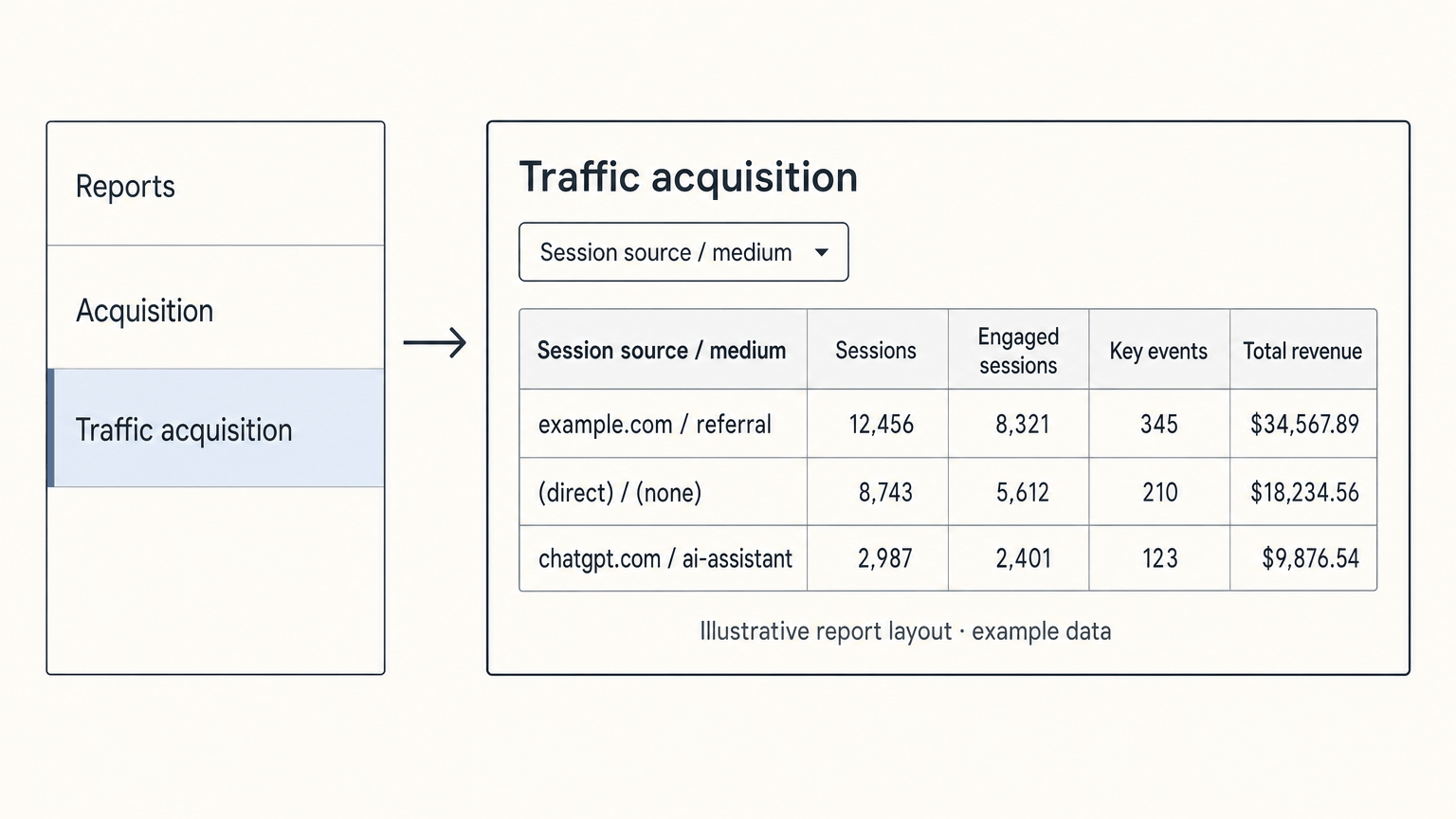
Build a deeper referral view in Explore
Use Explore when the standard report cannot answer the product question. Create a blank exploration, then add:
- Dimensions: Session source / medium, Session default channel group, Landing page + query string, Page referrer, Device category, and item or product dimensions that your ecommerce implementation sends.
- Metrics: Sessions, Engaged sessions, Engagement rate, Key events, Add-to-cart events, Purchases, Total revenue, and Average purchase revenue.
- Filters: A referral source, a channel group, a product-page path, or a comparison period.
Keep the source dimension and the landing page in the same view. A referral that lands on /products/ultralight-pack has a different commercial meaning from one that lands on /blog/gear-guide even when the two sessions came from the same domain.
Referral traffic vs. Direct traffic
Referral and Direct describe what GA4 can attribute at session start. They do not describe the visitor's intent with certainty.
| GA4 row or channel | What GA4 saw | Typical cases | How to use it |
|---|---|---|---|
example.com / referral | A visible off-site source and referral medium | Publisher links, partners, forums, marketplaces, and some AI clicks | Attribute the session to the visible source, then measure landing page and outcomes |
(direct) / (none) | No usable source or campaign data | Typed URLs, bookmarks, untagged campaigns, private apps, copied links, privacy controls, and some AI clicks | Treat it as a mixed unknown bucket and investigate its landing pages and behavior |
chatgpt.com / ai-assistant | A recognized AI referrer and GA4's AI medium | A detectable click from an AI assistant | Count it as observed AI traffic, never as the complete AI-influenced total |
The browser's Referer header can carry the page that sent a request. Referrer-Policy header can reduce or omit that information. Apps, webviews, redirects, copied URLs, consent choices, and missing UTMs can also break the trail.
That is why a large Direct row does not prove strong brand loyalty, and a small referral row does not prove that the source created all of the demand. Read both with landing pages, campaigns, device patterns, and outcomes.
Clean unwanted referrals before reporting performance
Some domains participate in your customer journey without being marketing sources. Common examples include:
- payment gateways and hosted checkout domains;
- authentication, password-reset, and account-management providers;
- owned subdomains when cross-domain measurement is configured incorrectly;
- support widgets or booking tools that send a customer away and back;
- domains used to complete a transaction or other website-managed interaction.
If a payment gateway starts a new session on the return to your confirmation page, GA4 may credit the purchase to the gateway. That inflates referral revenue and hides the channel that brought the customer in.
In GA4, open Admin > Data collection and modification > Data streams, choose the Web stream, select Configure tag settings, expand Show all, and open List unwanted referrals. Add the relevant domains and save. Google currently allows up to 50 unwanted-referral rules per web data stream. Follow Google's unwanted-referral steps.
Also audit the sources you control:
- Tag email, SMS, affiliate, influencer, QR, PDF, and partner links with consistent UTMs.
- Confirm redirects preserve query strings and campaign parameters.
- Check that paid campaigns use the intended source and medium.
- Remove UTMs from internal links so they do not overwrite the original session source.
- Check site migrations, consent changes, and cross-domain settings after deployment.
Proof example: checkout pollution. A row such as payments.example / referral with purchases is evidence of a visible referral, not evidence that the payment provider marketed the product. Excluding that domain prevents the return visit from starting a new referral session. It does not rewrite the original acquisition data, so inspect the dates and attribution windows after the change.
What AI assistant traffic looks like in GA4
Google added an AI Assistant channel in May 2026. When a recognized AI referrer is present, GA4 can set the medium to ai-assistant, set the campaign to (ai-assistant), and place the session in the AI Assistant channel. The recognized-source list includes services such as ChatGPT, Gemini, Claude, Copilot, and Grok, and can change as Google updates its definitions. The channel excludes Google's AI Overviews and AI Mode. Google's release note explains the new fields.
This is a useful floor for measurement. An assistant app or webview can send a link without a referrer. A shopper can copy a URL, search the brand after reading an answer, or return later from a bookmark. GA4 then has no reliable way to label the first influence as AI. It may show Direct, Organic Search, or another last-click channel.
If the native channel misses a source you need to monitor, create a custom channel group. Put it above Referral, then match the referrer with a rule for the assistant domains you actually observe. A starting pattern might be:
(chatgpt\.com|chat\.openai\.com|perplexity\.ai|gemini\.google\.com|claude\.ai|copilot\.microsoft\.com)Keep the list owned and reviewed. Google notes that custom channel rules should be ordered above Referral and updated when assistant URLs change. See Google's custom-channel example.
Published proof of the measurement gap
- Adobe Analytics: Adobe reported a 1,200% increase in generative-AI traffic to US retail sites from July 2024 to February 2025, with AI-referred visitors showing stronger engagement indicators than non-AI traffic sources. Read the Adobe analysis.
- GA4 property dataset: Search Engine Land reported a Previsible dataset of 6.77 million LLM-driven sessions across 166 GA4 properties. ChatGPT accounted for 92.4% of the trackable LLM referral traffic in that dataset, and ecommerce sessions often landed on product pages. Read the reported dataset.
These figures are market evidence, not a forecast for your property. Use them to justify building a visible-AI report before the channel is large enough to surprise you.
Measure likely AI-influenced Direct traffic
You cannot prove that one (direct) / (none) session came from an assistant after the source has been lost. You can define a segment that makes the uncertainty explicit and test whether the pattern persists.
Start with sessions that meet most of these conditions:
- source and medium are
(direct) / (none); - the visitor is new or has no recent session;
- the landing page is a product, category, collection, comparison, or buying-guide page;
- the landing page is not the homepage, login, account, support, careers, store locator, or checkout-return page;
- the session has meaningful engagement, an add-to-cart, checkout start, purchase, or another high-intent event.
Compare that segment with a baseline period. Choose a period before the visibility change, product launch, campaign, or AI-shopping release you are investigating. Then rule out other explanations:
- known AI Assistant sessions for the same dates;
- Search Console branded and product-name queries;
- paid, email, SMS, affiliate, influencer, PR, and promotion calendars;
- product launches, pricing changes, and marketplace activity;
- device and browser patterns;
- server logs, when available, to check whether requests carried a referrer.
Call the result likely assistant-influenced Direct or Direct product-page investigation segment. Do not call it exact AI traffic.
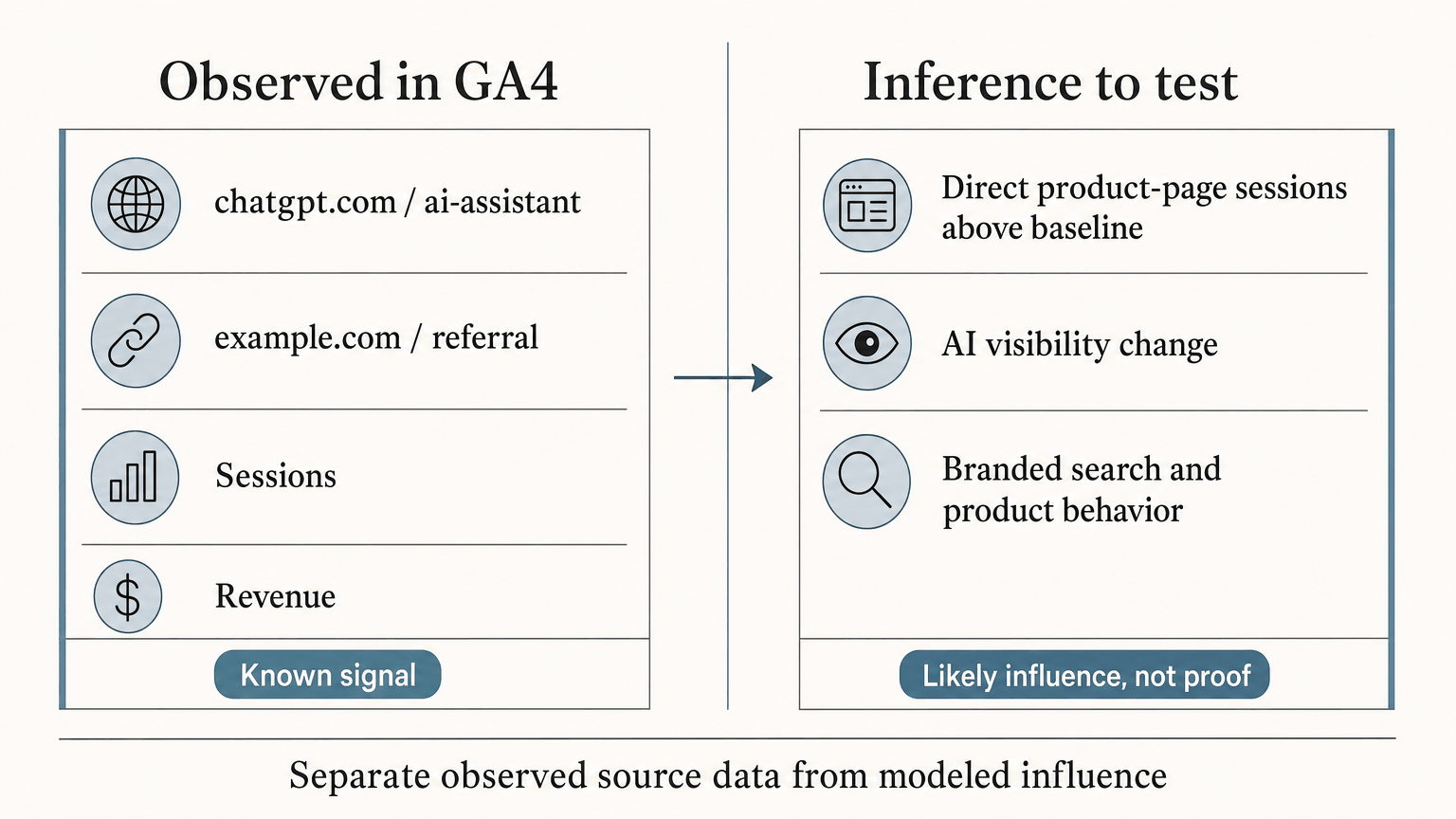
Inference example: product-page lift. Suppose Direct sessions to /products/ultralight-pack rise above the baseline at the same time that the product begins appearing for relevant assistant prompts. If campaigns, SEO demand, and site changes do not explain the lift, the pattern is worth investigating as possible AI influence. It remains an inference until a referrer, campaign tag, or another first-party signal confirms the source.
Catalog's guide to dark traffic in agentic commerce uses the term dark agentic commerce traffic for this class of under-attributed, high-intent journey. The useful operating practice is to separate what GA4 observed from what the surrounding evidence suggests.
Retailgentic's dark agentic commerce traffic analysis describes the same pattern: an answer engine can create product intent while the final visit looks Direct. Treat the label as a measurement problem, not proof that every Direct visit came from AI.
Connect referral traffic to products and outcomes
A referral report becomes useful when it connects three layers:
| Layer | Dimensions to use | Questions to answer |
|---|---|---|
| Channel | AI Assistant, Referral, Direct, Organic Search, Paid Search, Paid Social, Email, SMS, affiliate, and influencer | Which sources start sessions, and how do they compare? |
| Product and page | Landing page, page type, category, canonical URL, item name, item ID, SKU, and variant | Which products and content attract each source? |
| Outcome | Engaged sessions, add-to-cart, checkout starts, purchases, item revenue, total revenue, calculated revenue per session, or lead events | Which visits create commercial value? |
For example, a Direct session landing on /products/wide-fit-trail-running-shoe-blue-size-10 deserves a different interpretation from a Direct session landing on /. Report by page type and product group before relying on sitewide averages.
For a simple operating report, show these rows side by side:
| Product or page group | Known AI referrals | Likely assistant Direct | Organic Search | Paid and owned channels | Outcome |
|---|---|---|---|---|---|
| Product detail pages | Visible source/medium | Direct sessions above baseline | Product and branded queries | Campaign calendar | Add-to-cart, purchase, item revenue |
| Category pages | AI landings by category | Direct category sessions | Non-branded category queries | Promotions and sends | Product clicks and revenue |
| Buying guides | AI referrals to guides | Direct guide entries | Organic assists | Email and remarketing | Downstream product views and conversions |
Report three numbers instead of one blended “AI revenue” total:
- Known AI floor: sessions and revenue from visible AI Assistant or AI referral rows.
- Likely dark estimate: above-baseline Direct sessions that meet the segment rules and survive campaign and technical checks.
- Influence signals: visibility, branded search, product-page behavior, and revenue movement that align with AI exposure but cannot be assigned to one click.
Why product data still matters
GA4 tells you what reached the site. Product data helps determine whether an AI shopping system can understand a product well enough to recommend it and link to the correct page. Keep the product-data work tied to measurement by maintaining:
- canonical product URLs;
- current price, currency, and availability;
- product, category, and variant relationships;
- attributes such as size, color, material, compatibility, fit, and use case;
- stable identifiers, images, reviews, shipping, returns, and warranty details.
Consistent product records make landing-page patterns easier to interpret. Duplicate URLs, stale offers, and contradictory variants make both recommendations and downstream reporting harder to trust.
Catalog provides a product data layer for AI commerce. It structures product data, keeps it synchronized, publishes it to AI shopping surfaces, and measures what those surfaces do. It sits alongside the existing storefront and analytics setup. Use AI visibility for ecommerce when the question is whether the right product appears, then use GA4 to measure what happens after the click.
Common mistakes in referral reporting
Treating every Direct session as AI traffic
Direct combines typed URLs, bookmarks, missing campaign data, private-app visits, and possible AI influence. Segment it and state the assumptions.
Counting visible AI referrals as the whole channel
The AI Assistant row is a detectable floor. It excludes visits where the source was stripped or where the shopper returned through another channel.
Leaving payment and authentication domains in the referral report
Checkout and login flows can claim sessions and purchases. Configure unwanted referrals before comparing revenue by source.
Comparing channels without page context
AI referrals and likely dark traffic may concentrate on product pages, comparison pages, categories, or buying guides. Sitewide averages hide that difference.
Calling an inference proof
Above-baseline Direct traffic can support an AI-influence hypothesis. It cannot establish a source that GA4 never received. Keep observed rows and modeled estimates separate.
FAQ
What is referral traffic in GA4?
It is a session that arrives through a non-ad link from another site or app when GA4 can identify the source. A typical row is publisher.example / referral. GA4 then lets you compare that session's landing page, engagement, key events, and revenue with other sources.
Where do I find referral traffic in Google Analytics 4?
Open Reports > Acquisition > Traffic acquisition. Set the primary dimension to Session source / medium, then search for referral or a specific referring domain. Add landing-page and outcome metrics so the report answers more than “who sent the visit?”
What is the difference between Traffic acquisition and User acquisition?
Traffic acquisition is session-scoped and describes where sessions began. User acquisition is user-scoped and describes how new users first arrived. A returning user can create a new Direct session, so the same person can produce different rows in the two reports.
Is ChatGPT traffic referral traffic in GA4?
Sometimes. A recognized ChatGPT referrer can appear with medium ai-assistant and the AI Assistant channel. A click from an app or webview can lose the referrer and appear as Direct or another channel. The visible row is measurable AI traffic, not the full AI-influenced total.
Why does a referral source appear as (direct) / (none)?
GA4 received no usable source or campaign data for that session. Common causes include copied links, private apps, redirects, privacy settings, missing UTMs, and consent choices. Check the landing page and campaign context before deciding what the session means.
How do I stop a payment provider from taking referral credit?
Add its domain under Admin > Data collection and modification > Data streams > Web > Configure tag settings > Show all > List unwanted referrals. Check cross-domain measurement and the payment return flow as well. Exclusion prevents the unwanted domain from starting a new referral session; it does not reconstruct missing original attribution.
Should I add UTMs to AI assistant links?
Use UTMs wherever your team controls the link, such as email, SMS, affiliates, influencers, QR codes, PDFs, and partner placements. You usually cannot add parameters to links generated by third-party assistants. UTMs reduce avoidable Direct traffic, yet they cannot recover a source that another app removes.
Can GA4 recover dark AI traffic exactly?
No. GA4 can report the source data it receives. Use known AI referrals as the observed floor, then compare a carefully defined Direct segment with visibility, search, campaign, product, and server-log evidence. Label the result as likely influence rather than exact AI traffic.
A practical reporting standard
Referral traffic in Google Analytics remains a useful source signal. It shows which outside sites and apps began sessions and what those sessions did. The report becomes more reliable when you clean unwanted referrals, distinguish session from user scope, and report by product page and outcome.
For AI commerce, keep three levels separate: observed AI referrals, likely assistant-influenced Direct sessions, and broader influence signals. That gives your team a measurement loop it can act on without inventing attribution.
If your products are hard for shopping agents to read or keep current, see Catalog's product-data layer. Then use GA4 to see what AI is actually doing for you.
