
Product page template: a copyable ecommerce PDP outline
Use this copyable ecommerce product page template to plan PDP sections, fields, variants, structured data, and quality checks across every sales channel.
A product page template is a reusable structure for a product detail page (PDP), where a shopper evaluates one product and decides whether to buy it. A good template gives every product a consistent path from identity and evidence to price, selection, and purchase.
Use the copyable outline below for an ecommerce PDP. It is platform-neutral, so you can map it to a theme, a commerce platform, or a custom storefront without changing the product model underneath.
Copyable ecommerce product page template
Start with the sections below. The shopper question keeps each section focused. The fields make the content reusable. The QA check catches the failures that cause confusion, support tickets, and incorrect channel listings.
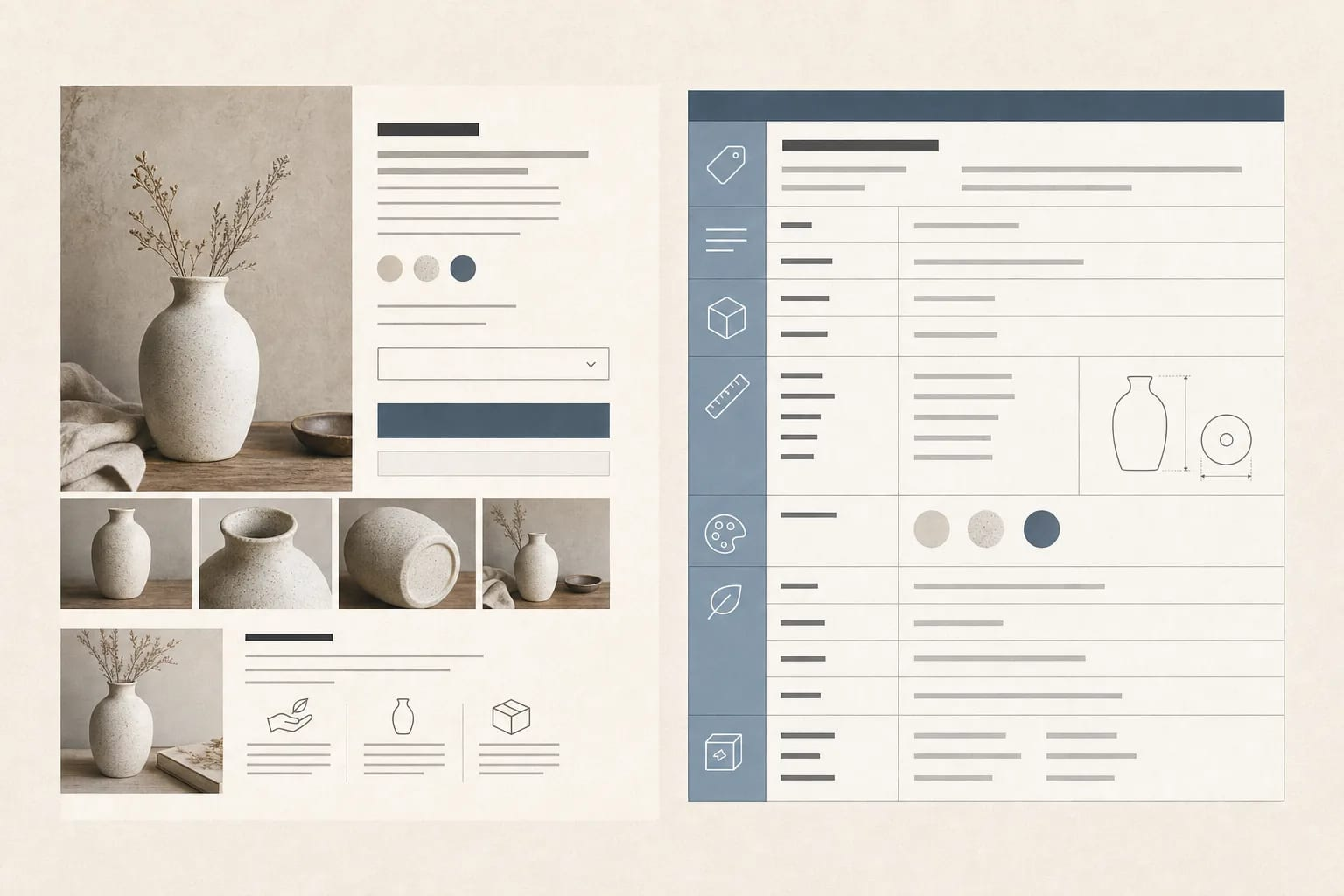
| Section | Shopper question | Fields or content to populate | QA check |
|---|---|---|---|
| Breadcrumbs and product identity | Where am I, and what exactly is this? | Category path, brand, product name, product type, SKU or product ID, canonical product URL | The category path is correct. The product ID is stable. The page has one clear product title. |
| Image and media gallery | What does it look like, and how is it used? | Primary image, alternate angles, in-use image, detail or scale image, video or 360 media, alt text | Every asset shows the same product and selected variant. Images load, zoom, and have useful alt text. |
| Title and short value statement | What is it, and why might it fit my need? | Concise title, brand, short description, two to five evidence-based benefits, primary use case | The title matches the product record. Benefits are supported by product facts. Copy does not hide essential specifications. |
| Price and offer | What will I pay? | Current price, currency, sale or reference price, tax treatment, promotion dates, financing terms when applicable | The page, checkout, feed, and structured data show the same current price and currency. Expired promotions are removed. |
| Availability and fulfillment | Can I get it, and when? | Stock status, quantity limits, lead time, shipping cost, delivery estimate, pickup, preorder or backorder status | Availability comes from current inventory. Delivery promises use the shopper's destination and match the offer. |
| Variants and options | Which version fits me? | Option names and values, selected variant, variant SKU, price, stock, image, size guide, compatibility or fit notes | Every valid combination maps to one variant. Changing an option updates the image, price, stock, URL state, and data output. |
| Purchase action | How do I buy it? | Add to cart or buy button, quantity, required option states, subscription or personalization controls | The action is clear and usable on mobile and desktop. The cart receives the selected SKU and quantity. |
| Specifications and attributes | Will it work for my needs? | Category attributes, dimensions, materials, compatibility, capacity, ingredients, technical specifications, identifiers | Values are complete for the category, use consistent units, and come from an approved source. |
| Full details and instructions | How do I use, install, or care for it? | Full description, what is included, setup steps, care instructions, manuals, warnings, certifications, warranty | Instructions match the package and product version. Claims and documents are current and accessible. |
| Delivery, returns, and support | What happens after I order? | Shipping methods and costs, delivery windows, return window and fees, warranty, contact or support path | Policies are accurate for the shopper's market, product, and selected variant. Policy links work. |
| Reviews and questions | Do other people find it useful? | Rating, review count, review text, customer photos, product questions and answers | Ratings and counts match the review source. Reviews are attached to the right product or variant. |
| FAQs and objections | What might stop me from buying? | Answers about fit, compatibility, sizing, safety, care, ingredients, delivery, or warranty | Answers resolve real support questions and do not conflict with the product record or policies. |
| Related products | What else should I compare, add, or replace? | Accessories, compatible items, alternatives, bundles, refills, replacement parts | Recommendations are relevant and available. A related item is not presented as included with the main product. |
This is a content model, not a demand to put every block above the fold. Keep identity, media, offer, options, and purchase action together. Move deep specifications, policies, reviews, and FAQs into scannable sections that are easy to reach.
For the writing inside the title, benefits, and description fields, use the product description examples as a copy reference. The template decides where that copy belongs and which facts it needs to support.
Product page template versus product listing page
A PDP and a product listing page (PLP) serve different jobs. A PDP helps a shopper decide on one product. A PLP helps a shopper find and compare several products in a category, collection, or search result. The PLP links to PDPs; it does not replace them. Catalog's product listing definition covers the broader listing model behind both experiences.
| Product detail page (PDP) | Product listing page (PLP) | |
|---|---|---|
| Primary job | Answer whether this product fits and can be purchased | Help a shopper find a relevant set of products |
| Typical content | Full media, offer, variants, specifications, policies, reviews, and FAQs | Product cards, short attributes, price, availability, filters, and sorting |
| Main action | Select an option and add the product to cart | Open a PDP, filter, sort, or compare products |
| Data depth | One product or product family with offer-level detail | A summary record for many products |
| Common mistake | A page that shows a title and image but leaves fit, delivery, or compatibility unclear | A grid that exposes too little information to narrow the set |
A product page template describes the PDP. A category grid or search-results layout needs its own model.
Use universal fields as the base layer
Every sellable product needs a small set of shared fields:
- Stable identifier, product URL, brand, product type, and title
- Primary media and accessible alt text
- Price, currency, availability, and fulfillment promise
- Variant relationship and selected option, when variants exist
- Short and full description
- Product attributes, specifications, and identifiers such as SKU or GTIN when applicable
- Delivery, returns, warranty, and support information
- Review and related-product relationships when available
Those fields create a skeleton. Required attributes change with the category, the buyer's risk, and the channel consuming the data. See the product attributes guide for a deeper field model.
Add category-specific fields where the decision needs them
| Product type | Fields that deserve a visible place | Useful above-the-fold cue |
|---|---|---|
| Apparel | Size, fit, color, fabric, stretch, inseam, rise, model measurements, care | Selected size, fit guidance, and a clear size guide |
| Furniture | Dimensions, material, finish, weight capacity, assembly, room fit, delivery constraints | Overall dimensions, configuration, and delivery method |
| Electronics | Model, ports, wattage, supported devices, operating system, battery life, warranty, included accessories | Compatibility and the specification most likely to disqualify a purchase |
| Beauty and grocery | Ingredients, shade or flavor, volume, allergens, usage, storage, certifications, warnings | The ingredient or suitability fact that answers the main concern |
| Industrial parts | MPN, dimensions, material, tolerance, compatibility, load rating, voltage, certifications | Fit or compatibility proof before promotional copy |
Do not make a field universal just because it appears on one product page. A size selector is essential for jeans and irrelevant for a desk lamp. A voltage field is vital for a power adapter and noise level for a cushion. Category templates should add, rename, reorder, or remove fields when the buying decision changes.
A separate category template earns its place when the product needs different selectors, evidence, instructions, or compliance information. Keep the same identity, offer, and QA rules underneath so the catalog remains comparable.
Model variants as products with relationships
Variants are sellable choices within one product family, such as a shirt's color and size. A related product is a different item that can be compared, paired, or bought alongside it. Treating both as simple links creates duplicate pages, missing options, and incorrect offers.
A variant-ready template should:
- Define the variant axes, such as color, size, capacity, finish, or voltage.
- Give every valid combination its own SKU or variant ID, price, availability, and fulfillment data.
- Store variant-specific media and attributes when the option changes what the shopper sees.
- Keep shared facts on the parent product and unique facts on the child variant.
- Show the selected state clearly, including the option values that determine the offer.
- Update the purchase action, URL state, structured data, and feed output when a selection changes.
For example, a merino hoodie can have the parent product Merino wool hoodie and a child variant MWH-NVY-M. The child record should carry color: Navy, size: M, its price and stock, and the image used for that color. The parent can carry shared facts such as merino composition, care instructions, and the warranty. A different fabric or a fundamentally different construction may deserve a separate product family instead of another dropdown value.
Keep option values normalized. Navy, navy blue, and midnight may look close to a person, yet filters, feeds, and recommendation systems can treat them as different values. The same rule applies to sizes, dimensions, units, and compatibility names.
Connect the page to structured product data
The visible PDP is one output of a product record. Structured product data is the machine-readable version of that record. It can describe the product, offer, identifiers, media, attributes, reviews, shipping, and returns in fields that other systems can process. Catalog's product schema glossary explains how that description layer connects to a product-data foundation.
Keep three things aligned:
- Visible facts: what the shopper can read or select on the page
- Page markup: structured data describing that product and its current offer
- Channel feed: the product and offer data sent to a shopping or marketplace destination
Google distinguishes product snippets from merchant listings. Merchant listings apply to pages where shoppers can purchase the product. Google's Product structured data guidance supports product variants and recommends combining page structured data with a Merchant Center feed. Its merchant listing documentation lists the fields and eligibility requirements for purchasable offers.
This is implementation guidance, not a promise of a rich result. Structured data does not repair an incomplete product record. If the page shows a selected navy medium at $129, the markup and feed should describe that same offer. If the product is out of stock, the availability should change in all three outputs. Keep schema focused on facts that the page actually supports.
Keep every channel on the same product facts
A storefront, marketplace, retailer feed, shopping surface, and AI shopping surface may each need different field names or formats. They should still start with the same normalized facts. A channel-specific title or attribute mapping is fine. A different price, identifier, or variant relationship is a data defect unless the offers are intentionally different.
Use this operating pattern:
- Assign a source of truth. Name the system or owner for each field. Inventory may own availability, a supplier document may own dimensions, and an approved content workflow may own benefits.
- Normalize the record. Set one name, value set, unit, and identifier rule for each concept.
- Map to each destination. Translate the shared record into the fields and accepted values that each channel requires.
- Validate before release. Check completeness, accuracy, accepted values, media, variants, URLs, policies, and price or stock parity.
- Monitor changes after launch. Track freshness lag, rejected listings, broken images, variant errors, and customer questions.
For a practical quality workflow, use Catalog's product data quality guide. It separates record completeness from category coverage and emphasizes accuracy, normalization, validation, and freshness.
A simple parity check catches many failures:
| Fact | PDP | Structured data | Feed or marketplace output |
|---|---|---|---|
| Selected variant | Navy, medium | Same variant relationship and option values | Same variant ID and attributes |
| Offer | $129 USD, in stock | Same price, currency, and availability | Same price and availability at the destination |
| Image | Navy variant image | Image URL for the selected or supported offer | Approved image for that variant |
| Delivery and returns | Current policy and estimate | Supported shipping and return fields | Destination-specific policy fields |
When these outputs disagree, shoppers see contradictory promises and systems lose confidence. A page template provides the shape. A maintained product-data layer keeps the shape filled with current facts.
How the template changes in practice
The structure stays stable while the evidence changes by product:
- USB-C charging hub: Put ports, wattage, supported devices, cable length, and safety certifications in the specification block. The QA check is whether the stated wattage and compatibility match the included charger and cable.
- Straight-leg jeans: Put fit, rise, inseam options, stretch, fabric composition, model measurements, and care near the size selector. The QA check is whether each size and color combination has the correct stock, image, and fit information.
- Replacement air filter: Put dimensions, MERV rating, compatible systems, material, replacement interval, and warnings before general brand copy. The QA check is whether the MPN, dimensions, and compatibility list match the equipment documentation.
Each example follows the same PDP path: identify the product, show evidence, state the offer, let the shopper choose, answer risk questions, and make the purchase action clear.
Product page template FAQ
What is a product page template?
It is a reusable structure for product detail pages. It defines the sections, fields, relationships, and checks that every product page should follow. It can be implemented in a theme editor, a commerce platform, or a custom storefront.
What should be on an ecommerce product page?
At minimum, show the product identity, useful media, title, value statement, price, currency, availability, variants when applicable, purchase action, relevant specifications, delivery and returns, and support for common objections. Add reviews, instructions, and related products when they help the decision.
How many product page templates should a store have?
Start with one shared skeleton and add category templates only when the buying decision requires different fields, selectors, proof, instructions, or policies. Too many templates create drift. One generic template can hide information that matters for a category.
Should every product variant have its own page?
There is no universal page rule. Model each variant as a distinct sellable record under a parent product when it has its own price, stock, identifier, or media. Whether a variant gets its own URL depends on the commerce system and the channel's requirements. The selected variant must remain clear wherever it is shown.
Does a product page need Product schema?
A store can sell products without Product schema. Structured product data gives search and shopping systems a consistent description of the product and offer. It should match visible page facts and feed data, and it does not guarantee a specific search appearance.
How do I keep product pages consistent across channels?
Maintain one normalized product record, map it to each destination, and validate price, availability, identifiers, variants, media, and policies before and after publishing. Channel-specific formatting can change. The underlying product facts should stay aligned.
When a template needs a product-data layer
A template solves page structure. It does not fill missing attributes, reconcile stale inventory, or keep a variant's price and image aligned across a storefront, feed, marketplace, and AI shopping surface.
Catalog provides product-data infrastructure for that work: normalized fields, typed product objects, live updates, and channel outputs from a shared record. If your team is maintaining the same product facts in several places, see how Catalog works.
