
Item master data: from ERP record to AI-ready product data
Learn what item master data includes, how it differs from SKUs and product data, and how to turn ERP records into trusted AI-ready product objects.

A product can have one name in an ERP, another in a supplier spreadsheet, and a third on your storefront. Purchasing sees one item, the warehouse sees another, and an AI shopping surface receives too little context to recommend either.
Item master data gives the business one controlled record for each item it buys, makes, stocks, or sells. The work includes a clear item grain, stable identifiers, governed attributes, ownership, and a reliable path to every downstream surface. We help turn those operational records into live, machine-readable product data for feeds, APIs, and AI shopping.
What is item master data?
Item master data is the set of relatively stable attributes that defines an item across business processes. An item master record describes one item. The item master is the collection of those records.
In a distributor, the record may describe a manufacturer part that can be purchased and shipped. In a manufacturer, it may describe a raw material, work in progress, finished good, spare part, or service. In retail, it often describes a sellable variant such as a specific color and size.
A record usually gives teams a shared answer to these questions:
- What is the item, and which identifiers refer to it?
- How is it measured, packaged, bought, made, stored, and sold?
- Which supplier, manufacturer, site, or warehouse is involved?
- Which rules govern its cost, price, tax, planning, and lifecycle?
- Which products, components, variants, or substitutes relate to it?
- Which customer-facing facts can be published to a catalog or channel?
The item master is a reference layer. Orders, receipts, stock movements, invoices, and shipments are transaction data that use the item record. On-hand quantity and a live price may sit beside the item record in an ERP, while the item master defines the item and its rules. Keeping those categories separate makes ownership and synchronization easier.
Master data management adds the governance discipline around shared records: definitions, stewardship, matching, approvals, and distribution. Item master data is one domain inside that broader practice.
Why item master data matters
A weak item master creates operational errors that look unrelated:
- Purchasing orders the wrong pack because the unit of measure is ambiguous.
- A warehouse receives a case but stores an each, so conversions and counts drift.
- Finance posts costs to the wrong account because item type or category is inconsistent.
- A storefront publishes duplicates because supplier part numbers were never matched.
- A marketplace rejects a listing because dimensions, identifiers, or required attributes are missing.
- An AI shopping surface cannot answer a request because material, compatibility, size, or use case is buried in a description.
A clean record lets each team use the same identity while retaining its own context. The warehouse can use case dimensions and handling rules. Merchandising can use customer-facing attributes. Finance can use valuation and tax fields. A channel feed can receive the subset it accepts.
A peer-reviewed study of 3,544 UK DIY shoppers found that poor product-information quality reduced online shopping outcomes. Title readability and the ability to compare product attributes were among the criteria that needed high information quality. The University of Surrey study shows why item data quality reaches the customer, even when the original error starts in an internal record.
That separation is the difference between one governed record with many views and many spreadsheets that happen to contain similar words.
What belongs in an item master record?
There is no universal field list. A food manufacturer, industrial distributor, and fashion brand need different attributes. Start with a shared core, then add fields by item type, site, market, and destination.
| Data group | Common fields | Why it matters |
|---|---|---|
| Identity | Internal item ID, SKU, GTIN, UPC, EAN, manufacturer part number (MPN), supplier part number | Joins records across ERP, warehouse management system (WMS), suppliers, marketplaces, and storefronts |
| Naming and classification | Short description, long description, item type, category, brand, taxonomy code | Gives systems a consistent label and determines the right attributes |
| Units and packaging | Base unit of measure (UOM), purchase UOM, sales UOM, conversion factor, pack size, case and pallet hierarchy | Keeps buying, counting, picking, shipping, and pricing on the same basis |
| Physical specifications | Length, width, height, net weight, gross weight, volume, material, color, capacity | Supports storage, freight, filtering, comparison, and customer confidence |
| Supply and sourcing | Manufacturer, supplier, approved vendor, lead time, minimum order quantity, source part number | Supports procurement, replenishment, substitutions, and supplier matching |
| Manufacturing and service | Make-or-buy flag, bill of materials, revision, routing, service level, substitute item | Connects the item to production, repair, and engineering processes |
| Financial and planning | Cost, price basis, currency, tax category, valuation class, reorder point, planning method | Controls financial posting, planning, pricing, and margin analysis |
| Compliance and handling | Country of origin, Harmonized System (HS) code, hazardous-material flag, storage temperature, certifications, restrictions | Carries requirements that affect import, handling, sale, and documentation |
| Lifecycle | Draft, active, blocked, discontinued, effective date, end date, supersession item | Stops obsolete or unapproved items from entering new processes |
| Product content | Titles, bullets, descriptions, images, manuals, claims, compatibility, care instructions | Makes the operational record useful on storefronts, feeds, and AI shopping surfaces |
| Governance | Source system, field owner, approval status, confidence, last verified, change reason | Makes each value traceable and keeps updates accountable |
Treat the table as a model, not a data-entry form. A field belongs in the item master when the business needs a stable, reusable fact or rule. A shipment's tracking number belongs to the shipment. A product's package dimensions belong to the item or packaging level. A temporary promotion belongs to an offer or price record with its own dates.
A practical item record
Imagine a supplier sends this row:
Item: JKT-NVY-M
Description: JACKET NVY MED
Supplier part: NL-884-M-NVY
UOM: EA
Pack: 1
That row may be enough for a first purchase order. It is too thin for fulfillment, product discovery, or AI commerce. A governed record can retain the source values while adding context:
item_id: JKT-NVY-M
sku: JKT-NVY-M
brand: Northline
manufacturer_part_number: NL-884-M-NVY
type: finished_good
base_unit: each
purchase_unit: case
units_per_case: 12
product_family_id: JKT-884
variant:
  color: navy
  size: M
attributes:
  material: recycled nylon
  fit: relaxed
  waterproof_rating: 10000 mm
identifiers:
  gtin: "09506000134352"
source:
  system: supplier-file-2026-10
  owner: supplier-data-team
  last_verified: 2026-10-12
lifecycle: active
The values above are illustrative. The design is the important part. Keep the internal item identity, supplier identity, product family, variant options, typed attributes, and provenance as separate fields. Do not ask a downstream system to parse JACKET NVY MED to discover the size.
Item master data vs. related product terms
These terms overlap in everyday conversation. They describe different scopes and jobs.
| Term | What it is | Typical owner or system |
|---|---|---|
| SKU | An identifier assigned by a seller to track a sellable item or variant | Retailer, merchant, ERP, or inventory team |
| Item master record | The full operational definition attached to an item ID or SKU | ERP, warehouse management system (WMS), procurement, or manufacturing system |
| Product master data | A broader product view that can include commercial content, relationships, media, and channel attributes | PIM, catalog, commerce, or product-data team |
| Inventory data | Changing quantities, locations, reservations, receipts, and movements | ERP, WMS, order management system (OMS), or inventory system |
| PIM | A system and workflow for governing market-facing product information | Product, merchandising, and content teams |
| MDM | The enterprise discipline for defining, governing, matching, and distributing shared master records | Data governance and domain stewards |
| Product feed | A destination-specific file, stream, or API output | Channel, marketplace, or commerce integration |
A SKU is one field. It is not the whole item master. An item master can also contain several seller-specific SKUs or supplier references when the business maps them to the same commercial product. The mapping must be explicit.
The distinction between item and product becomes important when one product has many transactable items. A shoe family may have 12 size-color combinations. Each variant needs its own item identity, stock state, and often its own GTIN. The storefront can show one family with selectors while the ERP continues to transact on each variant.
Model item identity, packaging, and offers
Most duplicate problems start when a team has never agreed what counts as one item. Write the rule before loading data.
A useful hierarchy can include:
- Model or family: the shared design or commercial concept, such as
JKT-884. - Sellable variant: a specific color, size, capacity, or configuration, such as
JKT-NVY-M. - Pack or case: a trade unit containing one or more sellable items, such as a 12-unit case.
- Shipping or pallet unit: the logistics unit used for transport and handling.
- Offer context: the seller, market, price, and availability associated with an item.
Do not collapse these levels into a title. Store the relationship and the quantity at each level. GS1's Global Data Model uses foundational, category, regional, and local attribute layers. Its implementation guidance also describes trade-item hierarchies in which each unit, case, or pallet level has its own GTIN.
Use identifiers according to their scope:
- Internal item ID or SKU: stable inside your business. Use it for inventory, fulfillment, and internal joins.
- GTIN, including UPC or EAN formats: a trade-item identifier assigned under GS1 rules. Preserve leading zeros and associate it with the correct item or packaging level.
- MPN: a manufacturer's model or part number. Store it with the manufacturer or brand that assigned it.
- Product or variant ID: your canonical key for APIs, feeds, and product relationships.
- Offer ID: the seller-specific commercial context when several sellers offer the same product.
Never use a product title as a join key. Never reuse an ID for a different item. When an item is retired, retain its history and lifecycle state rather than recycling its identifier.
How to manage item master data
Reliable item master data is an operating process. A one-time cleanup creates a better starting point. Governance keeps it useful.
1. Define the item grain
Decide whether each record represents a component, finished good, sellable variant, pack, case, service, or offer. Document the differences that create a new record. Examples include size, color, voltage, formulation, revision, packaging quantity, and market restrictions.
If purchasing and ecommerce use the word “item” differently, keep both views and connect them. Do not force one team to adopt an ambiguous definition.
2. Create a field dictionary
For every field, define its meaning, data type, unit, allowed values, required conditions, owner, source, and update cadence. Weight should say whether it means net product weight, gross packaged weight, or shipping weight. Color should use a controlled value set. Size should include its sizing system when that matters.
Category-specific requirements should extend the core schema. GS1's layered model is a useful pattern: shared attributes first, then category, region, and local requirements.
3. Choose a source and owner for each field
Your ERP may own item status and cost. A supplier document may be authoritative for a technical specification. A digital asset management (DAM) system may own approved images. A PIM may own localized copy. An inventory system may own availability.
Record the source and the accountable owner at field-group level. When two systems disagree, apply the rule instead of silently taking the newest value.
4. Match before creating
Search by internal ID, GTIN, MPN plus brand, supplier part number, and normalized description before creating a record. Flag possible duplicates for review. Keep the source identifiers even after a match so future files can resolve to the same item.
A duplicate check should return a reason. “Matched on GTIN” is actionable. “Looks similar” is a queue for review.
5. Normalize values
Standardize units, decimal precision, casing, punctuation, dates, currencies, category paths, and controlled values. Keep the original source value alongside the canonical value when auditability matters.
Normalization should preserve meaning. Convert 0.75 kg to 750 g only when the canonical unit is grams, and retain the conversion rule. Do not round a dimension because one carrier uses a different threshold.
6. Validate and approve
Run checks before an item enters a new process or channel:
- required fields are present for the item type;
- identifiers are valid, unique, and assigned to the right level;
- units and conversion factors are plausible;
- parent, variant, bundle, and substitute relationships resolve;
- lifecycle and effective dates are consistent;
- compliance and handling attributes meet the applicable rule;
- source, owner, reviewer, and verification date are recorded.
Route exceptions to a named owner. A completeness score without an owner only describes a problem.
7. Publish views and monitor changes
The item master is the source for downstream views. Map its fields into procurement, WMS, PIM, storefront, marketplace, feed, API, and reporting schemas. Do not let a channel-specific export become a hidden second master.
Monitor rejected records, stale fields, duplicate listings, broken variant links, missing images, search gaps, and mismatched prices or availability. Fix the source record or transformation rule that caused the issue. Then resync the affected outputs.
Turn item master data into AI-ready product data
An ERP item record is designed to run operations. An AI shopping surface needs a product object that can be retrieved, compared, and explained. The two layers connect, and they should not be treated as identical.
| Operational item master | AI-ready product object |
|---|---|
| Internal item ID and SKU | Stable product and variant IDs exposed to a channel |
| Abbreviated description | Factual title, description, and variant-selected text |
| Category code | Human-readable category and machine-readable taxonomy |
| Supplier attributes | Normalized fields such as material, size, dimensions, compatibility, and use case |
| Cost and purchasing terms | Approved customer-facing price, currency, availability, and seller context |
| Pack and UOM rules | Variant, pack, bundle, and relationship data |
| Internal media or document path | Public image, manual, policy, or product URL |
| Source and change history | Provenance, freshness, confidence, and approval state |
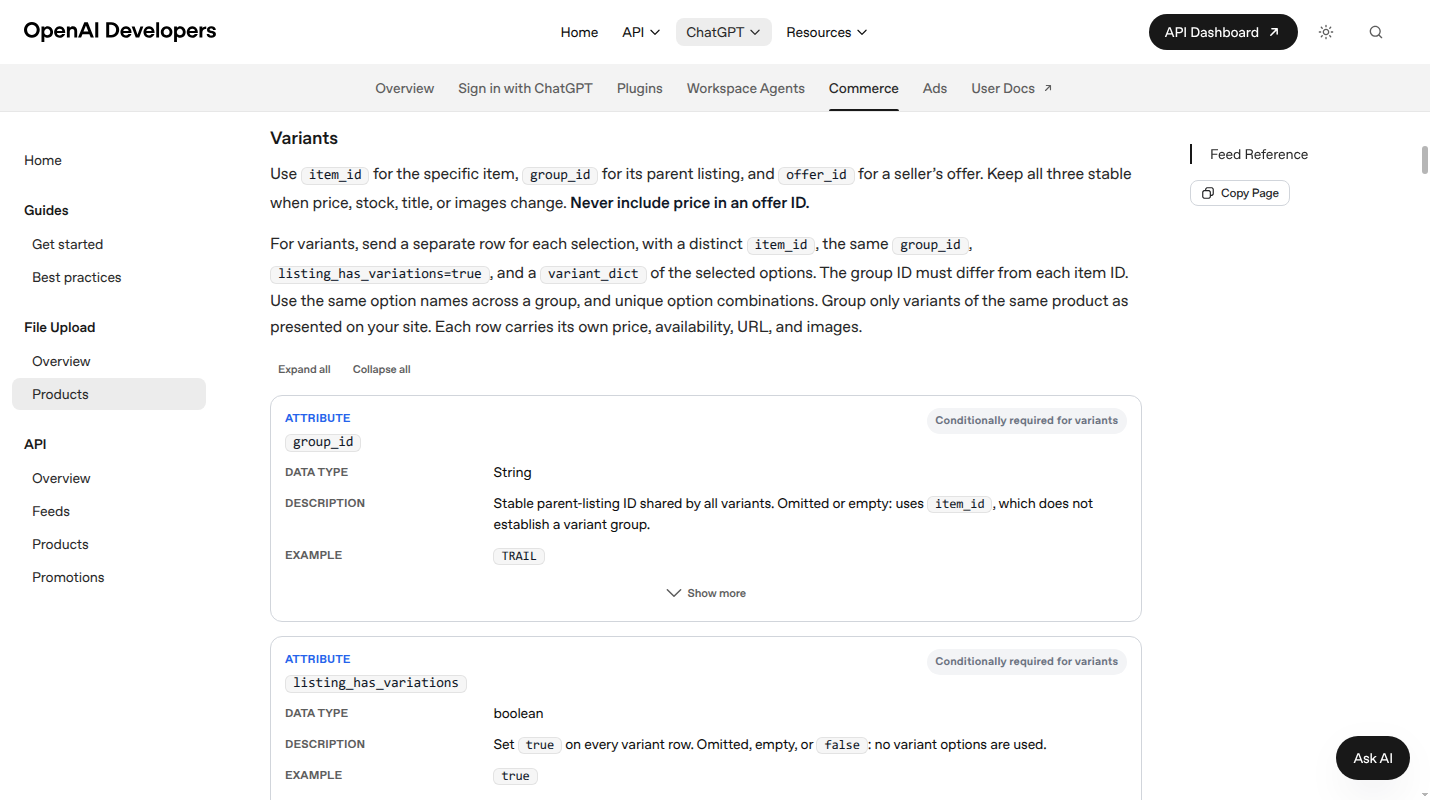
OpenAI's product feed specification illustrates the shape of a machine-readable discovery record. It requires a stable item ID, title, description, URL, brand, seller, image, availability, and price for a useful basic row. It also defines separate variant rows, group IDs, selected options, GTINs, MPNs, and offer IDs. That is the practical reason to model these relationships in the source layer instead of asking an AI system to infer them from an abbreviated item description.
Catalog fits at this boundary. We structure product data, keep normalized records synchronized, publish machine-readable product objects to AI shopping surfaces, and measure outcomes. Your ERP, WMS, PIM, DAM, and storefront can keep their existing responsibilities. Catalog gives those systems a parallel product-data layer that is ready for search, recommendations, feeds, APIs, and shopping agents.
For a deeper look at the customer-facing side, see our guide to product catalog management. For the quality controls behind the handoff, read product data quality.
A 30-day starting plan
You can improve an item master without migrating every record at once.
Days 1 to 5, set the boundary. Choose one category or site. List the systems that contain item records. Define the item grain, the five most common duplicate patterns, and the fields that block a key process.
Days 6 to 12, define the model. Publish the field dictionary, allowed values, units, identifier rules, source priorities, and accountable owners. Include packaging and variant relationships.
Days 13 to 20, clean a representative slice. Match duplicates before creating records. Normalize values. Record provenance. Include difficult cases such as a bundle, a discontinued item, a multi-pack, and a product with several variants.
Days 21 to 26, add gates. Validate required fields, identifiers, conversions, relationships, lifecycle dates, and compliance fields. Route failures to owners with a reason and a next action.
Days 27 to 30, publish and measure. Send the approved view to one downstream destination. Measure duplicate rate, required-field completeness, exception age, sync freshness, rejection rate, and time to create a new item. Use the findings to set the next category's rules.
FAQs
Is item master data the same as product data?
No. Item master data is the operational definition of an item. Product data can include that definition plus customer-facing content, media, relationships, offers, and channel-specific fields. The two should share identifiers and governed facts.
Does every SKU need its own item master record?
Usually, every transactable variant needs a distinct record or an explicit variant-level identity. A blue medium shirt and a blue large shirt need separate inventory and often separate identifiers. They can share a parent product family in the storefront.
Where should an item master live?
The system that runs the relevant business process often owns the operational record. An ERP may be the item master for purchasing and finance. A PIM may own enriched market-facing content. The important decision is field-level authority and synchronization, not a single application name.
What is the difference between item master data and MDM?
Item master data is a product or item domain. Master data management is the governance practice applied across domains such as products, customers, suppliers, and locations. An MDM program can govern the item master while other systems continue to transact with it.
Can a spreadsheet be an item master?
A spreadsheet can work for a small catalog with few editors, variants, suppliers, and destinations. It becomes fragile when you need approvals, field-level ownership, history, automated validation, frequent updates, or multiple outputs. Start with clear rules, then adopt a system that can enforce them as the catalog grows.
Your item master is the identity layer for every product process that follows. If your ERP records are operationally sound but too thin or inconsistent for storefronts, feeds, and AI shopping, talk to Catalog about your product-data layer.
