
Google product category: a practical mapping guide
Learn when to use google_product_category, how it differs from product_type, how to map one supported value, and how to maintain clean feed data.
Google assigns every product a category automatically. The google_product_category attribute is an optional way to override that assignment when the category affects requirements, campaign structure, or compliance. The hard part is knowing when to leave categorization to Google, when to intervene, and how to keep the mapping correct as a catalog changes. This guide covers that decision, the difference between google_product_category and product_type, and a maintenance workflow for large catalogs.
What google_product_category does
google_product_category accepts one category from Google's predefined product taxonomy. You can send the category's numeric ID or its full path. Google uses the value to classify the product and, in eligible countries, to support category-based Shopping campaign structures. It is a channel field, not a replacement for your own catalog hierarchy.
Google says that all products receive an automatic category. Accurate titles, descriptions, prices, brands, and GTINs help its systems classify products correctly. The attribute is therefore an override for specific cases, rather than a field that every merchant must fill for every product. Read Google's attribute guidance alongside the product data specification before adding it to a feed.
When you do provide a value, Google expects one predefined category. The value must be either the ID or the full path, never both. Google recommends the ID because it is shorter and less exposed to path spelling or formatting errors.
When Google's auto-categorization is enough
Leave google_product_category out when Google's automatic category matches the product and none of the following conditions apply:
- Google has assigned the item to a category with requirements that do not fit the product.
- You organize a Google Ads campaign by Google product category and need a deliberate grouping.
- The product is covered by a category-specific rule, such as alcohol, gift cards, contract phones, or software subscriptions.
- Your source data clearly describes the product, yet Merchant Center is classifying it incorrectly.
This is a sensible default for a clean catalog. It avoids maintaining a duplicate classification when Google already has enough product context. It also keeps your team focused on the fields that improve automatic classification, including an accurate title, description, brand, and GTIN when available.
Use an explicit value when you have a reason to change the result. Google's guidance lists three main override cases: correcting category-specific attribute requirements, structuring Google Ads campaigns around the category, and correctly classifying alcohol. Its additional guidance covers prescribed categories for bundles, mobile devices sold with a contract or installment plan, gift cards, and software subscriptions.
google_product_category vs. product_type
These fields answer different questions. google_product_category asks, “Which category in Google's shared taxonomy best describes this product?” product_type asks, “How does this merchant organize the product?”
| Field | google_product_category | product_type |
|---|---|---|
| Taxonomy | Google's predefined taxonomy | Your own hierarchy |
| Value | One supported ID or full path | Your own text, usually a breadcrumb |
| Primary job | Override Google's automatic categorization when needed | Organize inventory, bidding, and reporting around your business structure |
| Can it be repeated? | No, submit one category | Up to five values can be submitted, but only the first is used for Google Ads bidding and reporting |
| If there is no exact match | Do not invent a Google value | Use your own category here |
Google's product_type guidance recommends a full, consistent breadcrumb such as Home > Women > Dresses > Maxi Dresses. That path can be more specific than Google's taxonomy. Keep it in product_type without forcing it into google_product_category.
A record can contain both fields:
google_product_category: 2271
product_type: Apparel > Women > Dresses > Maxi Dresses
Here, 2271 is the supported Google category for Apparel & Accessories > Clothing > Dresses. The second value is the merchant's internal view. They can describe the same item at different levels of detail.
How to choose the right Google product category
1. Identify the product's main function
Start with what the item is primarily sold to do. Google uses an MP3 player as an example: even if it has a clock or other features, its main function is playing music, so the MP3 player category is the relevant one. An MP3 player charger belongs in the accessories category instead.
This rule prevents a secondary feature from deciding the classification. A camera bundled with a bag should use the category of the main product, for example Cameras & Optics > Cameras > Digital Cameras with ID 152.
2. Search the official taxonomy
Use Google's official taxonomy file, rather than a store menu or a third-party category list. Search for the product noun, then read the parent and child paths around each candidate. The path provides the context that a short label can hide.
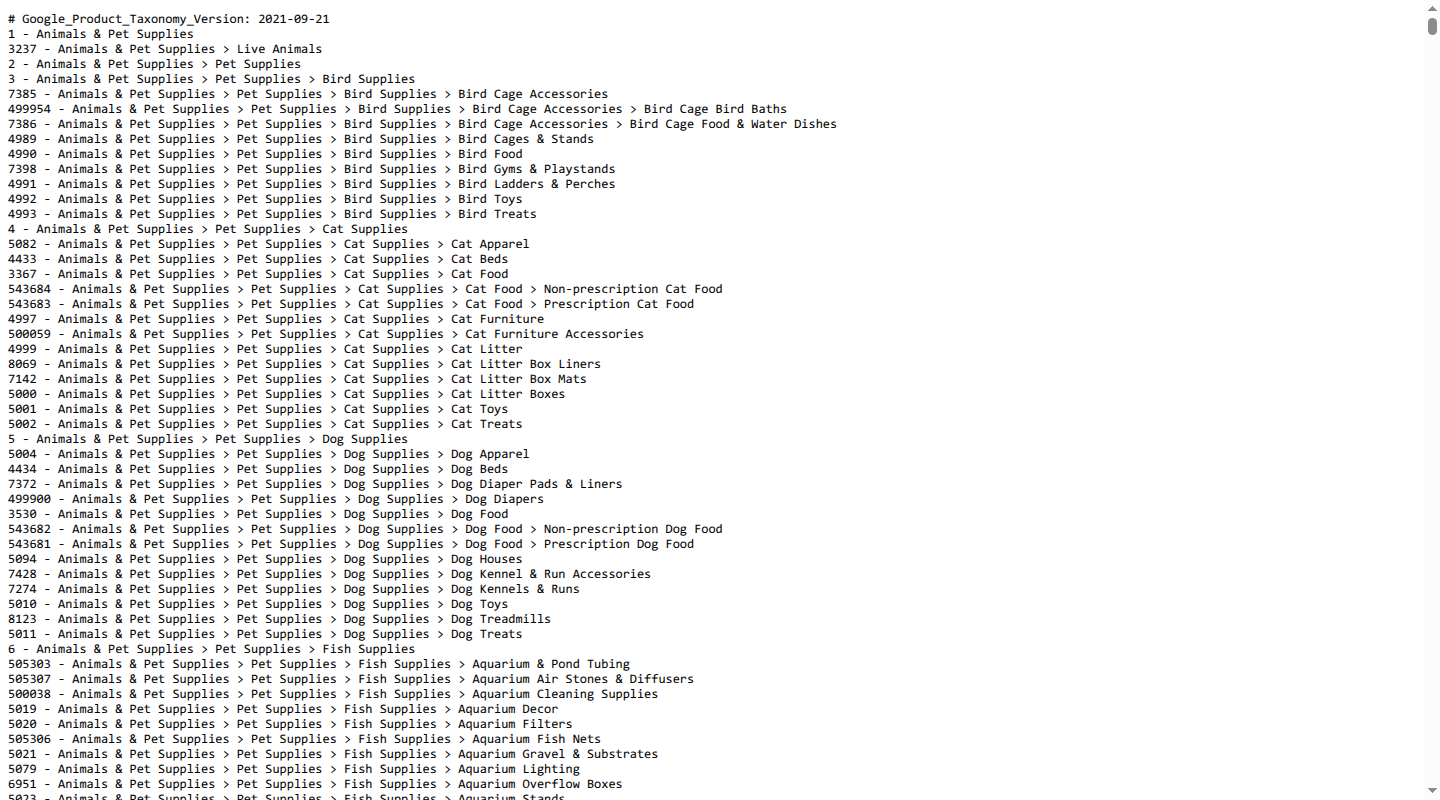
The file pairs each numeric ID with a full path. Keep both in your mapping record so a reviewer can understand the choice, then submit the ID in the feed. If the taxonomy is not available in your language, Google says to use the English value or numeric ID.
3. Choose the most specific relevant category
Choose the deepest category that the product's facts support. “Most specific” does not mean choosing a child category because its name contains a useful keyword. The product must actually fit that category.
Google contrasts a broad Electronics category with a more precise MP3 player category. The precise category is better when the item is an MP3 player. If the item is an accessory, use the accessory category. Google's product-data optimization tips also recommend values at least two to three levels deep when that level of detail is available.
4. Record the choice and its evidence
For each mapping, retain the source category, the Google ID, the path, the taxonomy version used, and a short reason. Record exceptions separately. This turns a one-off lookup into a mapping rule that another person can review and reuse.
How to submit one supported value
The field is not repeated. Send one value in the format required by your data source.
For a CSV or TSV feed, use either the ID:
google_product_category
2271
Or use the path:
google_product_category
Apparel & Accessories > Clothing > Dresses
For XML, the same choice looks like this:
<g:google_product_category>2271</g:google_product_category>Do not include the ID and path in the same value. Do not send multiple Google categories for one item. If you use a path, copy the supported spelling and hierarchy from the taxonomy. An internal category such as Women > Dresses > Maxi is valid as product_type, but it is not a valid google_product_category unless it exactly matches a supported Google path.
Some products have explicit category rules. Google lists these examples:
| Product case | Category guidance |
|---|---|
| Gift card | Arts & Entertainment > Party & Celebration > Gift Giving > Gift Cards & Certificates (ID 53) |
| Mobile phone with a contract | Electronics > Communications > Telephony > Mobile Phones (ID 267) |
| Tablet with a contract or installment plan | Electronics > Computers > Tablet Computers (ID 4745) |
| Software subscription | Software > Computer Software (ID 313) or a relevant subcategory, such as ID 5299 for antivirus and security software |
| Alcoholic beverage | Food, Beverages & Tobacco > Beverages > Alcoholic Beverages (ID 499676) or an eligible subcategory |
These values do not replace the relevant product, advertising, or alcohol policies. They identify the product category Google needs for the offer.
Common mapping errors
| Error | Why it causes trouble | Better fix |
|---|---|---|
| Sending an internal category | Google accepts predefined taxonomy values, not store menu labels | Keep the internal path in product_type; map it to a Google ID |
| Sending both ID and path | The specification allows one representation only | Submit the numeric ID and store the path for review |
| Sending multiple Google categories | google_product_category is not a repeated field | Choose the one category that best represents the product's main function |
| Choosing a broad parent by default | Electronics or Apparel & Accessories can hide the product's real type | Use the most specific relevant supported category |
| Mapping from keywords alone | A word in a title may describe an accessory, feature, or use case | Check the product's main function and supporting attributes |
| Using a stale category value | Google updates the taxonomy and translates older values to its latest version | Review the current taxonomy when launching products and when Google changes categories |
Treating product_type as a substitute | A merchant hierarchy cannot override Google's taxonomy | Keep both fields and give each one its intended job |
| Overriding every product | The attribute is optional and Google already categorizes products automatically | Override only when the result, requirements, campaign structure, or policy calls for it |
The most common conceptual mistake is treating category mapping as a naming exercise. It is a classification decision. The product record needs enough normalized facts to support that decision.
A scalable workflow for clean product data
A spreadsheet can work for a small catalog. It becomes fragile when source categories, variants, campaigns, and channels change independently. A governed crosswalk keeps the decision in one place.
1. Normalize the source record
Start with structured facts such as product kind, main function, brand, material, compatibility, audience, and bundle status. Normalize values before mapping. For example, keep MP3 player charger distinct from MP3 player, even though the names overlap.
Catalog's product attributes guide describes this upstream work: shared fields, controlled values, units, and clear ownership make downstream feeds easier to validate. A Google category should be derived from those facts, not from a last-minute keyword rule.
2. Keep a canonical crosswalk
Create one mapping table between your internal category and Google's taxonomy. At minimum, store:
- internal category or product rule
- Google category ID
- Google category path
- taxonomy version or snapshot
- mapping reason and exception flag
- owner and review date
Keep the ID as the machine value and the path as the human-readable evidence. If several source categories map to one Google category, document that many-to-one relationship instead of creating near-duplicate IDs.
3. Separate default behavior from overrides
Set auto-categorization as the default policy. Add explicit overrides for category-specific requirements, campaign structures, regulated products, or known classification errors. A rule should explain why an override exists and which product facts support it.
This keeps the Google field small and defensible. It also prevents a team from filling the attribute simply because a feed template has an empty column.
4. Generate channel output from the crosswalk
At export, emit one supported Google ID. Keep product_type as a separate output from the same normalized record. Do not ask each channel manager to choose a category independently. The mapping belongs upstream, where the source facts and previous decisions are visible.
We use this product data layer approach at Catalog: normalize product facts once, keep channel mappings explicit, and publish consistent outputs. It is the same principle described in our guide to product feed management: a channel feed should be an output of trusted product data, not the place where product truth is invented.
5. Validate before and after submission
Before exporting, check that every populated value is:
- a supported ID or exact supported path;
- present only once;
- represented as either an ID or path, never both;
- consistent with the product's main function and source attributes; and
- paired with the required category-specific fields when the category calls for them.
After submission, review Merchant Center diagnostics and the issue details page. Google identifies incorrect product category values as a possible source of disapprovals, limited eligibility, and incorrect displays. A feed that uploads successfully can still contain a bad classification.
6. Review on events, not guesswork
Review a mapping when you add a product family, change a bundle, launch a regulated product, change a campaign structure, or update the taxonomy snapshot. Run a scheduled review as a backstop. Compare the category ID, path, and reason together so a taxonomy change does not silently leave an old path in your source system.
This workflow keeps category maintenance proportional to risk. Simple products can rely on Google's automatic result. Ambiguous, regulated, high-volume, or campaign-sensitive products get a deliberate mapping and a traceable review history.
FAQ
Is google_product_category required for every product?
No. Google automatically assigns a category, and the attribute is optional for each product. Add it when you need to correct the assignment or meet a category-specific, campaign, or policy need. Omitting the attribute by itself does not mean a product should be disapproved.
Should I submit the category ID or the full path?
Either is supported, but use one representation only. Google recommends the numeric ID. Keep the path in your mapping table for review and troubleshooting.
Can I submit more than one Google product category?
No. The field is not repeated. Submit the one predefined category that best describes the product's main function.
What if Google's taxonomy has no category for my product?
Do not invent a Google value. Use product_type for your own hierarchy and leave google_product_category unset unless a supported category becomes appropriate. Revisit the taxonomy when Google publishes a relevant update.
How often should I update category mappings?
There is no universal calendar. Review mappings when the product, bundle, campaign, policy, or taxonomy changes, and run a scheduled check for stale IDs and paths. Keep the taxonomy snapshot and review date with each mapping.
If category rules live across spreadsheets, feed scripts, and channel owners, Catalog can give your team one normalized product data layer and one place to govern the crosswalk. Run a Catalog audit to find the product data issues that make channel mapping harder.
